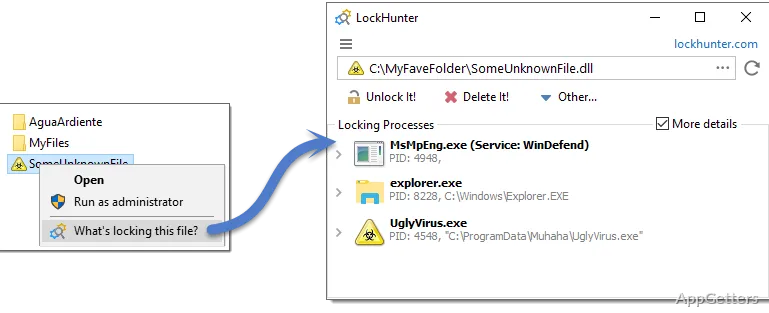
Locked files can be traced to the process holding them, then unlocked, copied, renamed, or deleted through LockHunter. The tool adds a “What’s locking this file” option to File Explorer and can schedule a deletion for the next Windows restart.
LockHunter identifies the processes holding files
Choose “What’s locking this file” from a file or folder’s Explorer context menu to see which processes have it open. LockHunter also shows process details, including the process ID and command-line parameters when the additional-details option is enabled. That information can help distinguish an application you recognize from a background process you need to investigate.
Unlock or remove a file from the results
After identifying the lock, select an action for the target. LockHunter can unlock, delete, copy, or rename a locked file. Deletions go to the Recycle Bin, so the file can be restored if it was removed by mistake.
If Windows cannot release a lock while the system is running, LockHunter can mark the file for deletion at the next restart. The tool can also terminate the process that is holding the file; stopping an application this way may discard its unsaved work.
Run file actions from the command line
LockHunter accepts commands for unlocking or deleting a specified file or folder, with optional switches for silent operation and automatic exit. A command can also request termination of processes associated with the target path. The command-line mode returns an error code when an operation fails, which can help when incorporating file cleanup into a script.
Pros
- Shows processes that are holding a file or folder
- Moves deleted files to the Recycle Bin
- Can schedule locked-file deletion for the next restart
- Offers command-line options for unlock, delete, and process termination
Cons
- Unlocking applies only when a process has an open connection to the target
System requirements: Windows 7, Windows 8.1, Windows 10, Windows 11 · 32-bit and 64-bit
How do I find out what is locking a file?
Right-click the file or folder in File Explorer and choose “What’s locking this file.” LockHunter displays the processes holding it.
Can LockHunter delete a file that is still locked?
It can attempt to unlock and delete the target, or schedule deletion for the next Windows restart.
Can I recover a file deleted with LockHunter?
Deleted files go to the Recycle Bin, where they can be restored if they are still there.