EXE
Home » Software » Windows » Utilities » LatencyMon for Windows
LatencyMon for Windows

LatencyMon for Windows

On occasion, trying to do real-time audio on a Windows machine can be very infuriating. The users might witness situations where the audio cuts out. Crackling noises may occur. There may also be totally unanticipated delays in the course of playback or recording. These problems pop up even on the most powerful computing machines. They leave the users clueless as to what the genuine reason is. Most times, the culprit behind such system latencies is one or more drivers or a background process.

To a musician, streamer, or video editor, such breaks may even upset a whole workflow. Finding the track of these problems is very seldom a walk in the park. On most occasions, system tools do not even clearly show which drivers or processes are responsible. LatencyMon is one of such situational tools. It is a system diagnostic utility. It is geared towards revealing what kind of latency the system can experience. And it lists the drivers or services that might be the main nagging factors. These factors affect real-time audio performance on Windows.

Understanding System Latency in Everyday Use

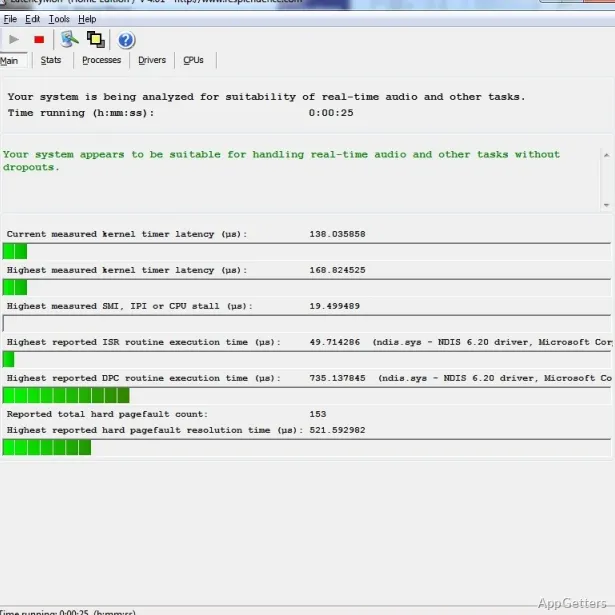
System latency is the lag between when a hardware request occurs and the time the OS gets around to processing it. In the case of musical production or live streams, even minute delays will result in audible glitches. LatencyMon keeps track of such delay through the analysis of Deferred Procedure Calls (DPCs) and Interrupt Service Routines (ISRs). These are basically the communication links Windows uses. They help make hardware understandable.

On the very practical side, it is designed to operate behind the scenes, measuring system load. Hence, after only a few minutes, it will come up with a report. The report indicates whether or not a computer is ready to do real-time audio production or playback without interruptions. Rather than guessing which piece of hardware may be exhibiting issues, the users get an accurate look at driver and process behavior during standard operation.

Reading and Understanding the Diagnostic Data

The concentration of LatencyMon’s UI is in giving out diagnostic data. It avoids getting involved in almost useless beautification. Without much effort, and possibly even with elevated apprehension, one can glance at the information pieces. One can then revert to the results. Still, they are arranged in a very straightforward manner. This includes a breakdown of latency metrics, the activity of drivers, and the statistical times of CPU handling.

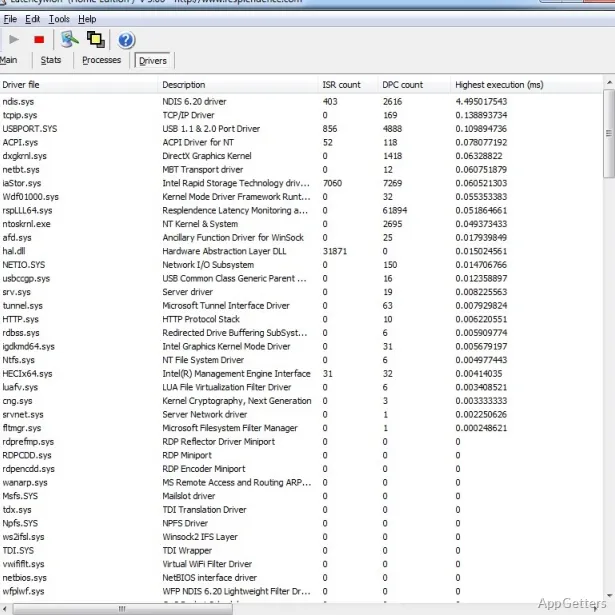
Among the most added value features is the driver statistics pane. This pane displays the list of system drivers. It includes latency figures attributable to each driver. Quite often in the field cases, network drivers, display drivers, or drivers for storage controllers are the primary culprits of delays.

Those struggling with audio problems can considerably benefit from this data. It enables them to perform driver updates. It also allows configurations only on specific drivers. This avoids blindly changing the system settings. In fact, with a bit of neat observation, even ordinary users without a technical background can quite successfully pinpoint the problematic elements.

Practical Strengths and Everyday Limitations

LatencyMon is generally quite good if used as a hand in diagnosing software or hardware issues rather than expecting it to be a panacea. It will not directly repair system problems, but it will show where the problems stem from. Making repairs automatically is what most users probably do not expect. They justifiably may be quite disappointed by the tool’s limits at this stage.

This utility is a nimble and quite an unsleek app. It can be used on most Windows computers. It starts the analysis very quickly. At the same time, it does not require complicated configuration settings. For this reason, it is always handy to have it ready. It allows users to quickly check systems before recording sessions or live streams.

Nevertheless, the users are the ones who are tasked with the interpretation of results. Though the software does not proffer any other information except latency data, the users are the ones who decide the direction to take. It may be that updating drivers, changing power settings, or even temporarily disabling some hardware components are the answers at those times. In other words, LatencyMon gives a clearer insight rather than a definitive solution with a single click.

Where LatencyMon Fits in a Windows Workflow

LatencyMon really shines for those who cannot do without enhanced real-time audio performance. Professionals in music production, podcasters, streamers, video editors, and the like frequently utilize it. They use it to verify if their machine can deliver demanding audio tasks. Besides that, it is quite a boon for students involved in audio engineering and system optimization courses.

Normally, home users will have to rely on this tool rarely. This happens when their PC suddenly starts to stutter during the playback of audio. It may also present system interruptions. As a rule, the diagnostic reporting alone aids the discovery of problems that the user wouldn’t have found otherwise.

Along with Windows workflow, LatencyMon serves as a great little utility for monitoring purposes. It helps users to fathom the manner in which their system operates during actual situations. While it is not a substitute for other means of troubleshooting, it strengthens present methods. It does this by giving a more transparent picture of delay problems attributable to the driver stage of the system.

Software Details of LatencyMon 7.31

License
Free
Version
7.31
File Size
3.31 MB
Downloads
2
Languages
English English, Afrikaans, Amharic, Arabic, Armenian, Belarusian, Bulgarian, Catalan, Chinese, Croatian, Czech, Danish, Dutch, Estonian, Farsi, Finnish, French, German, Greek, Hebrew, Hindi, Hungarian, Icelandic, Indonesian, Italian, Japanese, Kazakh, Korean, Latvian, Lithuanian, Malay, Norwegian, Polish, Portuguese, Romanian, Russian, Serbian, Slovak, Slovenian, Spanish, Swahili, Swedish, Tagalog, Thai, Turkish, Ukrainian, Vietnamese, Zulu
Category
Op. System
Windows
Last Updated
July 31, 2023

Version History

3 versions
7.31
Latest
3.31 MB
July 31, 2023
7.30
3.31 MB
July 24, 2023
7.20
3.45 MB
January 24, 2023

Leave a Comment

Your email address will not be published. Required fields are marked *

Software Icon
Security Report

Loading scan data...

Scroll to Top