It is quite easy for a Windows desktop to become disorganized. A desktop that was once neat can be overwhelmed with all the files, folders, shortcuts, screenshots, temporary downloads, and other items that just pile up. Many users treat their desktops as a quick-access workspace. But without an easy means to manage the items, one might face a drop in productivity. This is the solution that iTop Easy Desktop offers.
iTop Easy Desktop is a desktop organization tool that is lightweight. It makes it very easy for a user to organize the icons on their Windows desktop by grouping them into different categories. Instead of scattering the items randomly, users can create categorized areas on their desktop. Files are visually separated and easy to find. Users who base most of their work on their desktops should find that this method makes the daily file management task much more pleasant.
Transform a Messy Desktop into a Well-Ordered Workspace
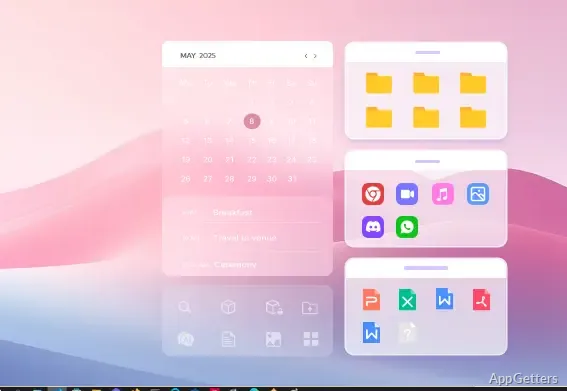
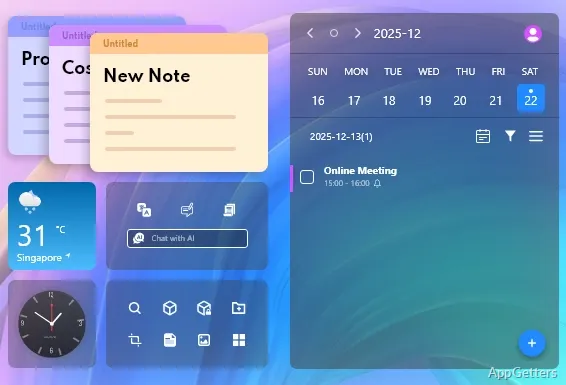
When you first try out iTop Easy Desktop, you will most likely be amazed at how it visually transforms the desktop environment. Instead of offering the desktop as a blank surface, the program offers the ability for users to create “boxes” or “containers”. In them, they can keep similar files, folders, or shortcuts.
In such a way, the desktop becomes like a well-arranged work area rather than a place where things are just thrown and left behind. For example, users can arrange their work documents, personal files, project folders, and regularly used apps in different sections. Placing things inside these groups is a simple drag-and-drop operation. This leads to less time spent looking for scattered icons.
Any user trying to accomplish many tasks simultaneously or being involved in several projects at once will especially appreciate this desktop layout. It allows users to see everything without forgetting about the important files.
Useful Features for Optimal File Access
In addition to helping with organizing files by groups, iTop Easy Desktop also gives users some helpful features when dealing with desktop files. Through the use of quick hide options, users can hide their desktop icons and clean the screen when giving a presentation or recording. The icons can be made visible again with one click.
Another handy feature that helps with quickly getting rid of the on-screen mess is the ability to collapse groups. This feature is excellent for users who have filled their desktops with many shortcuts. They need access to only a handful of them most of the time.
The whole experience stays consistent with other Windows tasks. This is because the software blends with the Windows desktop environment at the level of common operations. Users will feel that the changes are really very few or almost non-existent. The main tool they use, drag-and-drop, will be implemented in exactly the same manner.
Light ‘n’ Easy
Using many desktop customization tools can make users feel like they have to learn a complex new system. They may also feel they must always be fully focused. iTop Easy Desktop has a “simple” core, so it doesn’t overdo it with advanced system modifications. Instead, it stays focused on its function of organizing. It is designed so that installation and running the software are quite fast. Also, the straightforwardly designed interface helps new users understand the layout quite quickly.
Moreover, the software is hidden from the user’s view and requires only a small amount of system resources. Because of this, it is compatible with both older and modern Windows devices. Ordinary users surely will appreciate the fact that a desktop utility should not slow down their usual activities.
On the other hand, the main aspect of the software is the visual organization of the desktop. So, if a user is looking for automation or tagging features that are beyond basic, then they may feel quite unfulfilled by the software.
iTop Easy Desktop in Daily Windows Usage
iTop Easy Desktop is ideal for users who mostly have their desktop as their work area. For different people, it can be useful in different ways. For example, students can manage their study materials, users at home can organize their personal files, and office workers can have multiple projects on their desktops.
The software is quite helpful for users who value visual organization more than folder-based navigation. This way of organizing the desktop allows users more direct, desktop-centered access to their files. It reduces the need to always open File Explorer.
As it is, the software cannot substitute the entire file management system. But it does fill a logical gap by improving the usage of the desktop itself. If you are using Windows and have a hard time keeping your work area in order, it is a good opportunity to use iTop Easy Desktop as a clear yet effective tool. It can give your desktop a makeover without getting rid of your habits and ways that you are used to.