EXE
Home » Software » Windows » Image-Viewers » JPEGView Portable for Windows
JPEGView Portable for Windows

JPEGView Portable for Windows

  • By PortableApps
  • Free
  • Version: 1.2.45
  • 2.79 MB
  • Security Report:

Eventually, many Windows users face the problem with built-in image viewers: they seem slow, heavy, and inconsistent when handling large photo folders. The fact is that the problem grows more glaring when you sort screenshots at lightning speed or gaze at downloaded pictures. It also becomes noticeable when you open superbly large ones on older PCs. One very good reason for portable apps being preferred in these situations is that they don’t install anything. They can run from a USB stick or a secondary folder.

JPEGView Portable steps into the picture to satisfy this demand through a barebones, ultra-quick image viewer. It stresses reaction speed over the fancy look. First of all, it’s a Windows tool for users who just want to instantly open image files without resorting to heavyweight photo management software. Actually, the app is closer to a simple utility than a full media suite. That explains why a lot of people really like it.

Quick Photo Browsing Minus the Fuss

Speedy image loading on almost any hardware is one trait of JPEGView Portable that users notice almost immediately. Photo lovers dealing with extensive image collections place the highest value on speed rather than powerful editing features. So this software is designed for their workflow. Folder browsing via arrow keys is instant. This makes it very handy for checking out camera exports, downloaded wallpapers, or screenshots saved to the archive.

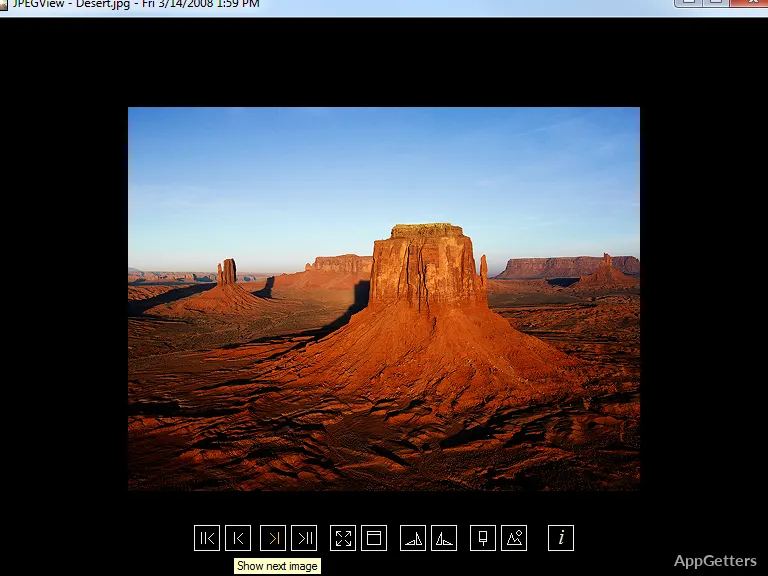
The UI here is quite minimalistic. Most of the time, the controls are hidden so the viewer’s attention is not interrupted unnecessarily. A long session in sorting and comparing images is well supported by this concept. There are some very basic editing functions like rotation, cropping, contrast adjustment, and sharpening. However, they can’t compete with the viewing experience that the program is primarily intended for. Unlike contemporary photo software packed with cloud integration and AI features, JPEGView Portable focuses almost exclusively on local image handling.

How Portable and Workflow-Oriented the Design Is

The portable format is quite a big part of the app’s identity. Since the app doesn’t get installed the traditional way, one can launch the app right off external drives or place it in shared work folders without tinkering with the Windows system. This is of great help in school computer labs, office computer rooms, or repair shops where users do not have administrator permissions.

At home, among many other reasons, the user decides to go for the portable one as it leaves less of a mark on the system. It is fast to run and is lean on system resources. It also does not start background services as larger photo management platforms do. This can very well become a step toward more agility every day for old Windows laptops or other resource-restrained PCs.

Of course, JPEGView Portable doesn’t claim to be advanced editing software. People wanting layered editing functionalities, cataloging tools, or online synchronization will find it rather limited. Besides, the interface may seem quite old-fashioned to those used to the new programs following modern Windows UI design. Nonetheless, its dependability and minuscule resource usage are among the factors why it is still kept by many for common image viewing activities.

JPEGView Portable: A Niche Product

JPEGView Portable is a perfect match for people who put speed, ease, and mobility ahead of media management power. There are students sorting educational images, office clerks going over scanned docs, and photographers needing to conduct image batch checks without interruptions, who can all take great advantage of its no-nonsense method. On top of that, it is a great alternative for those whose system is their weakest link.

The program works well in actual practice, not least because it refuses to compete with professional editing suites or cloud photo libraries. It realizes the main objective of making image viewing a smooth and guaranteed operation quite well. For Windows users facing the issue of opening large numbers of picture files regularly and preferring a low-resource single-file solution, JPEGView Portable is still a viable alternative that is both relevant and functional.

Software Details of JPEGView Portable 1.2.45

License
Free
Version
1.2.45
File Size
2.79 MB
Downloads
1
Language
English
Category
Op. System
Windows
Developer
Last Updated
June 16, 2023

Version History

1 version
1.2.45
Latest
2.79 MB
June 16, 2023

Leave a Comment

Your email address will not be published. Required fields are marked *

Software Icon
Security Report

Loading scan data...

Scroll to Top