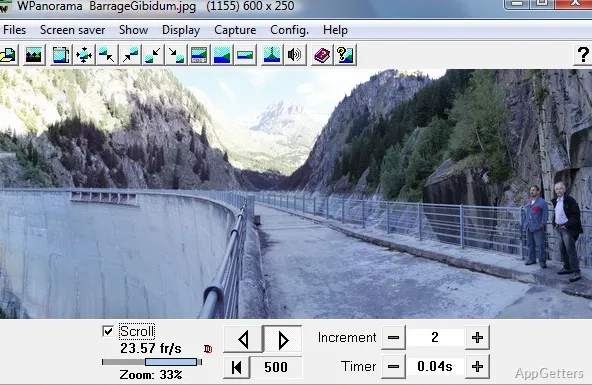
Lots of users working with panoramic images face a common problem. Typical image viewers don’t really support viewing ultra-wide panoramas very well. Usually, huge landscape pictures get so compressed that they are hardly recognizable, very difficult to navigate, or simply static. For those users who want to show very deep panoramic scenes but are not willing to deal with complicated 3D modeling software, finding simple tools is quite challenging. WPanorama is one of those tools. It targets the very specific task of panoramic image viewing and presentation rather than general photo editing or media management.
WPanorama: An Exclusive Way to View Panoramic Images
The main feature of WPanorama is its ability to display panoramic images more naturally than usual image viewers. These traditional viewers used to impose wide images into a fixed window. This is really not the best way to handle panoramas. However, with WPanorama, this hurdle is removed. It provides continuous horizontal scrolling that makes exploring panoramic content a lot easier.
From a regular user perspective, this feature completely transforms interaction with large images. Panoramic photos of nature, city views, and stitched travel panoramas can be viewed nearly effortlessly. Users do not have to frequently go in and out of Zoom modes. Besides, WPanorama has chosen to keep the interface simple. Even novices can operate it readily without much training. People who aim solely to work with panoramic images by simply opening, viewing, and presenting usually won’t need a tutor at all. Of course, this limited scope might be a shock for those who are expecting a full photo editing package or the latest multimedia suite.
A Compact Solution with a Few Shortcomings
One of the top advantages of WPanorama is its compactness. It is not very hardware-demanding, even for users who have old PCs. Also, it does not entail complex installation procedures or changes to existing system settings.
The workflow is perfect if you do not want to use it every day. It is very simple to navigate, open a panoramic file, change the display, and start the automated scrolling. It could also be interesting for some users to share their photos in slideshow mode at an exhibition or kiosk, and even at home.
Anyway, it is clear that this software has not been designed according to recent trends in software development. Besides the not-so-good visualization, people who are used to polished editing environments may experience difficulties. Most likely, if you try to edit your image with elaborate tools or organize your media with cloud features, you will be disappointed. Only very basic manipulation tools are included in WPanorama.
The Ideal Tool for Hobbyists, Vacation Photos, and Display Purposes
The main WPanorama audience is users working with panoramas as fully completed images and not artistic projects. It can be a great tool for hobby photographers, travelers, students, or home users who want to focus on the display of panoramic scenes without hassle.
For example, one who is photographing scenes of vacation or nature will probably prefer, simply put, a better presentation of their panoramic photos on the computer screen. In the classroom or gallery, the role of automatic scrolling is to keep the image interesting. It does this without the need for constant interaction.
Because the program concentrates on a certain image format, its predictable dependability in doing a small piece of work comes from that focus. Those users who want extensive photo editing, RAW workflows, or layered editing should definitely consider using other programs with WPanorama.
WPanorama in a Photo Editing/Managing Setup on Windows
WPanorama should definitely be seen more as a tool with a narrow focus than a comprehensive photo management system. Its main selling point is its ability to display, present, and casually explore panoramic images on Windows devices in a better way.
This changing role of the software helps those who take panoramic photography or have a collection of it appreciate their collection regularly. On the other hand, the old style of the interface and the limited toolset mean that it will not displace modern editing tools, though the software stays free of extra complexity.
In a real-life Windows environment, WPanorama is perfect if you prefer panoramic presentation, easy navigation, and lightweight operation. It is suited to users who prefer these qualities to extensive creative editing features.