EXE
Home » conversion » Image Tuner for Windows
Image Tuner for Windows

Image Tuner for Windows

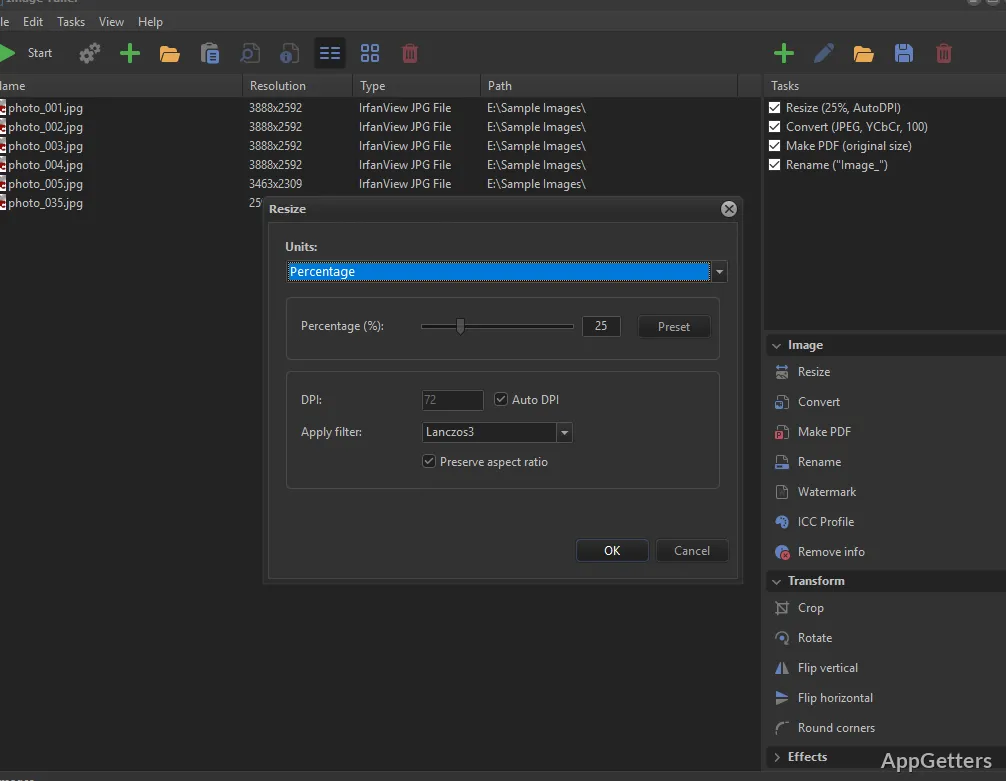
Working with images on Windows can sometimes be quite monotonous, especially when the collection of photos becomes large. Cameras and smartphones capture very sharp images that are visually stunning. But on the other hand, they are quite large and, to some extent, inconsistent, which makes them not very practical. Generally, users have to resize, rename, convert, or change a batch of images all at once. For example, when they want to share the images, upload them, or save storage space. Manual handling of the picture files in such a way would not only make one very slow but also, at the same time, unproductive, particularly if the files are in 100s. Image Tuner is what you need if these are exactly the issues you are having.

Because the software is focused on batch image processing in a very light and simple way of doing things. It is just a utility-style solution, but not a full editing environment.

Handling repetitive image tasks in everyday workflows

Practically speaking, the main concept behind Image Tuner is that it should be able to help users do less time-consuming repetitive image handling work. They are not expected to manually open each image and change one by one. Instead, users can select entire directories and make changes uniformly to all images. The types of changes include resizing, renaming, format conversion, and very basic modifications. In fact, for a typical Windows user, this tool is a regular go-to in situations like sending photos over email, updating photos on a website.

Doing school projects with pictures, or just properly managing a collection of photos. The software will take such users through the steps of image processing without much fuss. So that they can get the result and be done. So you get a simplified photo editing tool that just does those everyday functions. But does not at all aim to substitute professional editing software, which, on top of that, does deliver endless choices for users with creativity in mind.

Batch processing and practical time savings

Image Tuner is prominent for group processing functionalities. One does not even have to worry about organizing or grouping newly downloaded photos, ones from cameras, or even archived ones, when it comes to this feature in particular. Because all photos can be manipulated at once through a single workflow. Instead of checking one file, then performing and repeating the same action on another one, users only need to make a configuration once and then apply it to all chosen images.

Such a feature will really shine when it comes to daily real-life situations. Such as when students need to prepare their homework photos, office workers are tasked with report documentation, or home users have to sort digital photo collections. A great feature that takes time out of workflow is the ability to do multiple actions at once, which saves the user from operation interruptions. On the other hand, while it is true that advanced users may wish for more customizable features. The batch system itself that comes with this product should be good enough for handling the most common user tasks. As it offers an experience which is both fast and quite predictable.

Performance, usability, and realistic limitations

Even while dealing with a very large number of files, Image Tuner can still provide good performance on Windows machines. Having a very small size and a few dependencies, the software does not consume much in terms of system resources. And that is why it can be used even on a rather old PC. As well as the newest one that supports this software. The majority of tasks one would naturally expect to be able to perform with it run without problem. While it stays responsive during batch processing sessions.

On the other hand, it has been limited in terms of features to some extent. This is because creative editing is not the core of its mission. For instance, if you wanted to work with layers, it would not be possible here. The same applies to more refined retouching or deep color correction. The design of the program is such that it has to be a tool and nothing more than that. It only provides a way to get things done.

The interface is there to get the job done, but it is not very sympathetic, so to speak, from a user’s point of view, especially those who are used to newer apps. The simplicity is, after all, part of the design goal. But, of course, it also means that users who want a lot of visual control will be disappointed. The ability to automate and keep things consistent is where the program’s power is, not in the ability to give you the artist’s palette.

A practical fit for routine image preparation tasks

Those individuals who deal regularly with large numbers of images are the ones who can benefit the most from Image Tuner. Because it would provide them with a trusted means of rapidly processing their images. The program works great for students when they have to insert images into their documents. For office workers when they digitize paper documents. For sellers when they optimize images of their products. And for home computer users when they are handling personal photo collections.

It does the greatest good when it makes repetitive image management tasks on Windows easy for these specific groups of customers. Through integrating batch processing with the main conversion and resizing tools, it gives users the ability to keep their image collections well organized and compliant in terms of formats without having to count on complex editing software. Those users who are focused on getting things done quickly and in a stable manner and who also want to have an easy-to-use tool will definitely find Image Tuner a good and reliable program for everyday image management.

Software Details of Image Tuner 10.3

License
Free
Version
10.3
File Size
12.69 MB
Downloads
0
Languages
English English, French, Russian
Category
Op. System
Windows
Last Updated
November 6, 2025

Version History

5 versions
10.3
Latest
12.69 MB
November 6, 2025
10.1
11.6 MB
May 8, 2025
10
10.42 MB
February 17, 2025
9.9
7.69 MB
September 8, 2023
9.8
7.3 MB
July 11, 2023

Leave a Comment

Your email address will not be published. Required fields are marked *

Software Icon
Security Report

Loading scan data...

Scroll to Top