EXE
Home » conversion » Caesium for Windows
Caesium for Windows

Caesium for Windows

Working with image files on Windows can easily turn into a storage and workflow problem. As photo quality increases and file sizes become larger. Nowadays, phones, as well as cameras, make high-resolution photos that are perfect for details. But sometimes they are a bit of a problem when it comes to sharing, uploading, and storing. As time passes, users accumulate giant image albums. These, besides slowing down the backup process, may also exceed the limitations of email services or web platforms. And even though many programs have the option for image compression, most of the time they are part of big editing packages, which can be a bit of overkill for just one simple operation. Caesium closes this gap through emphasizing image compression and reducing size with a simple, user-friendly, and everyday helpful approach.

Making huge image files manageable is great for Windows workflows that make sense

Usually, the reason for resizing an image is not to inspire but to work in an effective way. Students handing in papers, executives sending reports, and grandma and grandpa sharing photos would time and time again run into the problem of file size restrictions. Actually, even such minor things as posting images on the web or sending images by e-mail are rather complicated. If the files are really big.

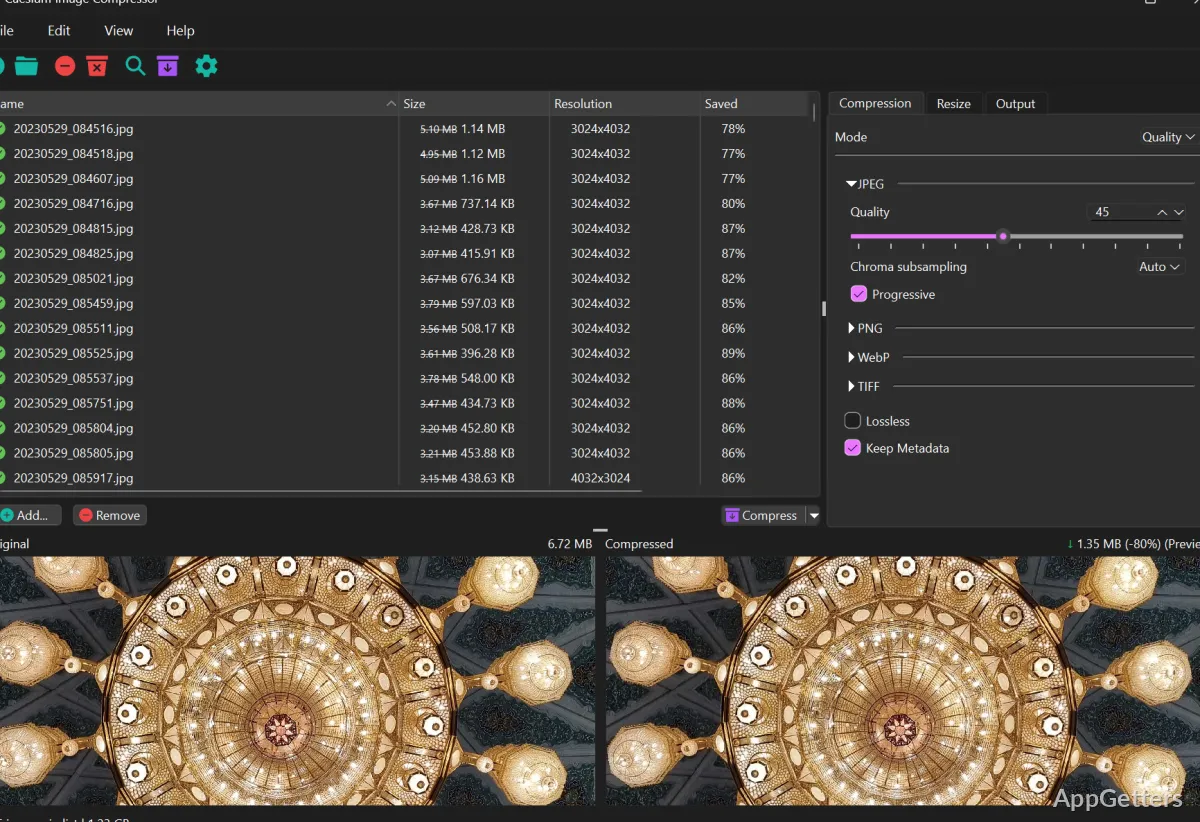
Caesium handles the problem through a compression process that is at the same time easy and focused. People can open pictures, set the compression levels, and output the files without having to ask themselves, “What’s with all these editing tools?” The main design of the tool is made to serve simple and rapid steps rather than an elaborate design. So, those users who basically want to free up space on their disks and are okay with a little bit of quality loss will find this practical method super handy for their day-to-day image editing.

Batch compression and storage optimization: Two sides of the same practical coin

Batch processing is definitely one of the very hands-on features of Cesium. The extent of freedom gained by not having to compress the images one at a time is massive. Users can choose settings/presets and apply them to entire folders in one go. This works tremendously for photo archives, dumped image sets, or big collections of images taken by mobile devices.

With batch compression, under common conditions, users see their storage significantly trimmed down without spending time on individual files. This is a blessing for those who are always complaining about running out of disk space or who simply want to have cloud backups of their stuff. To top it off, Caesium gives you the tool to compare before and after compression images, so you control the trade-off between quality and file size. While it is not a full-image editing tool replacement, its focused workflow makes it so much easier and quicker to do mass image compression.

Performance, usability, and practical restrictions

Cesium will keep up with your work on Windows even if you throw hundreds of images at it. It is a very compact design, so it hardly ever eats up system resources. This has made it one of the best software programs for people still using old laptops as well as those who have modern desktops. The application is made with efficiency as a purpose in mind. The speed of carrying out tasks will mainly depend on how large the photo files are and the settings you apply.

Still, its functionality was deliberately kept very limited in terms of advanced image editing tools. Users who want to have the entire set of creative options at their disposal will have to look elsewhere. On top of that, even though the program does its job well, some users may get the impression that it is quite basic and a little boring visually when compared to some of the more modern apps, where the user interface is a big focus. Yes, it is this level of simplicity that lets the program be what it is, but that also inevitably affects the overall friendliness to power users, those people who demand a bit of everything.

A Really Useful Tool to Manage Your Images’ Sizes Day-to-Day

Caesium is the right tool for users who constantly work with big image files and want a simple option for reducing file size. It does this without slowing down other parts of their workflow.

The software’s uniqueness comes from the concept of simplifying a task that everyone does quite often. And that is quite complex. Concentrating exclusively on image compression and handling batch operations, Caesium really makes a difference. And turns into an excellent assistant in keeping image file sizes at a reasonable level in Windows.


Software Details of Caesium 2.8.5

License
Free
Version
2.8.5
File Size
21.15 MB
Downloads
0
Language
English
Category
Op. System
Windows
Developer
Last Updated
May 19, 2025

Version History

5 versions
2.8.5
Latest
21.15 MB
May 19, 2025
2.8.4
21.11 MB
March 18, 2025
2.8.3
21.86 MB
March 10, 2025
2.8.2
21.76 MB
October 28, 2024
2.7.1
21.55 MB
June 3, 2024

Leave a Comment

Your email address will not be published. Required fields are marked *

Software Icon
Security Report

Loading scan data...

Scroll to Top