C: drive full while D: sits half empty? IM-Magic Partition Resizer shifts space between partitions by dragging their edges, without reinstalling Windows or wiping data.
How does it extend C:?
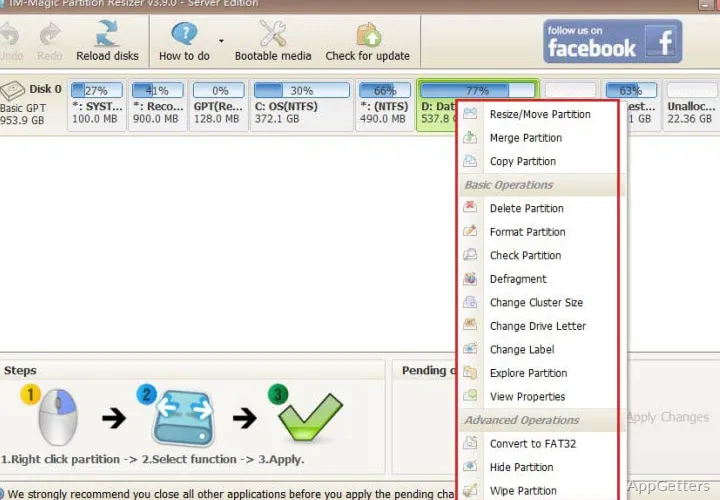
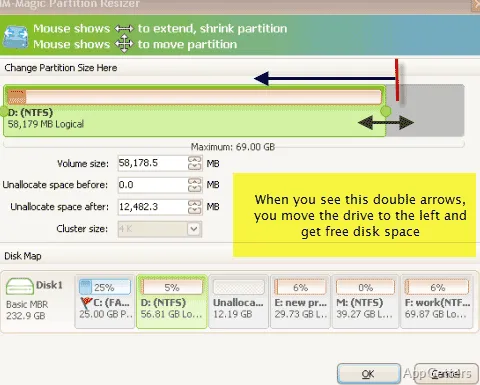
The partition layout shows where unallocated space sits in relation to each volume. To add space to C:, shrink a volume to create unallocated space, then move any intervening partition until that space is next to C:. Resize/Move can then extend the system partition. The program can also work on the running C: drive.
Changes can be arranged before applying them, including multiple operations in a batch. A move changes a partition’s position and the location of the unallocated space beside it; shrinking reduces a volume to create more unallocated space.
Partition layout and merge workflow
Right-click a partition to access Resize/Move or Merge Partition. For a merge, select two adjacent volumes; files from the merged volume are placed in a folder on the retained volume. The layout is important because volumes must be next to each other for this operation.
Rollback protection restores the previous partition state if a resizing task is interrupted, such as by a system crash or power loss.
Other disk operations
Alongside resizing, moving, and merging, Partition Resizer includes tools for cloning a disk, copying a partition to unallocated space, and migrating an operating system to another disk. It can also convert MBR disks to GPT and convert NTFS volumes to FAT32.
The program supports FAT12, FAT16, FAT32, and NTFS file systems. Formatting or wiping a partition removes data, and cloning one disk to another erases existing data on the destination disk.
Pros
- Drag-and-drop resizing and moving from the partition layout
- Can redistribute space to extend the running C: partition
- Merges adjacent volumes while retaining their files
- Includes rollback protection for interrupted operations
System requirements: Windows 7, Windows 8, Windows 8.1, Windows 10, Windows 11 · 32-bit and 64-bit
Can IM-Magic Partition Resizer extend the Windows C: drive?
Yes. It can shrink another volume, move intervening partitions if needed, and extend C: once unallocated space is beside it.
Can it merge two partitions?
Yes. Select two adjacent volumes with Merge Partition; files from one volume are moved into a folder on the retained volume.
Does it include disk cloning?
Yes. It can clone a disk to another disk, but existing data on the destination is erased.