Getting rid of an old drive, or trying to revive a disk that no tool will format any more? HDD Low Level Format Tool wipes hard drives and SSDs completely, along with supported external drives and memory cards.
Which drives and media can it handle?
The tool supports NVMe, SATA, IDE, SAS, SCSI, and SSD storage. It also works with external drives connected through USB or FireWire enclosures, and memory cards such as SD, CompactFlash, MMC and Sony's MemoryStick.
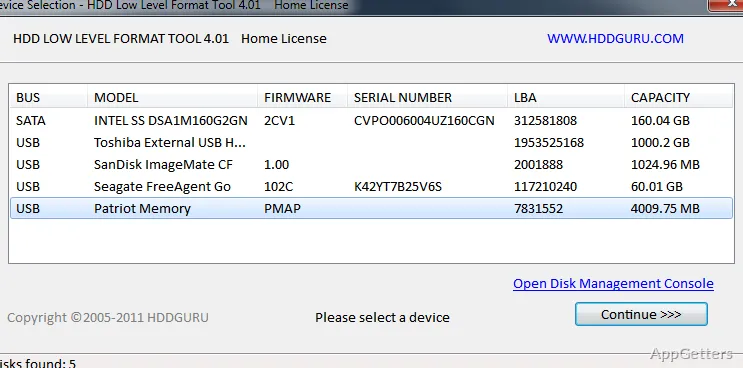
The selected device is the target for the operation, so identify it carefully before starting a whole-device task.
What does low-level formatting do?
The low-level format option performs a destructive operation across the whole device. It clears stored data and partitions, leaving the drive ready for new setup; it does not format just one selected volume. Treat the contents as erased when choosing this task.
The program also offers full-device Trim or discard on compatible Windows storage paths. That operation is distinct from the low-level format and depends on the storage connection supporting it.
Can the drive be inspected before an operation?
Physical-drive inspection reports device identity and health details. Host-side Read Verify provides another check by asking the computer to read data from the drive, while operation logging records activity for later review.
- Use identity details to distinguish drives with similar names.
- Read Verify checks host-side reads; it is not a repair operation.
- Logging records the tool's operations.
Pros
- Works with NVMe, SATA, IDE, SAS, and SCSI drives
- Supports USB and FireWire enclosures and several card formats
- Includes physical-drive identity and health reporting
- Offers host-side Read Verify and full-device Trim/discard
System requirements: Windows 10, Windows 11
Does a low-level format preserve files or partitions?
No. The whole-device operation erases user data and partitions on the selected device.
Can HDD Low Level Format Tool work with USB storage?
Yes. It supports USB external-drive enclosures and memory cards such as SD, CompactFlash, MMC and MemoryStick.
What is the difference between Read Verify and Trim/discard?
Read Verify checks host-side reads. Trim/discard sends a full-device discard operation when the Windows storage path supports it.