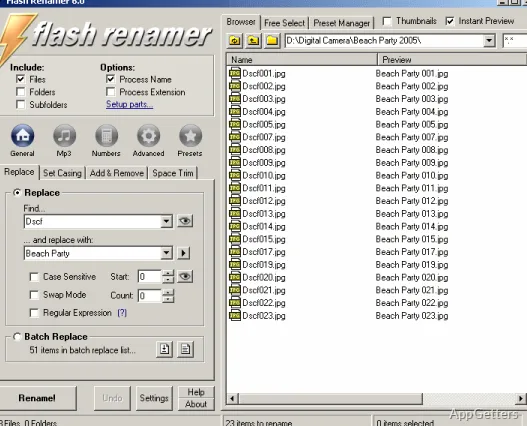
Flash Renamer batch-renames groups of files with rules for numbering, capitalization, text edits, and metadata. A live preview shows the proposed names before changes are applied, and the program includes undo for reversing a rename.
Which filename changes can you combine?
Flash Renamer lets you change capitalization, insert text at a chosen position, remove parts of a name, trim extra spaces, and find text to replace. Numbering rules add counters to a group of files, adjust numbers already in names, or add leading zeros so items sort in the intended order.
For more involved renames, the filename editor can rearrange sections of a name. Rules can also draw on metadata and file properties, such as image dimensions or media duration. Wildcards and regular expressions are available for matching filenames, and scripting lets you create custom rename rules.
How do music and photo renames work?
Music files can be renamed from tags and track properties. Flash Renamer also writes tags using information in filenames. Supported audio formats include MP3, Ogg Vorbis, WMA, MP4, FLAC, MPC, SPX, TTA, and WV.
For photos, thumbnail mode displays image previews while you work with a collection. Rename rules can use EXIF and IPTC information, and file dates can be set from sources such as an image’s EXIF date. The program works with files, folders, and subfolders, and can also change file attributes such as read-only or hidden.
How can you check a batch before changing names?
Select the files, apply the desired rules, and inspect the live preview to see how the resulting names will look. Saved presets retain frequently used commands, while context-menu access and hotkeys provide shortcuts for starting a rename workflow. If a rename needs to be reversed, Flash Renamer includes an undo function.
- CSV-based renaming can match filenames to entries in a list.
- Metadata-based rules can use music tags or image details.
- Numbering and text edits can be used together in a batch.
Pros
- Adds counters with zero padding for consistent filename sorting
- Uses music tags and photo metadata in rename rules
- Shows image thumbnails and supports EXIF and IPTC data
- Supports custom scripts, CSV lists, and saved presets
Cons
- Continued use beyond the trial requires buying the full program
System requirements: Windows 7, Windows 8
Can Flash Renamer rename folders as well as files?
Yes. It can apply rename rules to files, folders, and subfolders.
Can it use photo information in new filenames?
Yes. Rules can use EXIF and IPTC data, including image dates and other metadata.
Can I preview a batch before renaming?
Yes. The live preview displays the proposed filename changes before they are applied.