EXE
Home » Software » Windows » Image-Viewers » FastStone MaxView for Windows
FastStone MaxView for Windows

FastStone MaxView for Windows

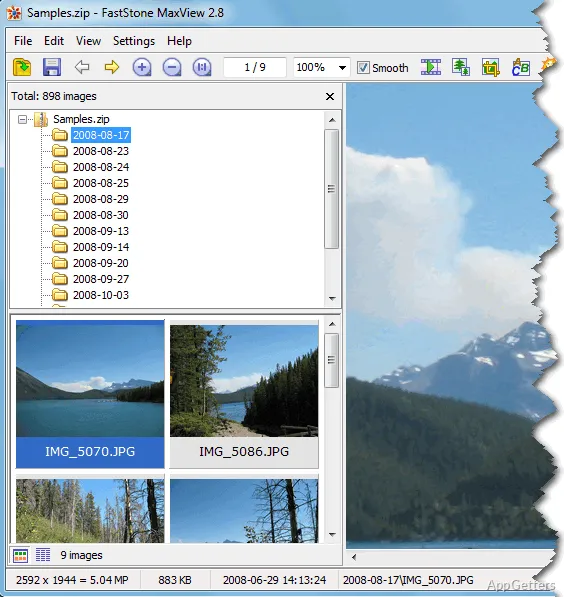
Many Windows users want an image viewer that launches fast and stays out of their way. It should be capable of doing basic image viewing tasks without the heaviness of a complete photo editor. The built-in tools tend to be quite limited. The complex graphics software packages add tons of extra features. The user hardly needs them if all he is looking for is speed. FastStone MaxView is the kind of app that is somewhere in the middle. It is a lightweight image viewer meant for people who mainly want to look at, check, and manage their pictures efficiently.

Simple Viewer Highlighting Speed

It is obvious that FastStone MaxView is designed for those who often open image files and want the least possible interference between tasks. In Windows, it loads very fast. Even with big photo collections, navigation is still very smooth. The program is very minimalistic, so it uses very little screen space. Its main feature is full-screen viewing. It is more suitable for continuous browsing of images than for editing work.

Generally speaking, this is what will be appreciated in the case of various people. These include the ones using PCs at home, students, photographers checking their photos, or office workers handling screenshots and images used as visual references. The application recognizes its main function is to help users get their files quickly. It also helps them move easily from one folder to another. As this is done implicitly, one will realize that these are precious moments added to everyday work.

Useful Viewing Features Without the Jargon of Editors

Instead of trying to replace heavy, professional editing software, FastStone MaxView is dedicated to making dealing with pictures easier. Therefore, there are lots of very useful features all included in the program. These include changing the size, rotating and zooming, color correction, and an automatic slideshow. What is most striking about it is that you carry out all these tasks without complicated menus or needing to be technically sound.

This makes the program very friendly to those who have not had prior experience using such programs. However, one will find it quite handy even if you are skilled at giving your images a nice touch. This is especially true when there is little time before sharing or tidying them up. When you use it normally, the software is at its best. It operates as a rapid checkpoint from taking a photo to getting it ready for sending out. However, anybody who enjoys building a layered composition, making designs, or changing photos in great detail will see only a limited toolset here. What it does best is the work part, while the creative production is left for other software.

Dependability and Boosting Productivity on Windows

One thing that is quite obvious when one starts to use FastStone MaxView is that it does things consistently over time. Oftentimes, small software either wins or fails based on whether and how stable they are. This is especially true during intensive use day in and day out. This one is all about behaving the same way every time you use it. When opening different image types, changing images, and selecting different viewing options all the time, it is more a case of feeling that one can rely on these. It is less a case of feature testing taking place.

For example, if you are someone who works with taking screenshots, scanning documents, photographing products, or storing their personal collection of images, then dependability is possibly something that will be more important to you. It may matter more than many other considerations. It may matter more than having a long list of different capabilities. The software is designed in such a way that even a very old Windows computer might be able to run it. It can do so without a hitch. A user can also decide not to have the image viewing programs take up a lot of their system’s resources. On the other hand, if the user is familiar with cloud-connected media type tools and integrated collaboration features, they will find the experience more closely associated with traditional desktop usage and traditional functionalities.

When and Why to Use FastStone MaxView

FastStone MaxView is a Windows image viewer that focuses on delivering quick and simple image display. FastStone MaxView also gives the user the ability to directly control the viewing process. It complements situations where one is opening, seeing, and making very minor changes to images frequently. It is almost never the case that one needs a full photo editing software.

One can find it very useful for the student preparing the project materials, a home user who is reviewing photos of the family, or a professional who might be reviewing screenshots or photos used as image assets. The major concept of the tool is that these are restrictions made to it, rather than it being a complex editor, media organizer, or collaborative platform. For those users who want an image viewer that never distracts and is reliable, FastStone MaxView is indeed a practical and very suitable choice. It also does not impose a change in the current pattern of using image files.

Software Details of FastStone MaxView 3.5

License
Free
Version
3.5
File Size
4.6 MB
Downloads
2
Languages
English English, Spanish
Category
Op. System
Windows
Last Updated
January 26, 2026

Version History

1 version
3.5
Latest
4.6 MB
January 26, 2026

Leave a Comment

Your email address will not be published. Required fields are marked *

Software Icon
Security Report

Loading scan data...

Scroll to Top