The main window presents Scan and Fix controls, along with options for additional reports. Farbar Recovery Scan Tool (FRST) records Windows configuration details that can help identify malware-related changes and startup or boot problems.
Run a scan and read its reports
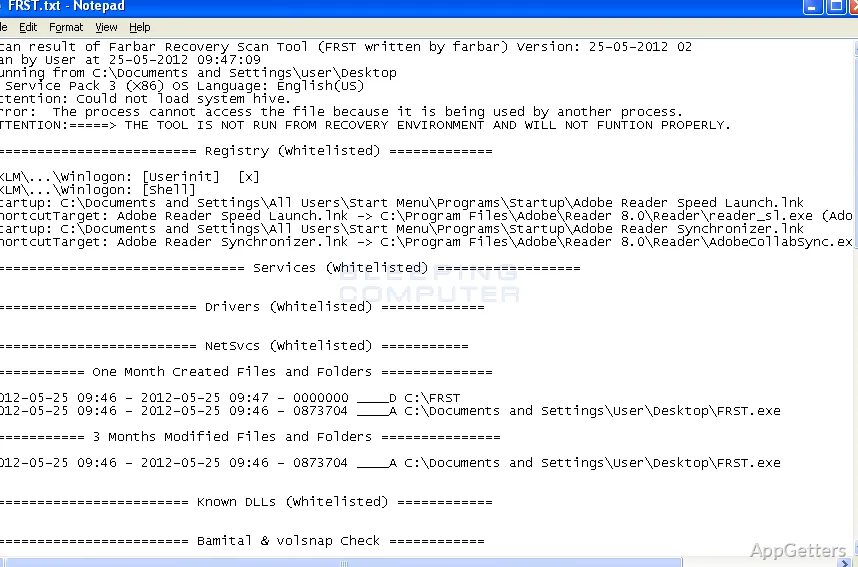
Choose Scan to have FRST examine Windows configuration and create diagnostic text files. The main report records registry loading points, services, driver services, Netsvcs entries, known DLLs, and information about drives and partitions. It also notes important system files that malware may modify.
The Addition.txt option adds another report with supplementary system details. These files give a technician or experienced helper material to investigate; a scan result is not, by itself, a diagnosis of which entries should change.
Inspect startup and service entries
FRST collects details from the places Windows uses to load programs and components during startup. Reviewing those entries alongside services and driver services can help trace suspicious persistence, unexpected configuration changes, or symptoms that return after a restart.
- Check the report's registry loading points for unfamiliar startup entries.
- Compare service and driver-service details when investigating unusual system behavior.
- Use the drive and partition information to understand the system's storage layout.
Diagnose problems in Recovery Environment
When Windows will not start normally, FRST can be run from the Windows Recovery Environment. That workflow lets a technician inspect the affected installation and investigate boot-related problems outside a normal Windows session. FRST can also run in normal or Safe Mode for malware diagnosis.
Apply a targeted repair
The Fix control applies instructions from a fixlist.txt file, allowing a helper to address selected findings from the scan. The list needs to match the computer's report; an unrelated fix list can target the wrong system state. Keep the scan report available when a technician prepares the repair instructions.
Pros
- Reports registry loading points, services, and driver services
- Includes drive and partition information in scan results
- Can run in Windows Recovery Environment
- Supports targeted repairs through a fix list
Cons
- Repairs require a fixlist.txt prepared for the system being scanned
System requirements: Windows 7, Windows 8, Windows 10, Windows 11 · 32-bit and 64-bit
Does FRST remove malware automatically?
No. It creates diagnostic reports; selected repairs are applied using a fixlist.txt file.
Can FRST run if Windows will not boot?
Yes. It can run in Windows Recovery Environment to diagnose and address boot problems.
What information does an FRST scan report?
It includes registry loading points, services, driver services, Netsvcs entries, known DLLs, drives, partitions, and important system files.