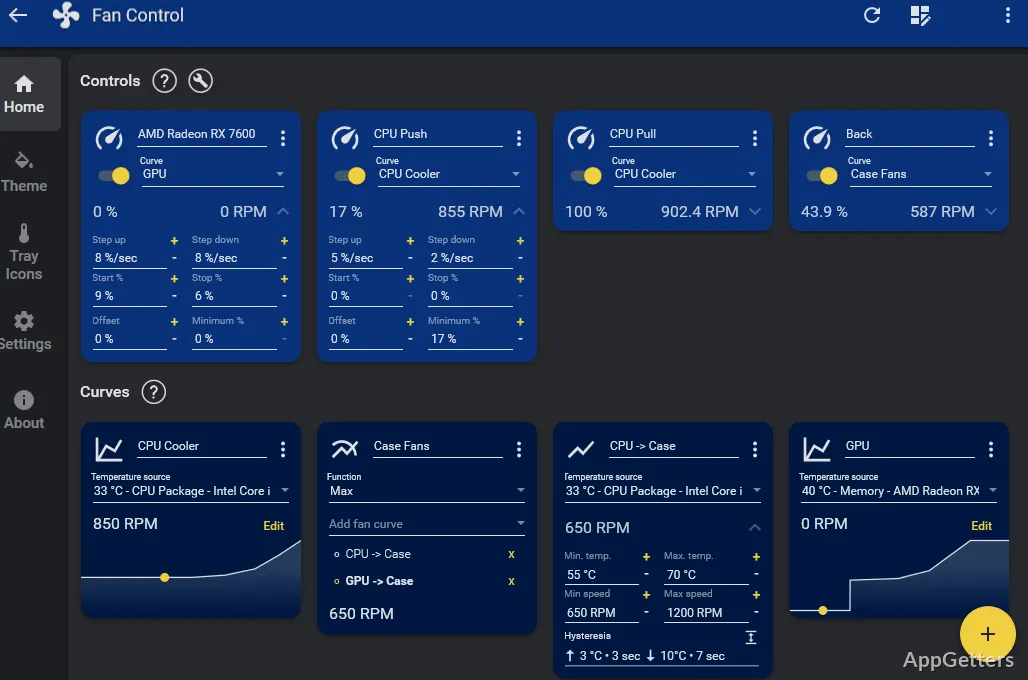
PC fans roaring at idle, or not spinning up fast enough in games? The free Fan Control ties fan speeds to temperature readings with curves you draw yourself. It provides a guided first-launch setup, editable curves, and controls for building profiles around the sensors and fans it detects.
Set up detected sensors and fans
The guided first-launch process presents the temperature sources and fan controls available on the PC. Readings can come from components such as the CPU, GPU, motherboard, and hard drives. Which controls appear depends on the machine’s sensors and fan controller.
Once the relevant inputs are available, select a temperature source for a curve and connect that curve to a fan control. A temperature-based curve can keep fan speeds lower during light activity and increase them as readings rise.
Shape curves and save profiles
Several curve types are available; the graph type lets you draw your own line from temperature to fan speed. Tuning options include start and stop percentages, response time, hysteresis, and steps. Calibration also supports avoid points for fan speeds that cause rattling or other unwanted noise.
- Combine multiple curves or sensors by using their maximum, minimum, or average value.
- Save, edit, and load profiles to keep different fan setups available.
- Change the application’s theme and colors in its appearance settings.
Add sensor sources with plugins
The plugin system can bring additional readings or device controls into Fan Control. Available plugins cover examples such as HWiNFO sensor data, Intel Arc GPUs, Corsair controllers, and some laptop models. Plugins can extend hardware support, but they do not guarantee that every fan controller will be accessible.
- Fan Control can start at boot as a service without a signed-in user session.
- It uses LibreHardwareMonitor as its main sensor backend, so detected hardware depends in part on that sensor support.
Pros
- Build custom fan curves from CPU, GPU, motherboard, and drive temperatures
- Combine curves or sensor readings using maximum, minimum, or average values
- Save and load multiple profiles for different fan configurations
- Extend sensor inputs through plugins
Cons
- Laptop fan control is limited and may need a model-specific plugin
System requirements: Windows 10, Windows 11
Can Fan Control combine readings from more than one sensor?
Yes. It can combine curves or sensor values using the maximum, minimum, or average.
Can Fan Control control laptop fans?
Support is limited because many laptops do not expose fan controls to third-party software. A plugin may support a specific model.
Can Fan Control run when no user is signed in?
Yes. It can start at boot as a service without a user session.