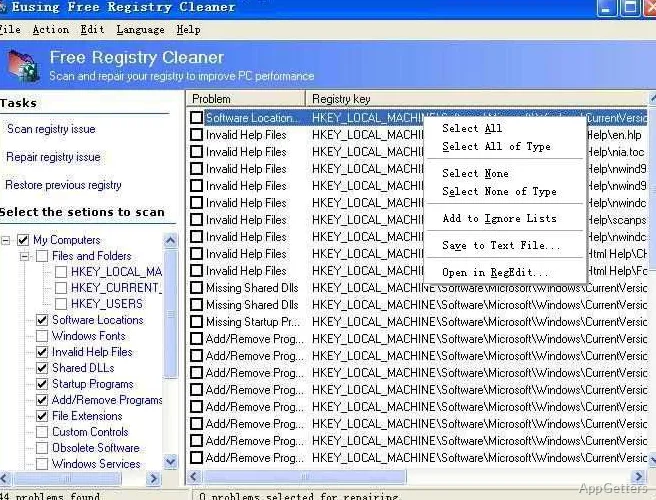
Uninstalled programs often leave junk in the Windows registry. Eusing Free Registry Cleaner scans for invalid or outdated entries. It groups findings into recognizable issue types and includes a way to back up repaired entries and restore them later.
What registry entries does the scan look for?
The scan searches the Windows Registry for information it considers invalid or obsolete, including references left behind by deleted files or uninstalled software. Results are displayed as a list so you can see what the scan found before applying repairs.
Its checks cover several kinds of entries, such as missing shared DLL references, invalid file extensions, ActiveX entries, invalid paths, and obsolete software keys. It also checks startup programs, fonts, installer references, and empty registry keys.
How do you review repairs and undo them?
After scanning, inspect the reported entries and run the repair action for the problems you want to address. The program automatically saves a backup of repaired entries. If a change causes trouble, use the registry-backup restore command to return those entries to their saved state.
Because the backup applies to repaired entries, it should not be treated as a full copy of the registry.
Which specific checks can you expect?
The scan includes checks for issues such as invalid help-file references, sound and application event entries, outdated Start menu ordering, MUI cache records, custom controls, and missing file or folder references.
Pros
- Scans for leftover references to deleted files and uninstalled applications
- Checks named categories including missing shared DLLs and invalid startup entries
- Creates backups of repaired entries and provides a restore command
Cons
- Backups cover repaired entries, not a complete registry image
System requirements: Windows 7, Windows 8, Windows 10, Windows 11
Does Eusing Free Registry Cleaner back up changes before repair?
Yes. It automatically backs up the registry entries it repairs, which can then be restored through its registry-backup feature.
Can it find references left by uninstalled programs?
Yes. It scans for registry keys associated with deleted files and uninstalled applications, along with other invalid or obsolete entries.
What kinds of registry problems does it check?
Checks include missing shared DLL references, invalid file extensions and paths, startup-program entries, and obsolete software keys.