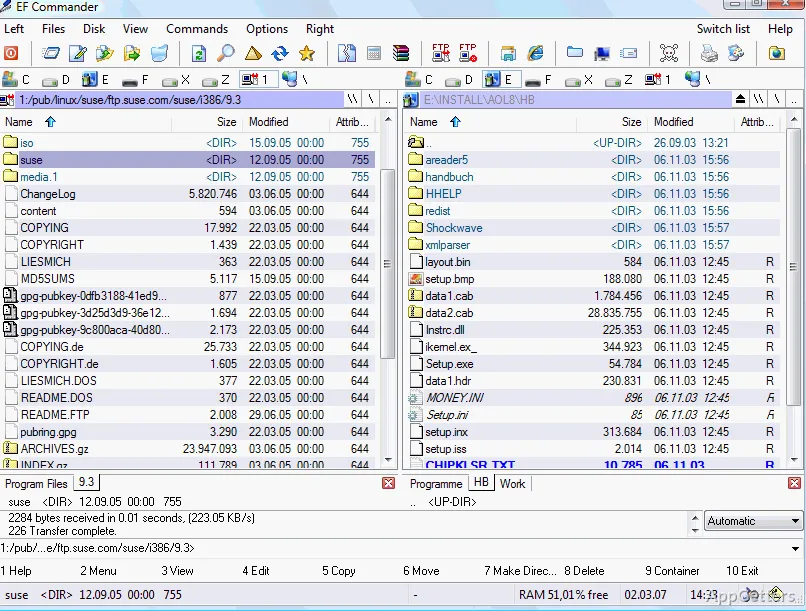
Miss the old Norton Commander layout with a folder on each side? EF Commander is a two-pane file manager that combines tabbed folder views with tools for archives, file inspection, and FTP transfers.
Two-pane folder views
EF Commander shows two directory panes, so files can be copied or moved between a source and destination without switching windows. Tabs let each pane keep multiple folder views available. The layout also supports drag-and-drop file handling.
Multirename and parallel operations
The multirename tool applies defined naming rules to groups of files in one operation. Rules can draw on MP3 tag fields or EXIF photo information. Long-running tasks such as copying can run alongside other file operations, including separate copy jobs.
- Split large files into parts and join them again.
- Create or verify SFV, MD5, BLAKE3, and SHA checksums.
- Synchronize files between computers or network locations.
Archives and file inspection
Internal archive support covers formats including ZIP, 7-Zip, RAR, TAR, GZIP, CAB, and ISO. The built-in viewer shows pictures and videos, and it plays common audio files such as WAV, FLAC, MP3, WMA and Ogg. Thumbnails and quick view provide other ways to inspect files from the manager.
Text and HEX editors are included for examining file contents. Optional XnView or IrfanView support adds more image-format viewing.
Remote transfers and disc writing
The transfer client connects over FTP, SFTP, FTPS, or SCP. It supports resuming downloads and FxP transfers between servers. EF Commander can also write CDs and DVDs directly, with Nero Burning ROM required for that function.
Pros
- Two panes and tabs keep source and destination folders in view
- FTP client supports SFTP, FTPS, SCP, and resumed downloads
- Internal tools handle archives, checksums, text, and HEX files
- Multirename rules can use MP3 tags and EXIF data
System requirements: Windows 7, Windows 8, Windows 8.1, Windows 10, Windows 11
Can EF Commander transfer files to an FTP server?
Yes. Its client supports FTP, SFTP, FTPS, and SCP, as well as resumed downloads and server-to-server FxP transfers.
Which archive formats can it handle?
Supported formats include ZIP, 7-Zip, RAR, TAR, GZIP, CAB, and ISO, among others.
Can it inspect files without opening another application?
Yes. The built-in viewer handles images, movies, and several audio formats, and the program includes text and HEX editors.