Same photos saved three times in different folders? Easy Duplicate Finder compares files beyond their names and extensions, then presents matches to review with previews before removal.
Scan modes and the Wizard
Pick one of the many scan modes yourself, or let the Wizard walk you through the choice. After selecting folders, start a scan to find matching files; matching names alone do not determine whether files are duplicates.
Photo searches can detect both exact and similar images. The program also supports searches across different file types, with previews available to inspect results before acting.
What happens after a scan?
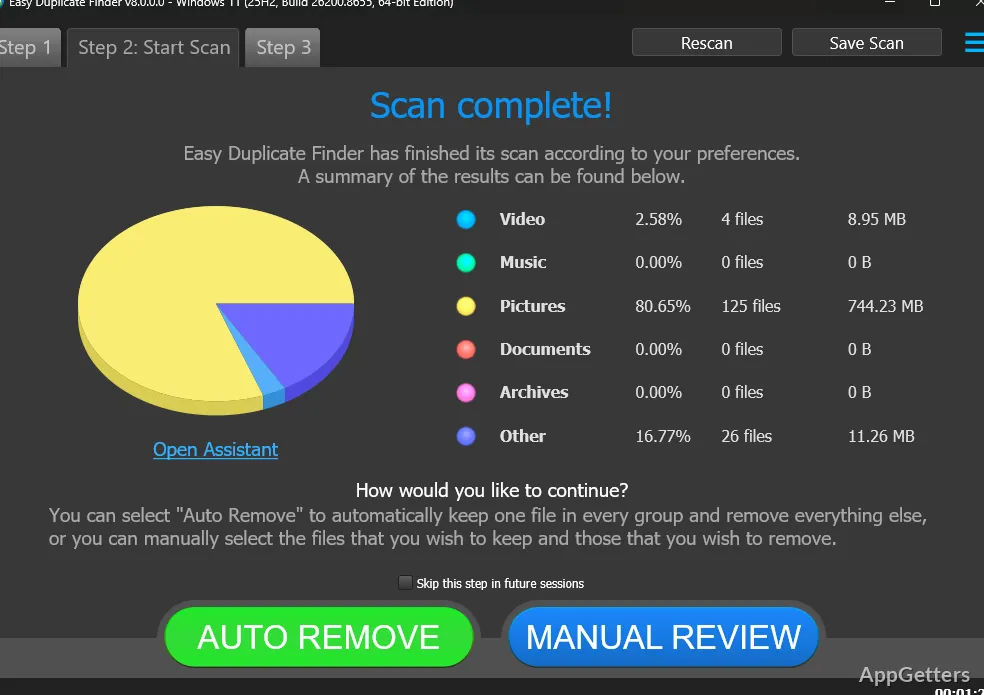
The results screen presents files identified as duplicates so you can decide which copies to remove. Easy Duplicate Finder can select files for removal, and an Undo button provides a way to recover from an unwanted cleanup action. System files and folders are protected during cleanup.
- Review file previews before removal.
- Use Undo if a cleanup action needs to be reversed.
Where can it search?
Alongside folders on a PC, Easy Duplicate Finder includes duplicate searches for Google Drive and Dropbox. A real-time duplicate finder can also help catch duplicate downloads as they happen.
Pros
- Over ten ways to scan and compare files
- Finds exact and similar photo duplicates
- Previews files and includes an Undo button
- Scans Google Drive and Dropbox for duplicates
Does Easy Duplicate Finder compare file contents or just names?
It looks beyond names and extensions to identify duplicate files.
Can it find similar photos as well as exact copies?
Yes. Its photo and image searches support both similar and exact duplicates.
Can a removal be undone?
The program includes an Undo button for recovery after an unwanted cleanup action.