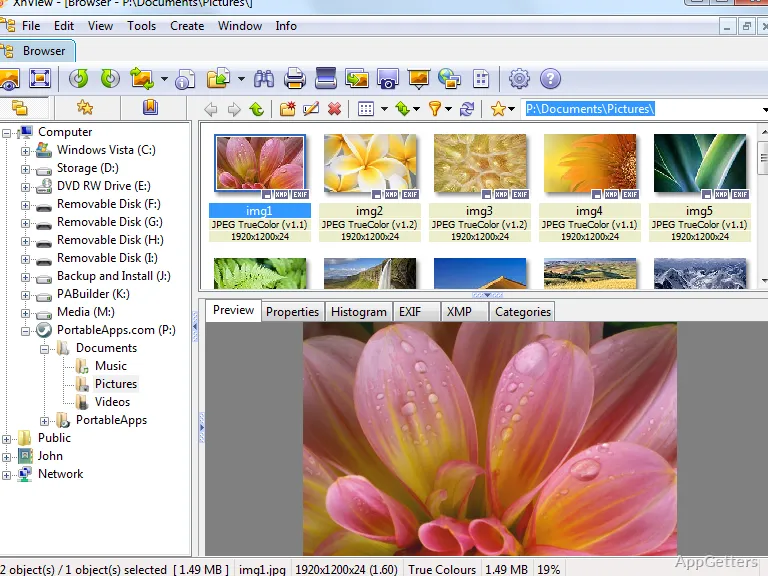
It’s quite easy for managing large image collections on Windows to get to a very frustrating level in a short amount of time. Standard photo viewers are usually only good for opening single files. However, they are quite inefficient when users start sorting folders, converting image formats, organizing screenshots, or dealing with batches of images, etc. Students, photographers, office workers, and casual users usually use a number of applications in order to do only the simplest of image management operations. In fact, XnView Portable underlines the problem because it is actually a utility-oriented software.
Not just a viewer, it is a tool to combine image browsing, lightweight editing, file conversion, and organizing images together in a portable package. It does not need to be installed to run. In fact, it is a kind of software that is very valuable for users who go from one computer to another or those who like to carry it.
Portable Image Management That Feels Efficient
One of the most useful practical features of XnView Portable is that it can manage large image libraries very quickly and efficiently. It is still smooth when users change to folders that contain lots of screenshots, photographs, or a mixture of media files. Thumbnails are shown without any problem, and the moment that one changes the directory is a nice experience. One can feel that it is faster than most of the image viewers that come with Windows by default.
Also, with the portable version, you can work with the program from an extra flash drive or a backup folder. This can be done without making very many changes to the main system. This is going to be very handy, for example, in the office where one always changes locations, at schools, when doing repairs, or at other shared venues. It is not always possible to install in one’s own way, depending on the computers available.
Batch processing is another feature that the program does exceedingly well during ordinary few picture operations that are expected of it. Doing mass renaming, format converting, re-sizing images, or doing first-level editing can be applied to a multitude of files. This may really enable people managing repetitive images to save a good amount of time.
More Than a Simple Photo Viewer
XnView Portable provides you with so many editing and managing possibilities that you will almost not need to get another one to do your work, at least for everyday things. Not only can you crop, rotate, change color, view metadata, and do other things with simple annotation, but you can also work with scaling, brightness, gamma, sharpness, and blurring.
However, the program’s editing features are quite limited in comparison to fully-fledged graphic design software. They are more than enough for simple adjusting and organizing work. The support of a broad range of file formats is something one has to count on. Users who deal with obscure old image types, graphics file formats, or mixed collections from different handsets. Will probably value that with this program, one hardly ever comes up against compatibility problems.
The main thing about the user interface is that it is mainly based on how well it functions. And not so much on how pretty it looks. At first, even new users may feel a little lost in the large number of menus and options. This is especially true when compared with very simple photo viewers that have a lot less than that. However, when one gets used to it, the interface becomes very convenient. The majority of the tools can be used without the need to get additional apps or third-party plugins.
Reliable Workflow With Some Learning Required
XnView Portable is a great choice for those who work regularly on their photo collections, rather than just occasionally opening a pic or two, to get the most out of it. Photographers who wish to keep their archives from getting messy can find value in the wide functionality of this program. Students who are planning to organize their research sources may also benefit from it. Artists who are going to be reviewing their assets can also make good use of its tools. Even those who work in offices and need tools to help them with their day-to-day management of documentation.
On the other hand, the vast amount of features is something users will need to get used to. Those who just want a very simple photo viewer at the end of the day. Might find the whole interface pretty over the top at the start. There are even some powerful features well hidden in menus. They are presented in the lingo of image management that not all users may be familiar with.
Also, the program is heavily bent towards handling local files rather than cloud-based collaborative work. People who are mainly in online shared photo libraries or automatic syncing platforms will, to some extent, have to use other services alongside them. Basically, XnView Portable is made to be a desktop productivity tool and not as part of a connected ecosystem.
Where XnView Portable Fits Best
XnView Portable represents a fine choice for Windows users who cherish flexibility, portability, and strong file management. Besides, these users are probably not fully convinced by the idea of giving up their control completely to cloud services. Because it can combine browsing, conversion, organization, and even light editing into one single portable app. It can be used in quite diverse workflows.
It is a known fact that, on the surface, this might look slightly old-fashioned. Someone new to it probably would need quite some time before feeling okay and being comfortable with the entire set of features. But eventually, its dependability and performance tend to be so strong that they make these worries almost insignificant.