Automatic Screenshot Capture saves screen images on a timer, with controls for the delay, capture count, and destination folder. It can continue capturing while its main window is tucked into the system tray.
Timed capture controls
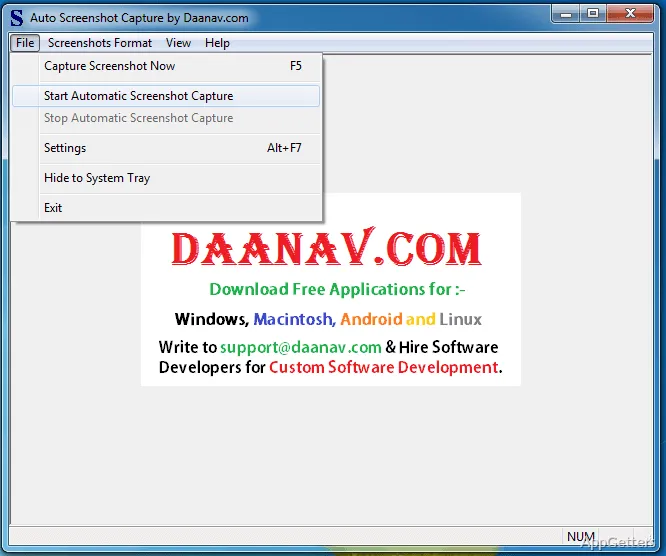
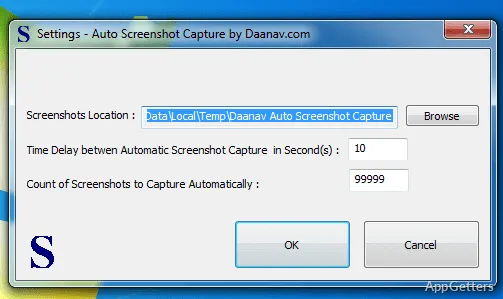
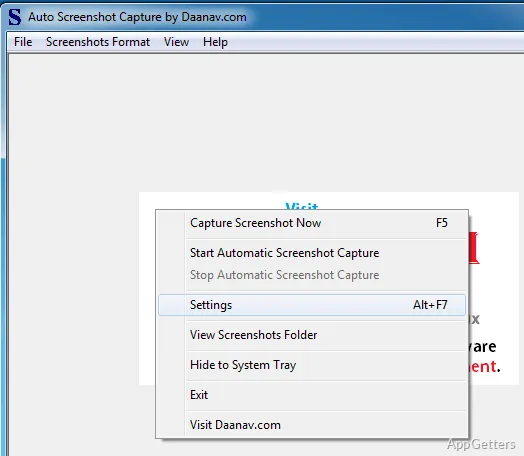
Set a delay between screenshots and choose how many the program should take. Start and stop the repeating capture from the main window or its right-click menu. Captures continue while the window is hidden in the system tray, where a separate menu provides quick access to commands.
The settings screen also lets you choose where the images are saved. By default, they go into a folder under Windows Temporary Files; you can select a different destination. The chosen folder needs to allow writing files.
Output folder and image formats
The program names saved images using the computer's date and time, so their filenames provide a chronological record. JPEG is the default format, and the format setting can be changed from the main menu. The selection remains in effect until changed again.
BMP is available too, though those files take more disk space than the program's other image formats. A status bar displays help text for the menu item currently selected.
Tray and multi-monitor capture
The File menu can send the main window to the system tray without stopping an active capture. Tray and right-click menus provide capture controls when the main window is out of view.
On an extended desktop, screenshots include the screen contents of all connected monitors. This suits records that need to show activity across the full multi-screen workspace.
One-time screenshots
For a single image, use the File menu or the right-click or tray menu to capture the complete screen. The resulting screenshot opens in the computer's default image editor.
Pros
- Set both the interval between captures and the number to save
- Choose an output folder and image format
- Captures the full extended desktop across connected monitors
- Start or stop capture from the tray menu
Cons
- The default destination is a folder in Windows Temporary Files
System requirements: Windows 8.1, Windows 10, Windows 11
Can Automatic Screenshot Capture keep working while its window is hidden?
Yes. Hide the main window to the system tray, and active timed captures continue.
What does the program save in a multi-monitor setup?
With monitors arranged as an extended desktop, a capture includes the contents of all connected monitors.
Where are screenshots saved, and what format do they use?
They go to a folder in Windows Temporary Files by default. JPEG is the default image format; both the destination and format can be changed.