EXE
Home » capture » WinSnap for Windows
WinSnap for Windows

WinSnap for Windows

  • By NTWind
  • Free
  • Version: 6.2.1
  • 3.55 MB
  • Security Report:

Taking screenshots on a Windows PC is something that most people think is easy when a really basic image is what they want. The ones that are built into the system itself may be enough if you hardly ever take screenshots. But if screenshots are a regular part of your communication, tutorial-making, bug reporting, and even remote collaboration, then built-in tools may seem quite restricting to you. At the same time, many people who take screenshots still have to resort to editing their images just to make them look nice. Rather than focusing solely on the capture part of the process, WinSnap goes for a more comprehensive approach.

It tries to make the entire screenshot-making process so simple that the end product becomes such a neat layout. You can almost share it with the world without a second thought. From home use to students, support staff to small teams, the difference will become obvious really fast when you get used to it.

Remodeled Screenshots for the Average User

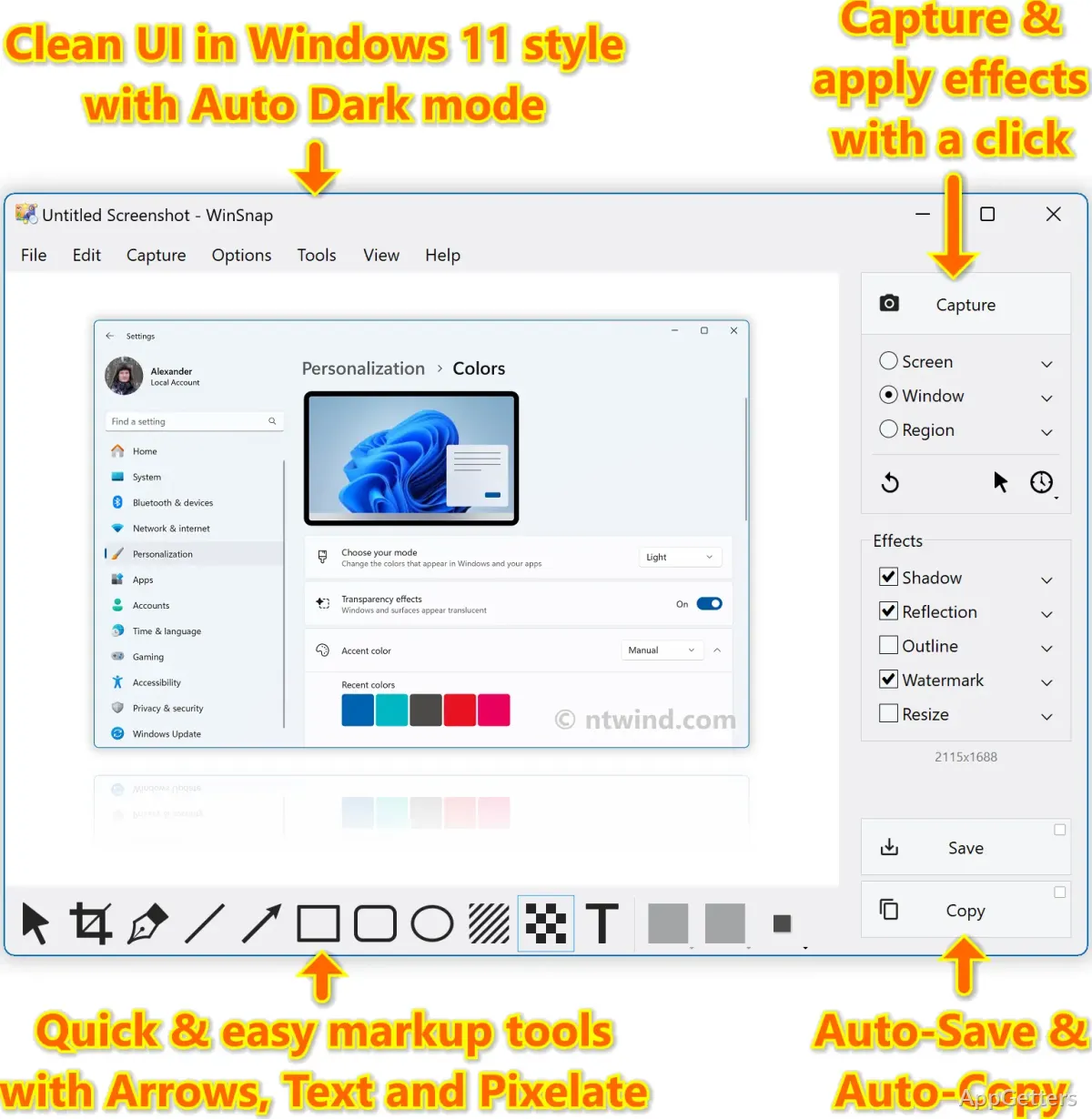
WinSnap comes with automatic styling features such as drop shadows, glossy reflections, and outlining that really have a big influence on screenshot presentation. The software knows that in order for screenshots to be effective, they have to look the part, too. So, it produces highly aesthetic screenshots that will tempt even the most resistant user to share, thanks to a simple workflow and a well-thought-out toolset.

WinSnap can handle working with multiple windows at once pretty well, if not perfectly. For this reason, the capture of windows with non-rectangular interfaces or transparency effects still poses a challenge for many simple screenshot tools. But not for WinSnap.

Minimalistic Yet Fully Capable

WinSnap is very proud of its simple interface and efficient workflow. The simple and neat visual appearance of the program, as well as the availability of main commands through toolbar keyboard shortcuts, make it very accessible to less experienced users. It is also fast enough to satisfy the needs of power users who capture screenshots quite often during the day.

Since the beginning, WinSnap has also maintained quite small memory and CPU footprints. This is something that users of low-end laptops or those with old office setups will most certainly enjoy and appreciate.

WinSnap has a few editing options that are available, such as crop, resize, highlight, and draw. These can be quite useful whether one is a professional or not. This way, the application does not get turned into a heavyweight image editor that the user has to learn for some time before producing good results.

Pros and Cons

If you value speed over full-featured customization, WinSnap is your program of choice. One of the most commendable features of this software is that it allows the user to go through the entire process in just a few moments. This starts with the one-and-only screenshot and ends with the final, fully-edited product. For this very reason, it is very popular among those users who generate tutorials, technical notes, product explanations, or educational material. The time saved can be spent productively elsewhere.

Certainly, there are fewer collaboration options and a lack of deep cloud integration in Fireworks. Those teams that rely very heavily on shared workspaces, live commenting, or browser-based workflows may find it a bit sluggish and lacking in features. This becomes more noticeable when compared with more modern browser user interfaces. Additionally, for users who want a highly visual or cutting-edge interface design, this may appear somewhat antiquated. By the way, its simple layout often becomes very handy after prolonged use. There are fewer interface distractions to slow the user down.

WinSnap Role in the Windows Environment

WinSnap is the best choice for those users who take screenshots regularly. To a large extent, it is enough to have a software tool dedicated solely to this purpose. A full productivity ecosystem built around it is often unnecessary. Students who have to prepare their assignments will definitely be able to use this simple tool efficiently. Office workers who need to document the behavior of software can also benefit from it. Bloggers who want to create walkthroughs, and regular home users who save visual references, will find it useful as well.

If we talk about what has made the software so popular over a long period of time, the answer would be the aforementioned fact. WinSnap offers a highly stable user experience. It can also be trusted to always perform at the level expected. It is not the case that the program tries to replace professional-grade design applications or suites for enterprise collaboration. All that it does is give Windows users a hand through the process of taking a screenshot. It also helps in producing a clear, professional-looking image with minimal effort and consistent results.

WinSnap is a very appealing solution for users who experience difficulties because of slow editing steps. It also suits those put off by extensive screenshot editing tools. They may want a middle ground between built-in utilities that are too basic and professional platforms that are too complex.

Software Details of WinSnap 6.2.1

License
Free
Version
6.2.1
File Size
3.55 MB
Downloads
0
Languages
English English, Chinese, French, German, Italian, Japanese, Portuguese, Russian, Spanish, Turkish
Category
Op. System
Windows
Developer
Last Updated
February 17, 2025

Version History

5 versions
6.2.1
Latest
3.55 MB
February 17, 2025
6.2.0
3.54 MB
December 3, 2024
6.1.3
3.51 MB
October 23, 2024
6.1.2
3.51 MB
January 29, 2024
6.1.1
3.49 MB
October 2, 2023

Leave a Comment

Your email address will not be published. Required fields are marked *

Software Icon
Security Report

Loading scan data...

Scroll to Top