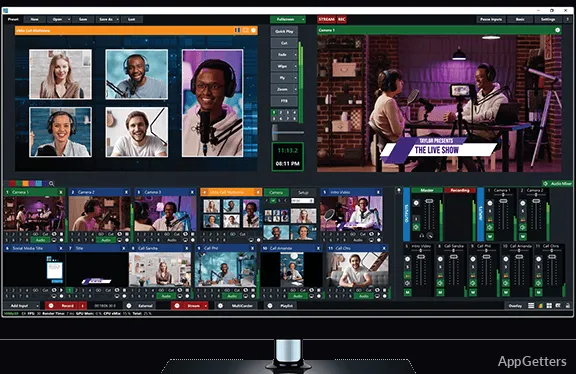
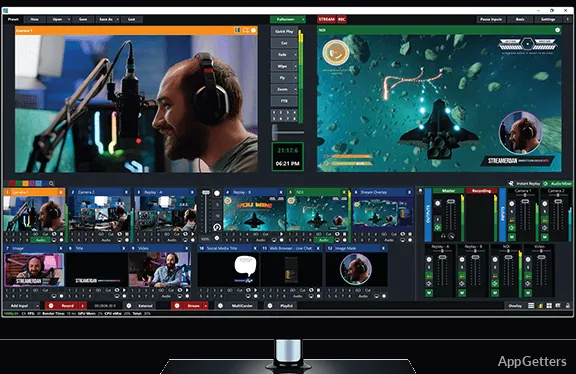
Producing a live show, church service or sports stream from a Windows PC? vMix brings cameras, video files, images, audio devices and network sources together in a live workspace for switching, recording, and streaming video and audio in HD or 4K.
vMix combines camera, file, and network inputs
Sources can be webcams and other cameras, network cameras, capture cards or audio interfaces. Productions can also include video files, images, desktop capture, NDI feeds, and SRT streams. Titles and virtual sets provide additional elements to bring into the mix.
For interviews, vMix Call connects remote guests to the production; the live interview feature supports up to eight guests. Zoom Meetings are also among the supported input types.
Switch sources and layer graphics during a production
The live workflow centers on mixing and switching between inputs while a production is underway. Titles and graphics can sit over the video, and the operator can monitor and mix audio alongside the picture. vMix also provides social-media integration for interacting with an audience during a broadcast.
- Use overlays for titles and graphics, including lower-third templates.
- Send the finished production to monitors, projectors, or TVs.
- Use instant replay for slow-motion playback in supported sports workflows.
Record the program and stream it to multiple destinations
Record a live production in high-quality formats while streaming it to multiple destinations. Supported streaming services include Facebook, YouTube, Twitch, and Vimeo. The program can also be sent to local screens as an output.
In the 4K and PRO editions, ISO recording captures camera sources separately. Keeping those source recordings supports post-production work after the live show, alongside the recording of the finished production.
Pros
- Mixes cameras, NDI, SRT, videos, images, and titles in one production
- Streams a finished production to multiple destinations
- Records camera sources separately for post-production in supported editions
- Includes instant replay for multi-camera sports productions
System requirements: Windows 10, Windows 11 · Minimum: 2 GHz quad-core processor · Minimum: 4 GB DDR4 RAM · 7200 RPM hard drive for recordings · Dedicated DirectX 10.1-compatible graphics card · 1920×1080 screen resolution
What sources can vMix bring into a production?
Sources include cameras, IP cameras, capture cards, audio devices, video files, images, desktop capture, NDI, and SRT.
Can vMix record while streaming?
Yes. It can record the live production while streaming to multiple destinations.
Can vMix connect remote interview guests?
Yes. vMix Call supports live interviews with up to eight guests.