EXE
Home » Software » Windows » Utilities » Transcribe! for Windows
Transcribe! for Windows

Transcribe! for Windows

  • By Amar Guerfi
  • Demo
  • Version: 9.41.2
  • 58.73 MB
  • Security Report:

Handling taped speech can notably slow down the work process. This happens when there is a need to have written transcripts. College pupils, reporters, investigators, and content originators quite often run into the same struggle. Having to re-listen to clips every time to type the whole speech can really decelerate the overall workflow. In fact, even a brief conversation or a talk recording might take a person hours to transcribe. This is especially true if doing it themselves.

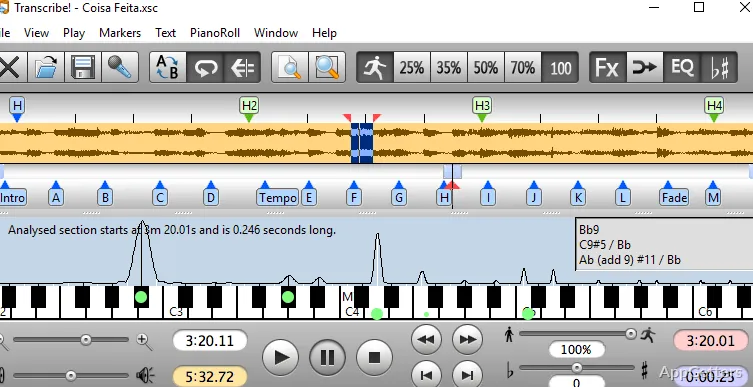
Transcribe! is a PC program aimed at making the above-mentioned workflow less difficult. Instead of being only a typical speech recognition app, it is oriented towards increasing the efficiency of human transcription. The tool comes with a set of features for time control. It also offers a graphical waveform representation. This allows users to understand speech better. On top of that, users can listen, pause, rewind, and slow down the recordings. They can do this with way more accuracy. This is usually not the case with standard media players. Lastly, a more comfortable and gradual transcription process is the major output of the program.

Transcribe! Audio Playback Features

Arguably, the biggest feature of Transcribe! is the usage of the program with a lot of control over audio playback. In addition to the standard functionalities of any audio player, this software lets the user change the speed of the playback. It does so without making the pitch sound unnatural. In case the recording is of a fast speaker, contains an unfamiliar accent, or is a multi-speaker dialogue, these features come in handy.

Thanks to the looping feature, the user can hear the same part of the recording over and over. However, the section of the recording to be repeated is not necessarily dictated by the user all the time. The software offers an option to set up the start and end points of the loop. This can be very helpful for seizing those artfully constructed sentences. It can also help with simply double-checking a phrase. Instead of rewinding the recording manually all the time, users can put their focus on listening and typing.

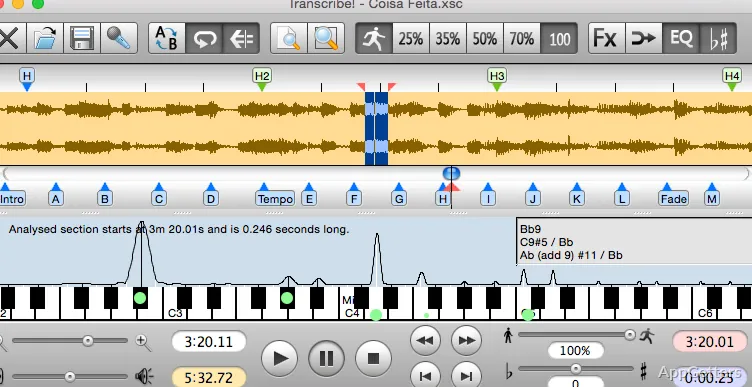
One more feature that supplements the audio is the representation of the waveform. It can be seen visually. So, users will be able to spot pauses, words, and transitions in speech with less effort.

Additional Features to Raise the Level of Transcription

For the purpose of greater accuracy, Transcribe! does more than just adjusting the playback speed or facilitating the setting of loop playback. One can also put markers inside the recording with the program. These markers can be a kind of indicator of a speaker’s change, topic shift, or a part thought of as difficult. Such a part must be listened to one more time.

Keyboard shortcuts are also very important and very practical. Constantly playing, pausing, rewinding, and continuing to play is required for many transcription tasks. The ability to execute these operations without even raising one finger from the keyboard will greatly contribute to keeping up the typing pace. It will also help to maintain concentration.

Users can not only set start/end points but also move the mouse cursor over the waveform. They can click to jump to a different place in the recording. This way is super easy and natural. It is easier than completing the entire transcription before navigating. It is also easier than just finding the timestamp(s) by changing the time in the input box. This is, of course, possible too. Another thing worth mentioning is that the program cannot produce transcripts automatically. At the same time, it alleviates the pain of generating transcripts manually.

Only for Auditory Analysis and a Bit More

This is precisely why Transcribe! is marketed and sold as such. This is the angle from which it was created. That is, as a tool to listen to the audio without losing focus. It also avoids changing the speed abruptly and significantly, or something like that. Other automated approaches to transcription and speech captioning are not part of its objectives. It just enables users to be very precise with their listening and controls.

That, in turn, makes the application pretty light and the response time very fast. A lengthy audio file will quickly open. The user will not notice any latency in moving from the current play position to the one in the past or the future. It will start playing immediately. Besides, there are some features for which, to be honest, one would have to pay a lot of money. This is when getting a fresh and shiny program with them. Among those are automatic transcription and online collaboration. The program is thus more or less an isolated workstation for the transcriptionist.

However, for many, this will be the characteristic that they are going to accentuate when comparing and justifying the purchase professionally. It gives a lot of freedom inside a very narrowly defined environment.

How Transcribe! Becomes a Part of the User’s Daily Routine

Transcribe! is especially handy if one’s work revolves around transcription related to voice content. One chooses to do one’s own transcription. Students transcribing lectures and journalists transcribing interviews are examples. Correspondents transcribing conversations are also examples of typical users of this software.

This program draws the musical and linguistic side, too. One might need to slow down the audio if it is a song. This helps to correctly distinguish the lyrics. On the other hand, language learners can listen to the same word over and over again to get their pronunciation exactly right.

In a nutshell, Transcribe! may not be the best software tool after all if you want to generate transcripts. But if you need a precision-listening companion, it will be a very good one. It is an assistance program rather than a transcription generator. It will help those who decide to type their transcripts to the end. It will do so quite a lot in terms of time and effort on Windows PCs.

Software Details of Transcribe! 9.41.2

License
Demo
Version
9.41.2
File Size
58.73 MB
Downloads
0
Language
English
Category
Op. System
Windows
Developer
Last Updated
January 16, 2026

Version History

1 version
9.41.2
Latest
58.73 MB
January 16, 2026

Leave a Comment

Your email address will not be published. Required fields are marked *

Software Icon
Security Report

Loading scan data...

Scroll to Top