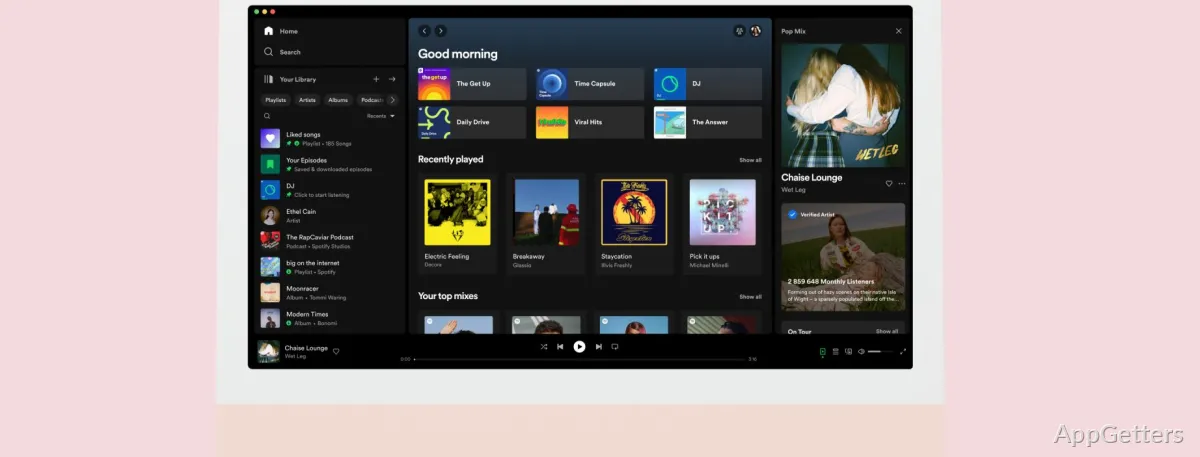
Want your phone playlists on the PC too? Spotify's desktop app streams music and podcasts on Windows, with playlists that stay in sync across devices. Search for artists, albums, songs, and podcast episodes, then manage playback from the desktop app.
Find music and build playlists
Use Search to look up music and podcasts, then play tracks or episodes from the results. Create playlists around a mood, artist, or activity, and keep saved music and playlists together in the app. Changes to playlists sync across devices signed in to the same Spotify account.
- Browse music and podcast selections.
- Create and organize playlists.
- Use a Spotify account to access the app and your saved library.
Keep playback within reach
The desktop playback controls let you pause, skip, go back, or repeat tracks while working in other apps. For a smaller view, open Spotify’s Mini Player: it displays the current song and playback controls in a compact desktop window.
Keyboard shortcuts can control common playback actions without navigating the interface:
- Alt+Right Arrow skips to the next track; Alt+Left Arrow returns to the previous track.
- Alt+R toggles repeat.
Download listening for offline use
Spotify’s Free plan streams music with ads and does not include offline downloads. Premium supports downloading music and podcast episodes in the app, so those downloads can be played without an internet connection. Downloaded content stays available through Spotify.
Pros
- Playlists sync across devices
- The Mini Player shows the current track and playback controls
- Keyboard shortcuts control track changes and repeat
- Premium supports offline downloads of music and podcast episodes
System requirements: Windows 10, Windows 11 · 64-bit only
Can Spotify play music without an internet connection?
Offline listening requires Premium downloads. Downloaded songs and podcast episodes play in Spotify without an internet connection.
What does Spotify’s Mini Player show?
It displays the current song and provides playback controls in a compact desktop window.
Can playlists made on the PC appear on other devices?
Yes. Playlists sync across devices signed in to the same Spotify account.