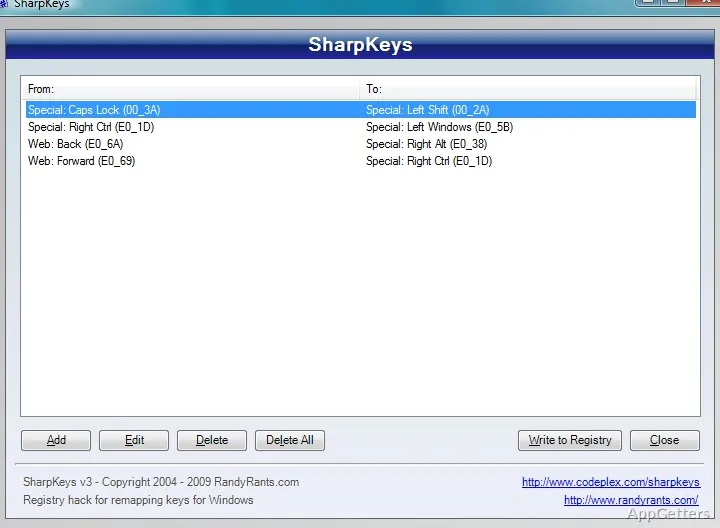
People who want to disable a troublesome key or give it another function can set up the change with SharpKeys. The program edits Windows keyboard mappings through a list-based interface, then applies the mapping through the system registry.
Building a mapping
Each entry pairs the key you press with the key behavior you want. In SharpKeys, add a mapping, choose the source key and its destination, then save the entry in the list. To turn a key off, set its destination to the disabled-key option.
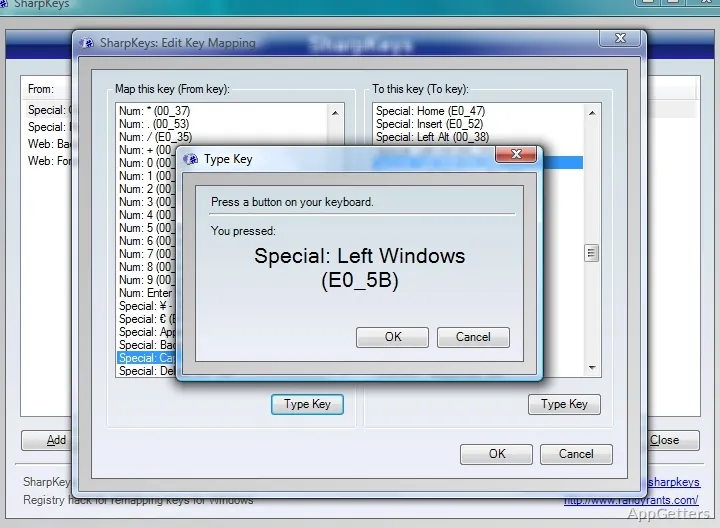
The key selector includes a catalog of available keys. Type Key can identify a key by pressing it, which is handy when its name is unclear. Some keys, including Alt, may need to be selected from the catalog because the capture window does not always detect them.
When do changes take effect?
SharpKeys writes the mapping to the Windows registry as a Scancode Map. After writing the changes, sign out and back in or restart Windows for the new mapping to take effect. The registry setting continues to apply after SharpKeys is closed, so the program does not need to run alongside other applications.
Mappings affect keyboard input across Windows, not just inside the app where they were created. To undo a change, remove its entry and write the updated mapping; clearing the list removes the mappings managed by SharpKeys.
Limits of key remapping
SharpKeys remaps an entire key. It cannot assign an action to a combination such as a modifier plus another key, create macros, or apply different mappings in different applications. Keys that use unusual scan codes, including some special or multimedia keys, may also resist remapping through Windows’ Scancode Map.
Pros
- Remaps one key to another or disables a key
- Choose keys from a list or identify one with Type Key
- Changes apply system-wide without a background process
Cons
- Key combinations and macros cannot be mapped
- Some special keys, including triple-byte scan-code keys, may not remap correctly
System requirements: Windows 7, Windows 8, Windows 10, Windows 11 · .NET Framework 4.0 required
Can SharpKeys turn off Caps Lock?
Yes. Add Caps Lock as the source key and choose the disabled-key destination, then write the mapping to the registry.
Do I need to keep SharpKeys running?
No. The mapping is stored in the Windows registry and takes effect after signing out and back in or restarting.
Can I make a shortcut with two keys?
No. SharpKeys remaps whole keys; it does not create key combinations or macros.