EXE
Home » Software » Windows » Utilities » Power Tab Editor for Windows
Power Tab Editor for Windows

Power Tab Editor for Windows

  • By Powertab
  • Free
  • Version: 2.0.22
  • 11.42 MB
  • Security Report:

Concepts flash through the minds of guitar players very fast. Often, they are gone before one can even catch them. The lightbulb can flutter at practice, while changing one’s chords, or when trying to figure out a new song. The problem is that if there is no simple and quick way to jot the idea down, then it can be easily lost. Most guitarists do not think about composing in standard notation. At the same time, scant tab in the form of simple text proves hardly sufficient.

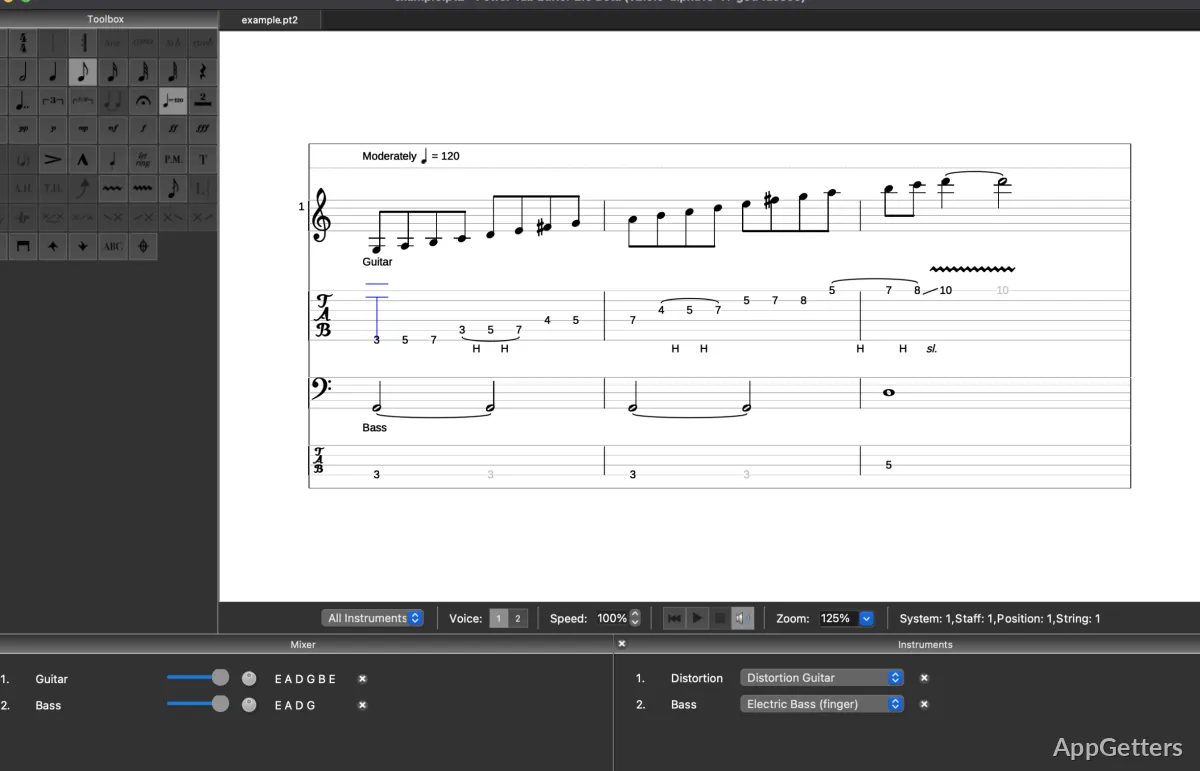
The first idea behind Power Tab Editor is to fill in the gap between simple text files and classical sheet music. It offers an easy-to-use interface aimed at writing guitar tabs on a Windows-based PC. Users are able to store their riff ideas, chord progressions, and entire song arrangements. They do this using a framework that is closest to what guitar players are used to. Instead of trying to offer numerous and complicated music production features, the focus of the program is on well-readable notation. It also focuses on good tab writing habits. Naturally, this makes it a very handy tool for musicians who are not interested in investing time learning a complicated music production program.

A Tab Writing Software for Guitar Where the User Can Concentrate

Working in Power Tab Editor is almost like marking music on paper. It is rather than handling a music production application. Its design uses measure numbers, staves, and tablature lines as the main elements. This allows the user to input notes with a guitar-friendly layout. In addition to chords, bends, and slides, the software may also be used for typing in a variety of other guitar techniques.

Thanks to such a way of organizing things, the software greatly helps in converting one’s playing of the guitar into written form. This happens without too much effort. Even if a player has not yet mastered standard notation, he or she can easily get along with tab format. In addition, MIDI playback will be done if one decides to use the included player. This allows users to practice their timing.

It is quite a barebones environment. The more recent music programs, for example, include not only big editing facilities but also plugin ecosystems. On the other hand, Power Tab Editor is all about notation. If writing and sorting up guitar tabs is the only thing the user wishes to do, the program may offer a welcome break. It offers a break from the multitude of features in other music software.

Concrete Benefits of Using Power Tab Editor for Studying and Sharing Music

One can say that the biggest impact of Power Tab Editor is on the users’ ability to learn and practice. It serves well as a tool for the documentation of exercises, chords, and songs. These are things that the student might want to come back to. Measuring the parts visually in a straightforward manner undoubtedly assists the learner. It assists in understanding the breakdown of the band.

Sharing musical material with others is yet another area where the use of such a program is a wise choice. Power Tab file format has become a very prestigious format among guitar communities online. As a result, lots of tabs can still be opened and worked on within the program. Anyone accessing an older database of online guitar tabs should find this functionality most useful. Furthermore, the program stays clear of the highest and most demanding system requirements. These are the requirements of today’s music production tools. This is because it concentrates on notation rather than sound recording. On the majority of computers running Windows, it works smoothly and loads projects fast. This includes slower hardware as well.

Issues and Restrictions of Power Tab Editor

Just like any other product, Power Tab Editor has things that can be improved. The interface certainly looks a bit out of date when compared with the ones of the modern tools for music notation. Some workflows will be somewhat tedious. People used to the polish and smoothness of contemporary graphical environments might find the sudden change rather shocking.

The other aspect is the absence of integrated composition and production features. Power Tab Editor refuses to be the choice for replacing digital audio workstations. It also refuses to replace notation suites with extensive features. MIDI playback is not very advanced, and recording of audio is not one of the program’s functions.

Nevertheless, these drawbacks are often not a big deal for guitarists because the software has only one goal. It is to provide simple and clear guitar tabs that can be read easily. Writing down riffs or preparing songs for the band are only a few ways. Through these ways, even this limited functionality might be useful.

Why Should Guitarists Use Power Tab Editor?

Power Tab Editor isn’t simply an abandoned piece of software. It is still the tool of choice of many musicians who want to write guitar tablature. Complete beginners are quite often the ones who fall in love with the simple and easy-to-understand layout. The experienced players habitually make use of it. They use it to note down their materials for practice or personal compositions.

For those guitarists who quite simply do not want to deal with recording software, this is simply going to be a dream come true. The program is easily an ideal platform for teachers, students, and hobbyists. It allows them to fashion well-laid-out exercises or share musical arrangements externally.

All in all, Power Tab Editor is still a familiar sight within the world of guitar software. It performs well for Windows users looking for a straightforward tool with the singular purpose of writing tablature.

Software Details of Power Tab Editor 2.0.22

License
Free
Version
2.0.22
File Size
11.42 MB
Downloads
0
Language
English
Category
Op. System
Windows
Developer
Last Updated
January 22, 2026

Version History

1 version
2.0.22
Latest
11.42 MB
January 22, 2026

Leave a Comment

Your email address will not be published. Required fields are marked *

Software Icon
Security Report

Loading scan data...

Scroll to Top