Typing the same addresses, replies or code snippets dozens of times a day? Perfect Keyboard from Pitrinec Software expands short abbreviations like .s1 into full sentences or paragraphs, and runs keyboard and mouse macros in any Windows program.
Shortcuts insert saved text
In the first window, users enter the text they want to reuse and choose the keys that will trigger it. Typing that shortcut inserts the stored wording, so a short combination can stand in for a longer response or paragraph.
Besides typed abbreviations, entries can fire from hotkeys such as Ctrl+Alt+W or appear as auto-complete suggestions while you type. Edit an entry once and the new wording is used everywhere.
Keyboard combinations can navigate tabs and windows
Perfect Keyboard can also assign shortcuts to moving among tabs and open windows. Users set up combinations for the navigation they repeat, then call on those combinations while working.
- Choose keys for the action or saved text.
- Use the shortcut to insert text or move between tabs and windows.
- Edit an existing shortcut when its text needs updating.
Macros handle repeated typing and commands
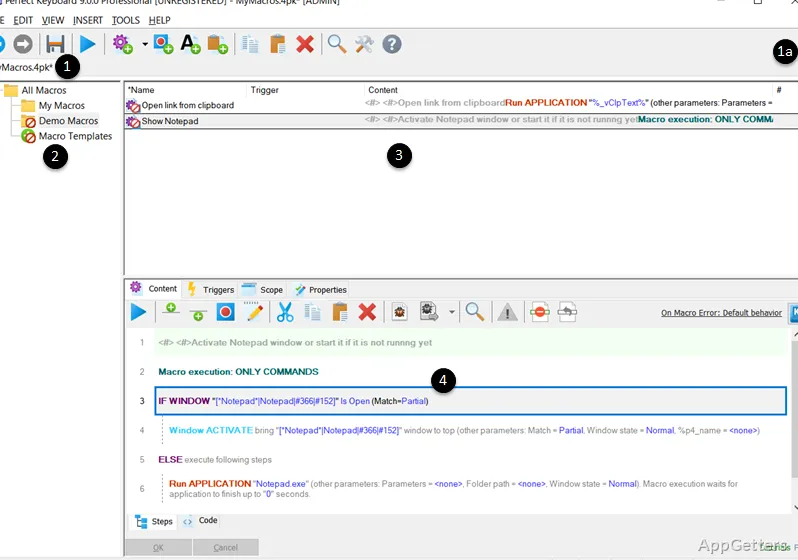
A recorder captures keystrokes and mouse clicks, and the macro editor offers more than 300 commands for launching programs, waiting for windows or inserting dates. The Professional edition adds AES-encrypted macro files, XML import and export, and several macro files open at once.
Pros
- Expands keyboard shortcuts into saved text and full paragraphs
- Lets users revise shortcuts when saved wording changes
- Supports shortcuts for navigating tabs and windows
Cons
- Macro editor has a learning curve
- Recorded mouse macros can break if windows move
System requirements: Windows 7, Windows 8, Windows 8.1, Windows 10, Windows 11
How do I trigger a saved paragraph?
Type its abbreviation (for example .s1), press its hotkey, or pick it from the auto-complete list.
Can Perfect Keyboard record mouse actions?
Yes. The macro recorder captures both keystrokes and mouse clicks.
Does it work in web browsers?
Yes. Macros and text shortcuts work in any Windows application, including browsers.