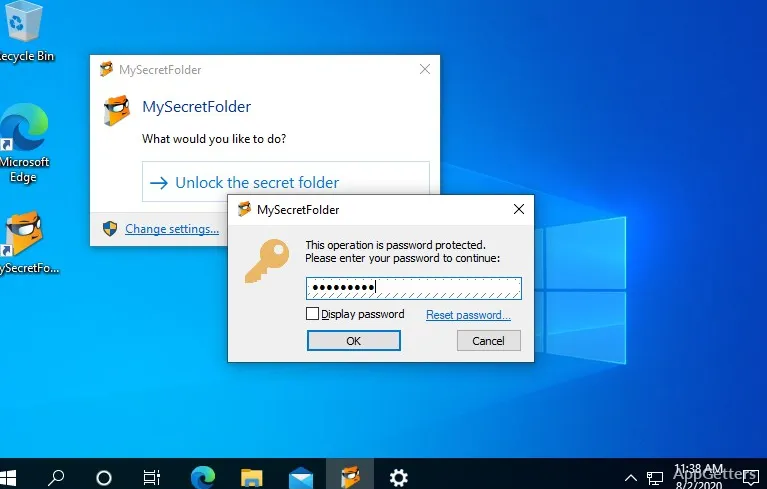
When other people share your Windows computer, you may want one folder to stay out of sight until you need it. MySecretFolder hides a selected folder and protects access with a password; files inside become visible again after you unlock it.
Choose the folder to protect
Select a real folder on the computer’s hard drive, set a password, then use the Protect button. MySecretFolder hides the chosen folder from Windows Explorer, other Windows and Office applications, and command-line tools. The folder stays hidden until someone enters the password to make it visible or unlock it.
The protected folder can contain files and subfolders, which become accessible together when you unlock it. MySecretFolder can protect folders on FAT32 and NTFS disks.
Reveal files when you need them
Start the program, or double-click its icon in the system tray, and type the password. Once the folder is visible, work with its contents as usual: open documents, save changes, or move files in and out. Afterward, close the folder window and respond to the prompt to lock it again.
Know what the password protection covers
MySecretFolder blocks requests to open or list the protected folder while protection is active. It does not encrypt or modify the files, so the folder is only shielded on the PC where the program is set up. The program protects one folder at a time; choosing another folder removes protection from the previous one.
Pros
- Hides the protected folder from Explorer and command-line tools
- Works with folders on FAT32 and NTFS disks
- Unlocking restores the folder with its files and subfolders intact
Cons
- Only one folder can be protected at a time
- The files are not encrypted and remain protected only on the configured computer
System requirements: Windows 7, Windows 8.1, Windows 10, Windows 11 · 32-bit and 64-bit
Does MySecretFolder encrypt the files?
No. It hides the folder and blocks access while protection is active, but leaves the files unchanged and unencrypted.
Can I protect several folders at once?
No. MySecretFolder protects one folder at a time. Its contents can include multiple files and subfolders.
How do I access a protected folder?
Start the program or double-click its tray icon, type the password, and the folder reappears.