EXE
Home » Software » Windows » monitoring » Meminfo for Windows
Meminfo for Windows

Meminfo for Windows

  • By Carthagosoft
  • Free
  • Version: 4.11
  • 1.59 MB
  • Security Report:

Memory usage on a Windows computer is typically a mystery to many users. Management tools, such as the Task Manager, usually show instructions and a list of processes. They hardly ever provide explanations about the memory usage patterns. Therefore, it can become a source of confusion for ordinary users when the computer runs slowly without a clear cause. Meminfo, however, sees this problem as an opportunity to introduce simplicity. Rather than confusing users with lots of technical information, it shares details about memory in an easier way. This makes it simple for a user to understand how the RAM is used at the moment.

More transparent memory dynamics

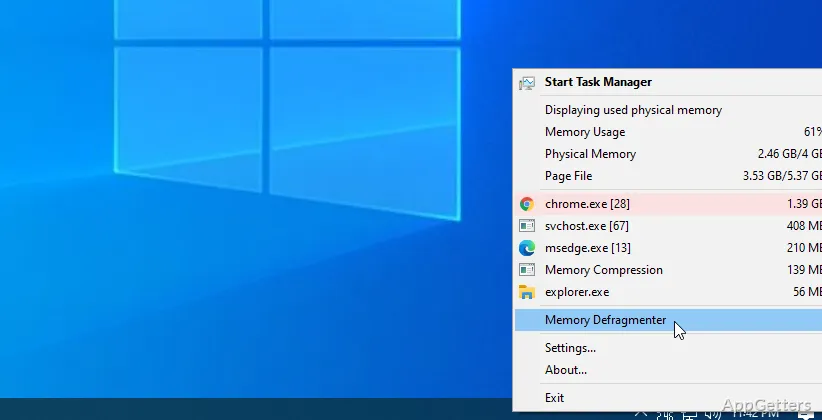
Actually, when using Meminfo, you would hardly think of it as a tool for fixing errors in a PC. Rather, it is barely noticeable software to monitor things. It is mainly concerned with indicating the consumption of memory, even without the user having to figure out complicated terms. When performing the usual routines, such as browsing the Net, working on docs, or allowing the system to run apps in the background, one can effortlessly monitor the levels of free memory. These keep fluctuating.

This is quite an interesting feature that works more so for computers with low amounts of memory. Instead of merely speculating which program might be slowing down the computer, a person can immediately tell when memory is under considerable stress. The UI deliberately lacks unnecessary items so as to accommodate novices. It does not force them to empty their minds. At the same time, it has sufficient data available to satisfy the pros.

Functionality without making it complicated

Meminfo blends well with daily activities without interrupting any of them. It may, for instance, just be positioned in the system tray. It spontaneously shows the user its fast, encapsulated summary when performance is suspected to deteriorate. Ignorance about system diagnostics is no longer a shortcoming of pupils or home users. This is because the feature is still there to make their lives easier.

Opening multiple tabs in the browser or running software tools without restarting the program can help verify that no memory overflow has happened. Then it is up to the user to decide whether the apps should be closed or the OS rebooted. It is good that the level of software intervention in the issues is nil. This ensures that users’ trust is kept. It just makes available understandable pieces of information at a good time.

Drawbacks

Although Meminfo is very user-friendly, it will not be able to replace the most powerful monitoring utilities in one go. Those who want to dwell more on the details of individual processes or get comprehensive analyses of memory usage stages may consider it a bit lacking. This is because only the overall memory usage situation will be communicated.

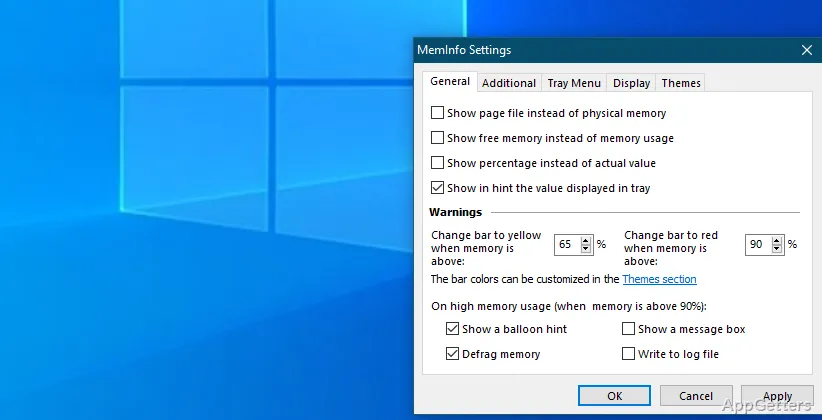
The same goes for customization and advanced report generation. Those who like detailed logs or being able to track things over time may find the feature set restrictive. But this is exactly where lots of its competitors have complicated things to the point of no return. It has to be pointed out that Meminfo’s target is to do the simplest thing well. It does this rather than trying to be full-blown single-resource performance analysis software.

Should be used as a light monitoring tool on Windows

As a tool for gaining straightforward, uncluttered insight, Meminfo is just the device that the doctor has prescribed, not for other purposes. It will help those who are after an easy, fast way of figuring out their computer’s memory status without the need to go through a complex UI. Most of the time, it will be a background element of the PCs, especially if they are used for shallow activities. However, it can serve as a minute performance reminder tool.

If a person had barely any time to notice that the computer might be getting slow but could not figure out what the reason was, then Meminfo is just the right tool. It has the right amount of information for one to formulate a hypothesis and be correct. It does not do the method of making the system perform better on its own. However, it is very much a help in a good user’s reaction. So to speak, the reasons why one would use it lie more in its user-friendliness. More specifically, in its clear presentation than in its deeper or more controlled features.

Software Details of Meminfo 4.11

License
Free
Version
4.11
File Size
1.59 MB
Downloads
0
Languages
English English, Spanish
Category
Op. System
Windows
Developer
Last Updated
March 1, 2025

Version History

3 versions
4.11
Latest
1.59 MB
March 1, 2025
4.0 SR1
1.56 MB
May 28, 2024
4.0
1.56 MB
May 11, 2024

Leave a Comment

Your email address will not be published. Required fields are marked *

Software Icon
Security Report

Loading scan data...

Scroll to Top