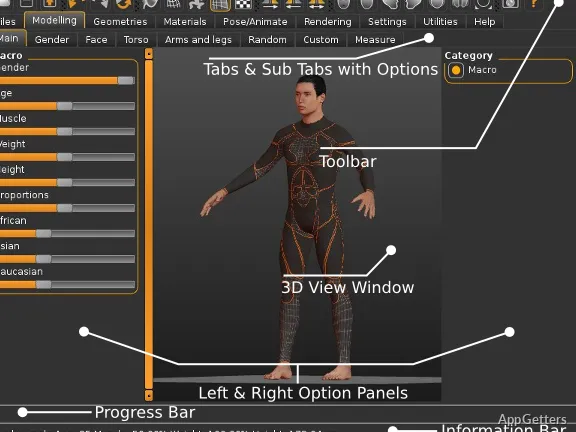
Designing human characters from scratch can be really tough for many first-timers. Usually, the need to know a lot about human anatomy, the use of sculpting tools, and polygon management becomes a step on its own. It comes before even thinking about designing something useful in regular 3D modeling software. This can make the process difficult for beginners. For school kids, small-time game developers, and other enthusiasts making small animation or game projects, this is one of the ways their progress in experimentation gets delayed. MakeHuman doesn’t do manual human sculpting, but rather focuses on human generation procedurally. With that, instead of making characters point by point, one changes parameters such as age, body shape, face structure, and body proportions.
This application is still being utilized on the Windows platform by people who want the human character generation part done fast. They also want to avoid spending a lot of money on commercial modeling tools.
Another Way To Character Design
What makes MakeHuman stand out in practice is the fact that the novice can create a convincing character model really quickly with the help of the program. The interface is designed in a way that helps users move easily between categories. These include gender, race, height, and muscle mass. It also helps users move through facial details easily. The interface makes these feel more like personal alterations rather than the process of making a model. This goes a long way toward softening the blow of the professional 3D suites.
Concept creation, academic work, and prototyping are the areas where this tool really shines. Animation and game design students are able to come up with full-body characters within minutes. They can then export them into other programs for the stages of rigging or rendering. Besides that, the presets prevent users from making proportions so bad that only beginners would make such mistakes. It can be said that the characters created with this program lack realism when compared to high-end characters from CGI movies. However, they can be depended on for teaching and small production pipelines.
Enhanced Workflow and Export Compatibility
It is due to its multi-format compatibility that MakeHuman is still in the limelight. Characters can be exported in formats that are compatible with, for example, Blender, Unity, and Unreal Engine. If you are a Windows user who is just dabbling in indie game development or animation, this sort of flexibility paves the way for the software to be a more viable tool for you. It becomes more than just a 3D modeling tool lying there.
When it comes to posing or animating models, the rigging options are like a trove chest. A user who is keen on this will find them quite thrilling. You can also add the necessary clothing and accessories. However, one does sense that the library is there more for functionality than for the lavishness of choice. If one were to evaluate the MakeHuman performance usage-wise, it is best thought of as a starting place rather than a complete production environment. A lot of times, creators will make a base character in MakeHuman. Later on, they do related things like textures, clothing, or facial details in other software.
The stability of the program performance is something most people attribute to mid-range Windows rigs. Owing to the fact that it is far from being as heavy as many of the commercial 3D apps, the software is still user-friendly for those who happen to be on older systems or laptops. These systems do not have dedicated workstation hardware.
Some Users Will Meet Limitations
They say that “the devil is in the details”. Since that is so, the more experienced folks coming to MakeHuman to create their masterpieces have come away with the impression that the characters generated here sometimes seem overly sanitized. This becomes especially noticeable when lined up with the photorealistic character tools of today. If you really want detailed skin textures, total cinematic realism, or sculpting freedom to the extent of stylization, you will probably have to go beyond this software.
The interface that is used also speaks of the software being open source. Even though it works, some of the menu and asset management sections seem like they have survived from the last century. This becomes noticeable when compared to how modern creative software behaves. Complete newbies tend to settle in quite nicely, but artists who are very experienced will miss the bit of polish that a commercial pack has on them.
Asset diversity can be a real pain, too. Clothes, hairstyles, and accessories can generally serve the usual scenarios. However, projects that call for very out-there costumes or completely bonkers looks will inevitably have to go the external-editing route. For this reason, it can be said that MakeHuman offers the greatest value as the tool to get you started. It works better as that than as the solution for character production end-to-end.
The Right Context For MakeHuman
Among its peers, it is MakeHuman that is the knight in shining armor delivering the message of “let’s not complicate things”. This is mainly aimed at people who simply want to be able to access and quickly iterate. They also want to operate in learning-oriented workflows. Rather than go through the hassle of the big movie character level, they can concentrate on learning and experimentation. It can be a boon for a student who is trying to absorb the basics of 3D. MakeHuman can also help a developer of indie games who is making prototypes. It can help an instructor who is planning lessons for students. It can also help someone who is a hobbyist and whose digital character design work is their very first foray.
The core advantage of the software is that it drastically reduces the technical barriers to entry. Instead of requiring users to get good at sculpting before they can have a model to work with, it allows them to concentrate on playing around. It also helps them integrate their workflow. For a Windows user who is into making characters for animation training, minor games, virtual avatars, or educational projects, the program will continue to be a great first step. It integrates smoothly into the dramatically larger creative pipeline.