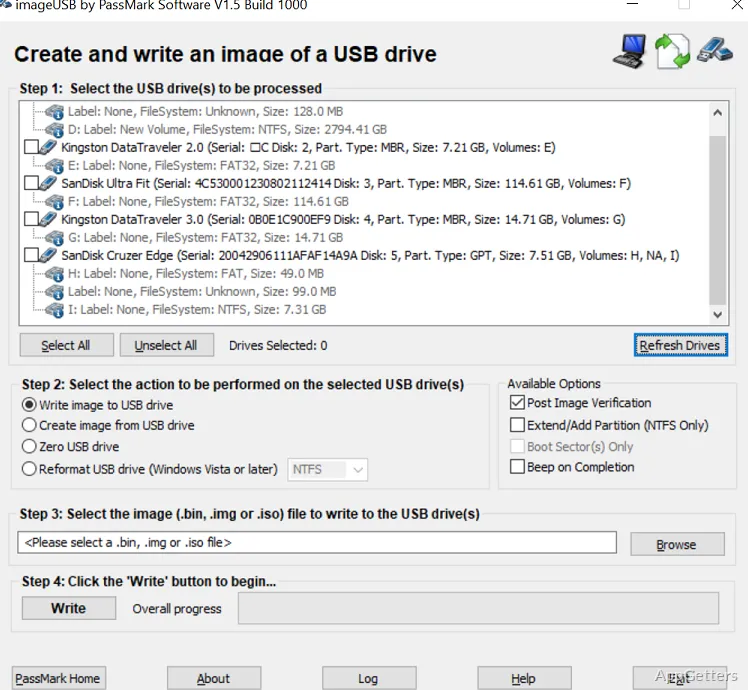
Need ten identical bootable USB sticks for a class or an office? The free ImageUSB creates byte-level drive images and writes an image to multiple selected drives at the same time.
Create an image from a USB drive
Select a drive in the device list and choose the image-creation operation to save its contents as a file. The image captures data at the drive level, including partition information, the Master Boot Record, and unused or slack space. This preserves details that a file-by-file copy does not include.
The drive list also shows partition information, which can help distinguish connected devices before selecting a source.
Write one image to several drives
Choose an image file, select the destination USB drives, and start the write operation. ImageUSB processes selected drives concurrently, making it possible to prepare matching copies from a single image. A verification option checks the result after writing.
- ImageUSB supports its own image files and .img files.
- It can write an ISO byte by byte or extract ISO contents onto a USB drive.
Choose how to handle ISO files
Byte-by-byte ISO writing preserves the image data directly on the USB drive. ISO content extraction is a separate mode; for detected bootable images, ImageUSB can attempt to write an appropriate bootloader. ISO extraction is experimental, and not every ISO will produce a bootable drive.
Directly writing a CD ISO can also leave a USB drive that does not work in every operating system, because CD and USB formats differ.
Zero or reformat a USB drive
ImageUSB includes options to replace drive contents with zeros, or to zero only the MBR and GPT entries. Its reformat function can reclaim space on drives that have become difficult to format.
Pros
- Creates bit-level USB images, including unused space and the MBR
- Writes one image to multiple USB drives concurrently
- Can verify written images and zero drive contents
Cons
- Writing a smaller image to a larger stick can leave the extra space unusable until the drive is reformatted
System requirements: Windows 7, Windows 8, Windows 10, Windows 11 · 256 MB RAM · 4 MB of free disk space for installation, plus space for image files
Does ImageUSB copy hidden and unused drive space?
Yes. Its bit-level imaging can preserve unused and slack space, along with structures such as the MBR.
Can ImageUSB write the same image to multiple USB drives?
Yes. Select multiple destination drives and ImageUSB can write to them concurrently.
Will a byte-written CD ISO always boot from a USB drive?
No. CD ISO file systems may not work on USB drives in every operating system. ISO content extraction is available, but not all ISO images will boot.