Streaming videos is easy and convenient; however, it is not always practical. Internet connections can be unstable, mobile data can be limited, and lots of users want to be able to watch offline videos, such as educational ones, tutorials, music, etc. They want this without being connected to the internet all the time. Browsers do give quick access to YouTube, though. Yet they hardly ever provide an easy way to save the content on your device for later watching. Bright standalone downloaders step in exactly at this point. Gihosoft TubeGet Free YouTube Downloader is one of those Windows tools that are quite simple and dependable. It is used for downloading videos online present in the market. Without adding browser extensions or complicated download managers, the software really represents a standalone utility. It is able to perform the job directly and quite conveniently.
Straightforward Video Download Workflow
In fact, the weightlessness of the download workflow can be confirmed at a glance when using the program. It directs all the power towards one single and very important objective: grabbing videos from YouTube. It also saves them locally on a Windows machine. To begin, the user copies a video link from the browser and pastes it straight into the app.
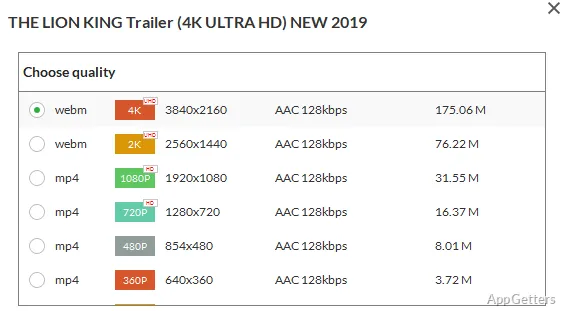
After the link has been analyzed, the user is shown a list of downloadable resolutions. They can pick one among the most common quality levels based on the available storage or the requirements of the playback. This step takes only a moment, and the interface is still intuitive enough so even non-expert users won’t get lost.
Unlike browser-based solutions, the tool being browser-independent means that closing the browser wouldn’t stop the downloads. Users who are collecting tutorial videos, lectures, or reference material on a regular basis will like this simple, straightforward, and reliable manner. It handles the downloading operation in a dependable way.
Targeting the General Public
The interface layout denotes a thoughtful and realistic intent. It presents computer usage to the widest possible range of everyday users rather than just a handful of geeky professionals. The buttons are neatly labeled, and one main window of the program displays the download queue. It discourages the users from going through complicated menus.
Probably the most regular users of such software are students who want to save their lectures or any other educational materials so that they can be accessed offline. Besides, uploading videos of one’s favorite music or entertainment can be done to the platform by other users. Anyway, it can be said for sure that the software hardly ever draws too much attention to itself or the function that is being performed.
The software works in a normal mode that is as lightweight and responsive as a program could be. Besides, it doesn’t require any complex PC resources. Even running other programs cannot affect the performance of this downloader. This, obviously, makes it easy to use for those who are using less recent versions of Windows, too.
Consistent but with Certain Functional Boundaries
Actually, the reliability of downloading constitutes the core feature for a software like this one. When it comes to Gihosoft TubeGet, it is mostly quite stable in case of standard YouTube URLs, and odd interruptions are the exception rather than the rule for the downloads.
On the downside, as it tends to be with other absolutely free download utilities, there will be a couple of limitations imposed. It may be that the free version will not give access to such features as downloading videos of high resolutions or utilizing conversion options. Those who need to extensively control formats or… batch operations will probably have to agree that the number of features is a bit on the low side.
It is also worth remembering that the internet platforms are being changed more or less regularly. The video downloading tools need to be updated from time to time in order to be compatible with the structures of the sites. So, the performance keeps on being consistent only when one is ready to update the program every now and then.
Good Enough Helper for Staying Offline
For those users whose main goal is simply to put YouTube videos on their Windows computer hard drive, Gihosoft TubeGet Free YouTube Downloader assumes a succinct and clear role. It doesn’t engage in trying to take over the role of a full media management suite. Or that of an excessively complex download platform.
Rather, it is a lightweight tool that carries out one specific job quite reliably. Offline study library builders and tutorial hoarders are likely to find it handy. Those who face the problem of unstable internet connections are likely to find it handy.
Given the above context, this comes down to being a functional, everyday viewing companion. It offers users a very simple means to have important or frequently watched videos still physically available even without an active internet connection.