EXE
Home » Software » Windows » Download Managers » AB Download Manager for Windows
AB Download Manager for Windows

AB Download Manager for Windows

On Windows, particularly large files can be a remarkably delicate thing to download. Would you believe that if a browser tab all of a sudden crashes, if your Wi-Fi is off just for a few minutes, or if the system goes to sleep at the wrong time, your multi-gigabyte file might have to be re-downloaded from the very beginning?

Students downloading lecture archives, professionals working with software builds, and even home users downloading media files — all these groups can be put out of their work rhythm. Bandwidth may be wasted. The bit that AB Download Manager plays in the drama of daily frustrations is that of a tool to solve the problem. Working not as the replacement of your browser but in tandem with it, the program picks up large or important downloads. It handles them with more control and sturdiness than one would usually expect from a browser download panel.

A More Controlled Download Experience

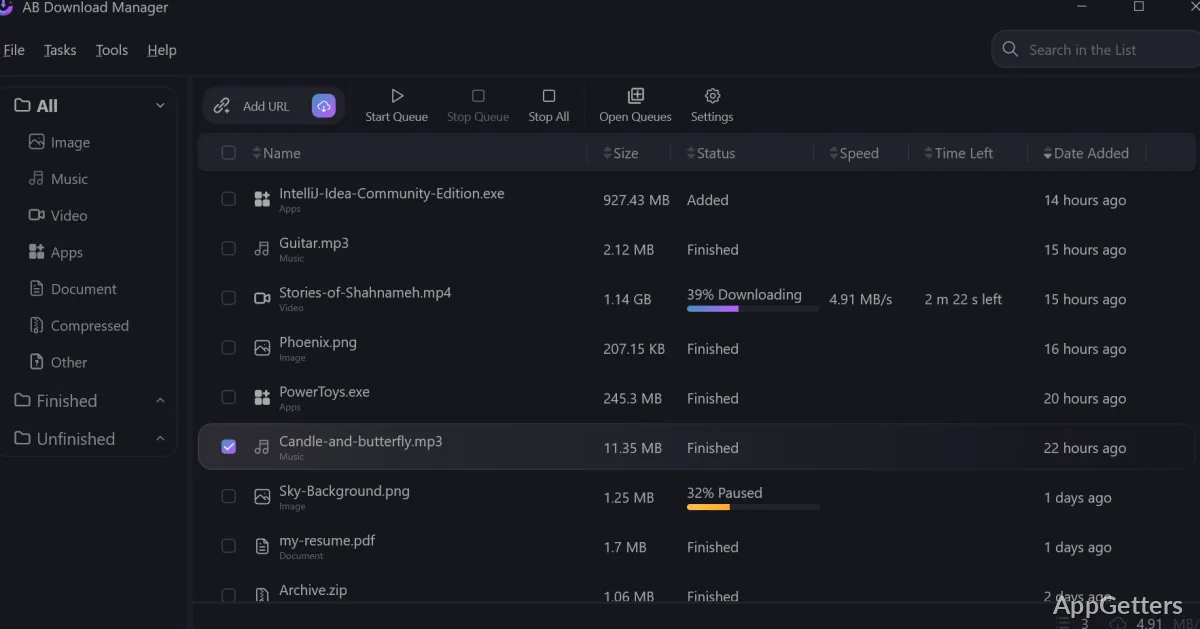
Upon actual use, AB Download Manager appears as a product specially designed for those who are dealing with managing large files on a regular basis. Once it has been installed as an extension to a browser, downloads can be sent via the redirect feature to the application automatically. What you get in the interface is a clean list. It shows clear status indicators and transfer speeds for both active and completed downloads.

The element that makes it different is its capability to deal with temporary loss of connection, amongst other things. Supported downloads are enabled to resume rather than restart from the beginning in case of a dropped connection or system restart. This aspect is perfect for users on unstable network connections or those sharing bandwidth in dorms or family homes. They can benefit the most from it. Equally, the feature of having manual pause and resume functions at your fingertips gives you more control. You can plan your limited data usage. You can allocate time to urgent work during the daytime, for instance.

Speed and Stability in Practice

Similar to other download managers, AB Download Manager employs segmented downloading if the server supports it. From a layperson’s point of view, this might mean a higher overall throughput as compared to a single-thread browser download. This is particularly noticeable in the case of large ISO files, software installers, or zipped archives.

Speed improvements, however, are mainly reliant on the source server. Not every file will be downloaded faster; hence, on very well-optimized CDN infrastructures, the difference is minimal. What is, however, permanently all the same is the stability side of it. The application was able to keep up with the demand without any freeze or progress misreporting problems. This occurred during long test downloads of multi-gigabyte files over several hours. The trustworthiness of the app in this respect is definitely more important than the power of the raw speed. This is especially true for users who need to have their file transfers happen predictably. It is part of their daily routine.

Organization and Workflow Impact

The product does assist in organizing the matter, and not only in throwing an entire folder’s worth of stuff into the Downloads folder. Here, users can sort the files into categories. They can even have the destination folders based on a given file type. All of this, after a while, will result in the typical Windows “Downloads” folder no longer being so dirty.

Students with course materials, developers with SDKs, and users of media libraries at home — formula-wise, this approach to file hygiene is a plus for each one of them. Scheduled downloads have their place as well. This applies to big transfers being done overnight during a time of low internet congestion, to name one. On the one hand, the app doesn’t try to be a complete file management suite. On the other hand, it greatly improves how downloads can be integrated into the existing workflow of Windows.

There are a few minor flaws. The working interface is functional rather than modern, and advanced users may yearn for further automation or scripting support. Still, the tool is quite simple and easy to use for the task that it is meant to accomplish.

Where AB Download Manager Fits in a Windows Setup

The tool AB Download Manager is basically very helpful for people who frequently download large or multiple files. They desire more download stability than that provided by their browser alone. It fulfills the needs of students accessing lectures offline who are in bad spots in terms of internet connectivity. AB Download Manager also supports professionals downloading builds or datasets. It supports home users who like to organize their files in a structured way.

On the other hand, it is really not necessary for those users whose only downloads are small documents and occasional pictures. The built-in downloader of a browser is good enough in such cases. However, when the consequences of download failures are real inconveniences, or when it really matters how the files are kept, AB Download Manager is a handy utility that supports Windows. The role is not eye-catching, but it is practical. And for quite a few users, that calm dependability is precisely what makes it worth their while.

Software Details of AB Download Manager 1.8.7.0

License
Free
Version
1.8.7.0
File Size
65.54 MB
Downloads
7
Languages
English English, Afrikaans, Amharic, Arabic, Armenian, Belarusian, Bulgarian, Catalan, Chinese, Croatian, Czech, Danish, Dutch, Estonian, Farsi, Finnish, French, German, Greek, Hebrew, Hindi, Hungarian, Icelandic, Indonesian, Italian, Japanese, Kazakh, Korean, Latvian, Lithuanian, Malay, Norwegian, Polish, Portuguese, Romanian, Russian, Serbian, Slovak, Slovenian, Spanish, Swahili, Swedish, Tagalog, Thai, Turkish, Ukrainian, Vietnamese, Zulu
Op. System
Windows
Last Updated
February 20, 2026

Version History

9 versions
1.8.7.0
Latest
65.54 MB
February 20, 2026
1.8.6.0
65.54 MB
February 13, 2026
1.8.5.0
65.3 MB
February 9, 2026
1.8.3.0
62.92 MB
December 27, 2025
1.8.2.0
62.91 MB
December 21, 2025
1.8.1.0
62.87 MB
December 20, 2025

Leave a Comment

Your email address will not be published. Required fields are marked *

Software Icon
Security Report

Loading scan data...

Scroll to Top