EXE
Home » Software » Windows » Screen Recorders » FlixiCam for Windows
FlixiCam for Windows

FlixiCam for Windows

  • By FlixiCam
  • Trial
  • Version: 3.2.0
  • 171.96 MB
  • Security Report:

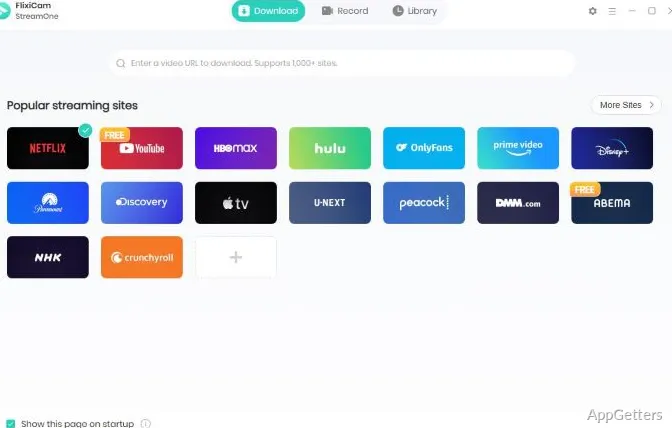
Streaming movies, TV shows, and documentaries is the main way of entertainment nowadays. However, not all the locations/inclinations may offer reliable internet connections. Even more, there are occasions such as traveling, studying, etc., when a user may want to have content available offline. This has been fundamental in the appearance of programs that enable users to work and watch their streaming content on Windows devices in a more relaxed way. FlixiCam is a Windows program that helps users save and organize content from the supported streaming sites for offline watching. It targets letting users access a local library without an internet connection, rather than viewing media. Regular streaming users can, for sure, benefit a lot from this in terms of ease and organization for their day-to-day activities.

General Usage and Simplicity of the Program

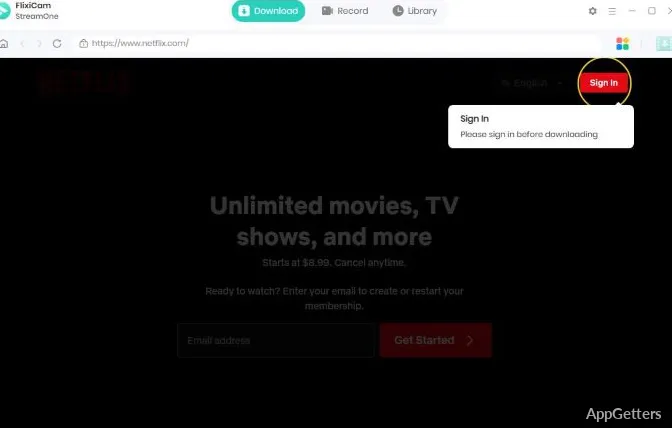
One of the main features that makes FlixiCam stand out is its quite simple process. The users are literally led from one step to another to discover the content, choose download options, and also keep track of successful downloads without the need to learn heavy stuff.

In the daily operations, the software usually gives more importance to simplicity. This might be a great assistance for less technical users who want to have better control over the time and ways of accessing their media. Besides, the specified interface is arranged in a manner that least adds steps and distractions to the process. This allows the users to concentrate on the content rather than changing the software settings.

The people who travel a lot or have access to the Internet that is often interrupted can cut down on the time spent searching for what to watch next. They can also reduce their dependence on finding the streaming service available by taking this simple approach.

Download Quality and Added Advantages of Workflow

Actually, how valuable FlixiCam is to a user depends on what kind of viewing they do. They might like to have offline access if the commutes, flights, or other places with limited or no internet opportunities are involved in their schedules.

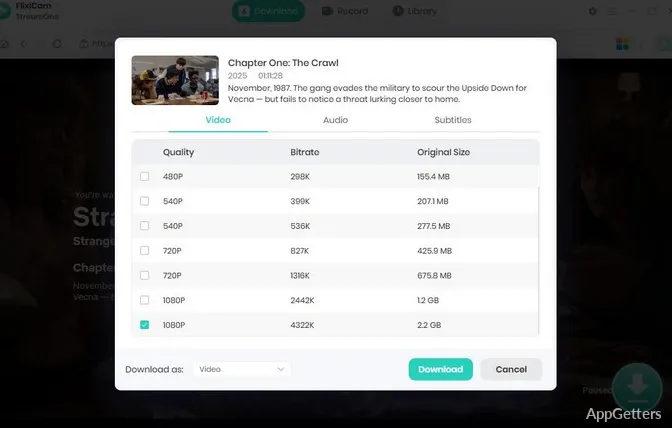
There is no shortage of features for FlixiCam users to modify their downloads, including video quality, audio tracks, and subtitles. It can be hard sometimes to see the differences in the viewing experience between different download settings unless you take care of the audio and subtitles. Therefore, it could be wise to know which sort of viewing experience to aim for. It may be one of high quality or one of medium quality, saving disk space as well.

Just like dealing with media in all situations, the download speed and the overall performance cannot be strictly depended on by the users. It changes from time to time, i.e., system specs, etc. Those users whose collections are sized in terms of GBs and TBs definitely have to really think properly about setting up the spaces for media storage over time.

FlixiCam Advantages and Weaknesses

It is very good from the point of view that FlixiCam is greatly specialized. In fact, it does not try to be your all-in-one media player. Instead, it helps people obtain content and arrange it for offline watching. Having only one focus leads the software to a more compact and user-friendly version. It remains accessible even for those who are not very tech-savvy.

However, it should not be forgotten that this is not a video editor. Nor is it a media production tool or a very advanced library management platform. If you do not have a strong need for offline access, you probably will not find many occasions to use it. It may not fit naturally into your workflow. Consequently, only the people who are really dependent on the downloaded content may find the software to be an integral part of their daily viewing usage.

Windows Users Who Enjoy Watching Streaming Content Frequently

FlixiCam caters best to those who watch a lot of streaming content. It is also ideal for users who want to manage their viewing without an internet connection all the time. Travelers, students, remote workers, and even home users will benefit most from the software. This is especially true when they have to cope with a malfunctioning internet connection at times.

Simply put, that is to prepare media for offline viewing, which is handy. At the same time, it minimizes the need for continuous internet access. While keeping the user experience simple and the product focused on one task only, FlixiCam easily integrates into workflows. What matters most is getting and having at hand what is needed. Installing or using other advanced media management features is not the priority.

Software Details of FlixiCam 3.2.0

License
Trial
Version
3.2.0
File Size
171.96 MB
Downloads
0
Language
English
Category
Op. System
Windows
Developer
Last Updated
August 13, 2024

Version History

2 versions
3.2.0
Latest
171.96 MB
August 13, 2024
3.0.0
137.17 MB
September 28, 2023

Leave a Comment

Your email address will not be published. Required fields are marked *

Software Icon
Security Report

Loading scan data...

Scroll to Top