EXE
Home » Software » Windows » Download Managers » DW Free Video Downloader for Windows
DW Free Video Downloader for Windows

DW Free Video Downloader for Windows

Streaming has made online video more accessible than before, but it cannot meet every viewing need. Internet connections may be unstable, especially for those using mobile data or shared networks. Students often want to download lectures to watch at their convenience, and many users prefer to have copies of videos they find interesting available for offline viewing. Lightweight download companions are extremely helpful in these situations. DW Free Video Downloader stands out among the range of Windows software for users who want a straightforward way to save online videos locally. It does so without the complexity of advanced media capture features. It isn’t a comprehensive media organizer, but rather a dedicated video downloader designed to be as simple and easy-to-use as possible. The purpose is to simplify the process of saving videos for later viewing.

Capture Online Videos with a Simple Workflow

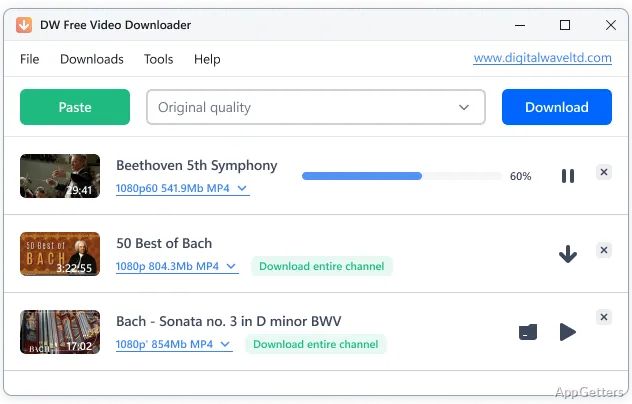
The first thing users notice about DW Free Video Downloader is its ease and transparency. The software keeps the interface clean, showing only what’s necessary, and the workflow is immediately intuitive. Typically, you copy the video’s web address from your browser and paste it into the downloader. Then you let the program take care of the rest.

For the occasional users, this means that they will not be put off just because they are not familiar with all the features and settings of the program. There will not be even one step before starting that will require a technical understanding of video download and conversion. The software can detect web videos and automatically go to the next step with only a simple user intervention. So, it does not limit a person who has never used this type of software before from starting to use it immediately.

Formats and Flexibility

Catching a video online is not the end of the story. The video after catching needs to be in a format compatible with a person’s player of choice. Its size should also be reasonable, not to take up too much space. DW Free Video Downloader solves these issues by letting users select one out of several formats for output and also set the quality. Thus, they are given the freedom to decide if they prefer a better quality of video or a lower resolution. The lower resolution may already be enough for being stored on a mobile device.

This applies quite often in the case of practice, as many people who prepare videos for learning without the Internet would rather have smaller-sized files. These can easily be carried on a laptop or USB stick. One, however, who needs to have a very nice picture on the big screen is a totally different matter, as you can guess.

The whole process of downloading and formatting runs simultaneously. So, you rarely receive a situation where a separate third-party converter is needed. Though professional media tools supply a much wider selection of format choices, the ones included in this software are ordinarily more than enough. They are enough for users who want to watch their videos without being connected to the web.

Stability and Common Limitations

DW Free Video Downloader is more suitable for simple and standard tasks, as free software for downloading applications usually is. With downloading videos from a small number of popular platforms, the tool is expected to be pretty reliable. It generates the right links and downloads the desired files almost without user interaction.

Nevertheless, one should not exclude the possibility of restrictions completely. In fact, tools that download videos are often experiencing problems after the changes made to video hosting websites. So, the situation when the software fails to detect a particular video on the first attempt is not unheard of.

The working speed depends. There is also an element of the bandwidth a user has and the source video. The efficient management of the data transfer by the downloader is quite obvious. But do not expect it to find you a way around the conditions set up by the host. For casual users, such limitations are rather nuisances. But when you have downloading software, you always have to bear in mind the fact that these things can happen.

How It Goes With DW Free Video Downloader

DW Free Video Downloader can really save you a great deal of work if you take it as a handy tool for the task of video downloading, rather than a complete media suite. Its simplicity and user-friendliness can be very beneficial for students and household users. In fact, anyone who, from time to time, finds himself/herself in need of saving an online video for offline viewing.

Users who create a small collection of videos for self-study, tutorials, lectures, or as a reference may well consider this tool a really good find. The simplest flow and minimal changes to the settings allow one to go from a newly discovered video to a locally stored one as fast as is humanly possible.

Software Details of DW Free Video Downloader 1.4.31.628

License
Free
Version
1.4.31.628
File Size
64.43 MB
Downloads
0
Languages
English English, Dutch, French, German, Italian, Japanese, Portuguese, Russian, Spanish
Op. System
Windows
Developer
Last Updated
July 30, 2025

Version History

1 version
1.4.31.628
Latest
64.43 MB
July 30, 2025

Leave a Comment

Your email address will not be published. Required fields are marked *

Software Icon
Security Report

Loading scan data...

Scroll to Top