Is your hard drive or SSD starting to fail? The free CrystalDiskInfo Portable shows each drive's health status, temperature and S.M.A.R.T. readings, and can warn you as soon as the status changes.
The drive panel summarizes health and temperature
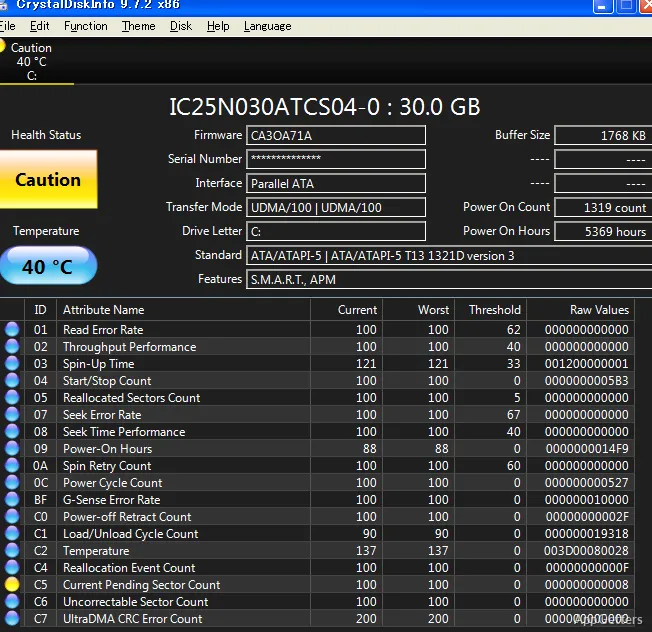
CrystalDiskInfo presents a health label and temperature for the selected disk. The color-coded status provides a quick indication of reported drive condition; the temperature gives a separate reading to watch over time.
When more than one drive is available, select another drive in the window to view its readings.
S.M.A.R.T. attributes show the reported drive data
The S.M.A.R.T. table lists drive attributes and their reported values. Columns such as Current, Worst, Threshold, and Raw Value provide more detail behind the overall health label. Attribute names and values vary with the drive, so the table is most useful for inspecting what that particular device reports.
A normal workflow is to select a disk, note its temperature and health status, then look through the attribute rows if the status calls for closer attention. CrystalDiskInfo also provides real-time status alerts, so changes can be noticed while monitoring is active.
The portable edition runs without a traditional installation
The portable build can be kept in a folder or on a USB drive and launched on a Windows computer when a drive check is needed.
Pros
- Shows drive health, temperature, and S.M.A.R.T. attributes together
- Switches between monitored drives from the main window
- Portable edition can run from a folder or USB drive
System requirements: Windows 7, Windows 8, Windows 8.1, Windows 10, Windows 11 · ARM64 and x64 · Internet Explorer 8.0 or later · .NET Framework 4.8 or later for latest email notification features; 2.0 or later otherwise
What does CrystalDiskInfo Portable monitor?
It monitors HDD and SSD health using S.M.A.R.T. data, temperature readings, and drive status alerts.
How do I check a particular drive?
Select the drive in the main window, then review its health status, temperature, and S.M.A.R.T. attribute table.
Does the portable edition need to be installed?
No. It can run from a folder or USB drive without a traditional installation.