EXE
Home » Software » Windows » monitoring » ChrisPC RAM Booster for Windows
ChrisPC RAM Booster for Windows

ChrisPC RAM Booster for Windows

  • By Chris P.C.
  • Trial
  • Version: 7.25.1229
  • 3.56 MB
  • Security Report:

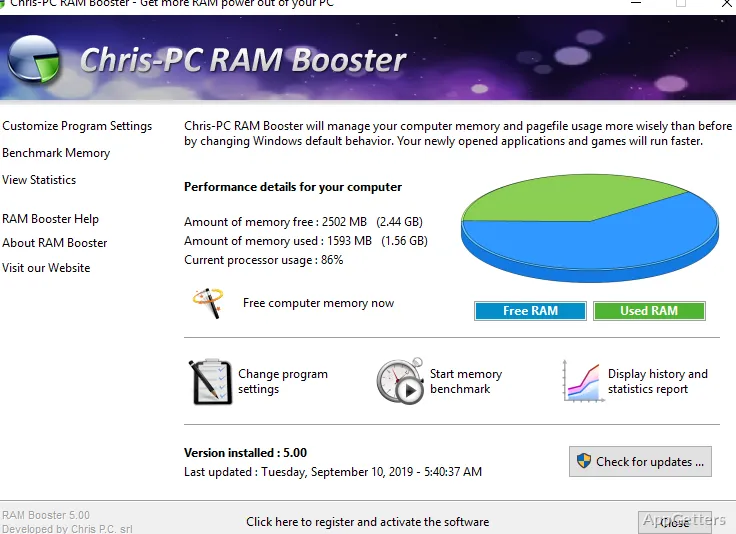
Sometimes, Windows users may experience slowdowns with no clear cause. The system that worked very fast in the morning will get slower. This is especially noticeable if multiple browser tabs are opened or some background applications are running. Although Windows has a built-in mechanism for managing the memory, it does not always explain what it is doing. It does not do so in a way that the average user can understand. ChrisPC RAM Booster and other tools in its category come into the picture by giving one a more hands-on method of keeping track. They also change the way RAM is consumed on the fly.

Memory Usage Made Simple

With the regular use of ChrisPC RAM Booster, one will notice that one of its features is how it presents memory usage. It does so in a more easy-to-understand manner. This level of user-friendliness can be very helpful to players who are still learning the ropes. They could easily be confused by unexpected changes in system consumption of resources that affect their gaming session.

When one performs one’s daily activities, e.g., switching from browser to office tools and media playing software, the program will let one see more clearly. It shows when the system is running out of memory. Being able to see what is happening helps one in making good choices. For instance, one can decide to shut down some programs before the system gets slower.

Actual Effect on Normal Usage

Essentially, the program acts as a memory cleaner that disposes of unnecessary or cached memory. This results in a more reactive system. When activated, either by the user as required or automatically, it tries to free up RAM. This RAM is occupied by processes that are not in use. On machines with less memory, e.g., old laptops or single-process desktop systems, this may even mean something more. The user experience will be close to what one gets with a new PC.

On the other hand, the changes will be minor, if any, in most cases. After all, the memory management feature of Windows is very effective. We see the most benefits in the corners of the market. If one is looking at it as a big game changer in performance improvement, one will be quite disappointed.

Accessible Design Without Many Sacrifices

One thing about ChrisPC RAM Booster is that it does not come with a lot of options to change. You get a program that is installed quickly. It has a clean and easy-to-understand interface. You can do most things with just one click of the mouse. This makes it very convenient for those who want to solve their problem immediately. They can do so without getting into the depths of the workings of the system.

On the other hand, this leads to a lack of certain features. If you are one of those people who like to tweak every aspect of the system memory management, this may not suit you. This also applies if you want to explore system diagnostics. You are unlikely to be attracted by this product. This is a program focusing on doing just one thing, but doing it well. It is not a complete system optimizer.

The Typical Placement With Windows

The most suitable users of ChrisPC RAM Booster would be people around the house. This also includes students or just anyone using Windows on a low-end computer. It is not a must-have tool supplying the core system functionality. It is a choice that one can go for from time to time. This is when the system shows signs of being overloaded due to memory.

It is almost needless for a recent system that has a lot of RAM. One can even say that one would be duplicating the effort. This effort is of the internal Windows memory management. Essentially, it is more of a monitoring and reporting device. It is not a must-have optimization tool for such systems.

To sum up, the program is intended for a certain kind of user: someone who likes to have a simple device. He can see it working. He does not want to go into technical details or make a lot of changes. It is not a substitute for standard system software tools. In the right situations, it can add value. This is especially where getting to the bottom of an issue is not possible. At the same time, making a quick fix is more valuable than having detailed control.

Software Details of ChrisPC RAM Booster 7.25.1229

License
Trial
Version
7.25.1229
File Size
3.56 MB
Downloads
0
Category
Op. System
Windows
Developer
Last Updated
January 7, 2026

Version History

6 versions
7.25.1229
Latest
3.56 MB
January 7, 2026
7.25.1204
3.56 MB
December 3, 2025
7.25.0409
3.56 MB
April 9, 2025
7.24.1209
3.56 MB
December 8, 2024
7.24.0826
3.56 MB
August 25, 2024
7.24.0202
3.55 MB
February 3, 2024

Leave a Comment

Your email address will not be published. Required fields are marked *

Software Icon
Security Report

Loading scan data...

Scroll to Top