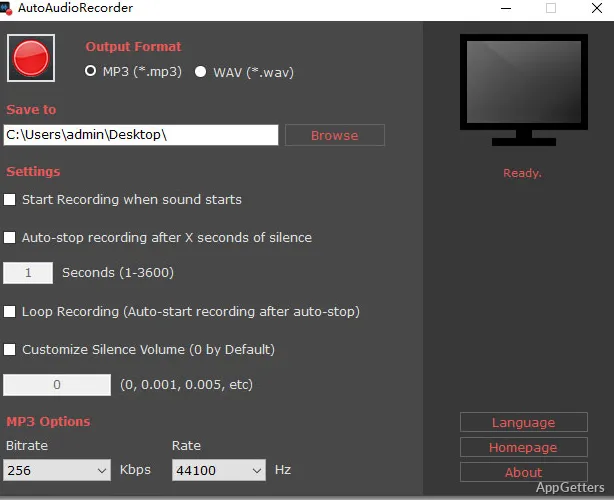
Want to record a radio show or an online lesson while you're away from the PC? AutoAudioRecorder captures the computer's own sound and can begin on a schedule or wait until it detects audio, then save the recording as an MP3 or WAV file.
Recording computer audio
AutoAudioRecorder records audio playing through the PC directly, so the recording source is the computer's internal sound instead of a microphone. This suits audio from live broadcasts, online lessons, meetings, calls, and other streams played on the machine.
Choose MP3 for a widely compatible file or WAV for an uncompressed recording. The program can save recordings to a chosen location, keeping output files accessible after an unattended session.
How does sound-triggered recording work?
With sound detection enabled, press the red record button to put the program into listening mode. It waits for audio before writing recording data, so a quiet period at the start does not create a file filled with silence.
AutoAudioRecorder can also stop after a configured stretch of silence and resume when sound returns. That behavior suits broadcasts or streams with breaks, since one recording session can follow the audio as it comes and goes.
Schedules and recording controls
Scheduled recording lets AutoAudioRecorder start and stop without someone sitting at the computer to operate it. Set the recording time for recurring listening tasks, such as a radio program or a planned online talk.
Keyboard shortcuts provide manual control without clicking the window: Alt+1 starts recording and Alt+2 stops it.
- Pick MP3 or WAV for the output format.
- Set a recording location and schedule.
- Use sound detection to handle silence and resumed audio.
Pros
- Captures audio playing inside the computer
- Starts recording when sound is detected
- Can resume after a period of silence
- Offers MP3 and WAV output
Cons
- Saves recordings only as MP3 or WAV
System requirements: Windows 7, Windows 8, Windows 10, Windows 11 · 32-bit and 64-bit · .NET Framework 4.7.2
Can AutoAudioRecorder capture sound without a microphone?
Yes. It records audio playing inside the computer directly.
Can it wait for audio before saving a recording?
Yes. Enable sound detection and start listening; recording begins when the program detects sound.
Which formats can recordings use?
Recordings can be saved as MP3 or WAV files.