No speakers on your PC, or want its sound in your phone's headphones? The free Audio Share Server captures the computer’s audio and streams it to an Android device, which plays it through its speaker or headphones.
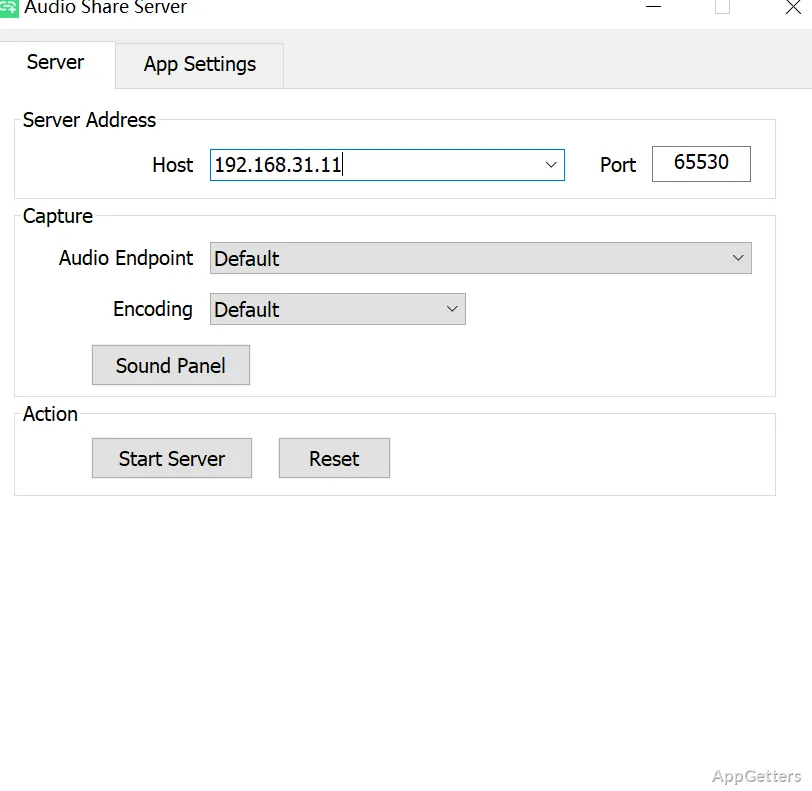
Host field and server connection
In the Windows GUI, the Host value is the computer’s address on the local network. Start the server, then enter that same address in the Android app’s Host field and tap its play button. The phone and PC need a network connection to each other; Wi-Fi and USB tethering are examples.
Audio Share Server captures the PC’s audio output, so music, video, and other computer playback can come through the connected phone. The computer still needs a sound card and an available audio endpoint for capture.
PCM format and audio endpoint
The stream uses uncompressed PCM and keeps the capture format’s channel count and sample rate. Audio Share supports the PCM encodings Android’s AudioTrack can play: 8-bit, 16-bit, packed 24-bit, 32-bit, and floating-point PCM. Which one is used is decided by the playback device.
- Windows captures in that device's default format.
- The Windows Sound control panel’s Playback device properties include an Advanced tab for changing the default format.
- If no endpoint is available, some Realtek devices can expose one through an Audio Console setting; another option is a virtual audio device driver.
Android playback controls
The Android app has an Audio Volume control that adjusts its playback level without changing Android’s system volume. Loudness Enhancer can raise the app’s output independently, while PC system volume, the PC player’s volume, and Android media volume remain separate controls.
Because audio travels over a network, playback has some delay. The connection quality affects the stream, so timing-sensitive uses such as live conversation may be less suitable.
Pros
- Streams the computer’s audio to an Android phone over Wi-Fi or USB tethering
- Transfers uncompressed PCM audio in the capture format
- Android app includes separate Audio Volume and Loudness Enhancer controls
Cons
- Audio arrives with a slight network delay, so it is less suited to live calls
System requirements: Windows 10, Windows 11 · 64-bit only · Microsoft Visual C++ 2015–2022 Redistributable (x64) · An available PC audio endpoint · An Android phone running Android 6.0 or newer · A network that connects the phone and PC
Can Audio Share Server stream PC audio to an Android phone?
Yes. Start the Windows server, set the Android app’s Host field to the PC’s network address, and tap play.
Why is there no audio to stream?
The PC needs an available audio endpoint. Some sound cards need an audio setting changed, or a virtual audio device driver may be needed.
Can the Android app change playback volume independently?
Yes. Audio Volume and Loudness Enhancer adjust the app’s playback separately from Android’s system media volume.