EXE
Home » IDE » Visual Studio Community for Windows
Visual Studio Community for Windows

Visual Studio Community for Windows

  • By Microsoft
  • Free
  • Version: 18.7.1
  • 5.42 MB
  • Security Report:

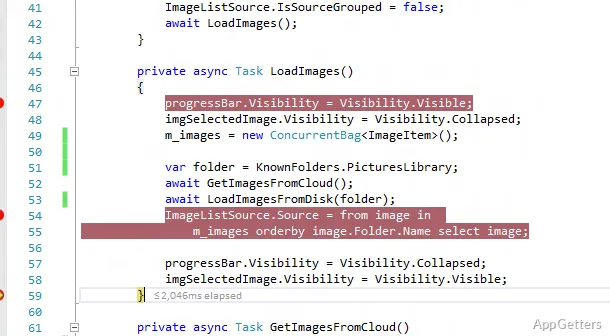
Determining the proper development environment is the major problem that a lot of Windows users who are learning programming or building software projects will encounter. For one thing, a text editor without features for the development of larger applications will be even less suitable. On the other hand, professional development platforms can be very intimidating to new users. The problem is that Visual Studio Community, which is a full-featured integrated development environment (IDE) that continues to be accessible to students, hobbyists, and independent developers, seems to have solved it. Actually, this software acts like a single point of access where coding, debugging, testing, and project management are all performed in one place.

Using one app rather than switching between several tools, the user is able to carry out the majority of the development process. Due to this consolidated approach, Visual Studio Community has become a usual entry point for Windows-based software development.

A Structured Environment for Building Applications

Visual Studio Community is well-known for the fact that it gives a lot of importance to the organizational aspect. Within a well-organized workspace, developers are taking care of projects, files, dependencies, and build settings. Application developers can easily control themselves as they see the projects and activities that they usually carry out visible on one screen.

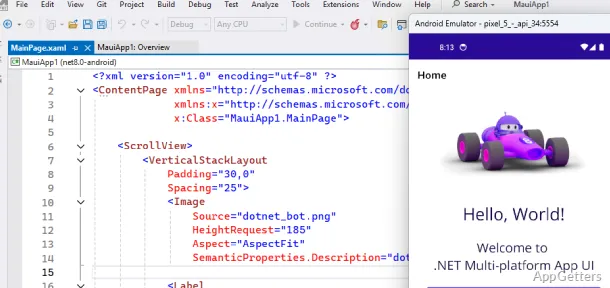
When they first take a look, beginners can think that a huge number of tools and menus are the cause of the initial interface being intimidating. Still, the main thing is that the software basically nudges new users towards the road of project creation. It does this with templates that they can easily use and other such options that make the whole project creation part a walk in the park. No matter if the user works on desktop applications, web projects, or other software developments, they will hardly ever have to make an extensive manual configuration before getting down to work.

The environment will be of great use in the long run once the user starts to master it. The tricks and tools that seem to be of little use when the user learns to program now will undoubtedly be noticed later. This is when it comes to large projects or group work. Learning by doing is the method that they propose, so the users will keep using the software even after they get out of the beginner mode in no time.

Reliability Amid Human Development

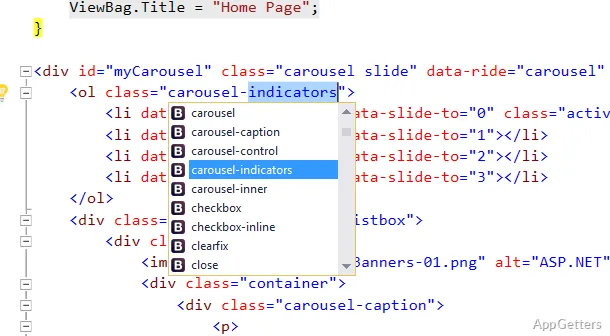
One of the main priorities of developers working in the real world is the reliability of an application or system. Feature requests are less important most of the time. Visual Studio Community has really excelled in this aspect, for instance, by providing a very stable project management system, effective debugging tools, and standard build processes. All of these things are sure to result in at least a hefty reduction in walking around looking for bugs. They also help in making sense of the unforeseen behavior of applications.

One more reason why the software is so excellent for development activities is that Microsoft technologies and Windows-focused development are the two areas with which it works best. The biggest highlight, for many users, is that the whole environment removes the need to use other utilities. This applies during the most common programming tasks. In fact, testing, debugging, and deployment can all be done inside the IDE.

In opposition to this is the larger utilization of resources. Visual Studio Community requires more disk space and system resources than slim code editors. On old machines, one may perceive delays in the initialization of the program and the loading times of projects. For such small tasks, the environment may be deemed a bit too extensive.

Well-suited for Training and Career Development

Visual Studio Community can be a great choice for students, self-learners, casual programmers, and independent developers. They may want a professional-level set of tools without commercializing their software environments. Thanks to their combination of being both easy-to-use and deep, users will be able to start with small projects. They can gradually plunge into further advanced development.

As far as long-term development is concerned, the software’s biggest advantage lies in the fact that it can grow with the users. An absolute beginner can make use of it for programming basics. The advanced user may find the same environment suitable for performing complex and even more demanding tasks.

Looking to find a reliable platform to develop for Windows? The Visual Studio Community version is still one of the best-balanced experiences out there. It is software that provides enough features for serious software creation. It still remains understandable for first-time programmers and application developers.

Software Details of Visual Studio Community 18.7.1

License
Free
Version
18.7.1
File Size
5.42 MB
Downloads
0
Languages
English English, Afrikaans, Amharic, Arabic, Armenian, Belarusian, Bulgarian, Catalan, Chinese, Croatian, Czech, Danish, Dutch, Estonian, Farsi, Finnish, French, German, Greek, Hebrew, Hindi, Hungarian, Icelandic, Indonesian, Italian, Japanese, Kazakh, Korean, Latvian, Lithuanian, Malay, Norwegian, Polish, Portuguese, Romanian, Russian, Serbian, Slovak, Slovenian, Spanish, Swahili, Swedish, Tagalog, Thai, Turkish, Ukrainian, Vietnamese, Zulu
Category
IDE
Op. System
Windows
Developer
Last Updated
June 17, 2026

Version History

5 versions
18.7.1
Latest
5.42 MB
June 17, 2026
18.7.0
5.42 MB
June 10, 2026
18.6.3
5.41 MB
June 10, 2026
18.6.2
5.41 MB
May 27, 2026
18.6.1
5.41 MB
May 22, 2026

Leave a Comment

Your email address will not be published. Required fields are marked *

Software Icon
Security Report

Loading scan data...

Scroll to Top