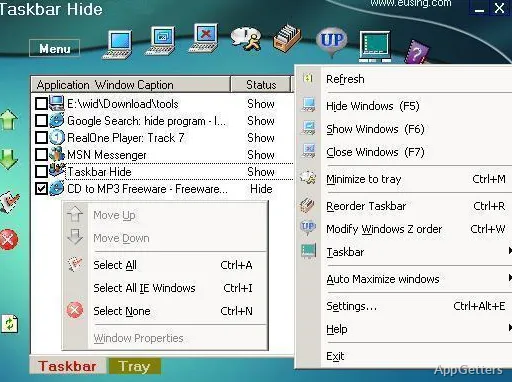
People who want a clear desktop during focused work or full-screen viewing can use Taskbar Hide to control taskbar visibility with a hotkey. It also provides controls for hiding program windows and managing how windows and icons appear on the taskbar and in the system tray.
How do you control visibility?
Taskbar Hide offers a keyboard shortcut for toggling the taskbar, so it can be shown or hidden on demand. The program can also hide program windows completely using a hotkey or its system tray icon. This gives users separate ways to clear the desktop: hide the taskbar, hide a window, or bring the window back when needed.
The hotkey approach suits repeated changes during writing, browsing, or viewing media. The tray icon provides another route when using the keyboard is inconvenient.
Taskbar and system tray arrangement
Beyond visibility, Taskbar Hide lets users choose how windows are arranged on the taskbar. It can also hide selected, less-used icons from the system tray, reducing the icons shown beside the clock without hiding the programs themselves.
Automatic window maximization
Taskbar Hide can maximize newly opened windows automatically. A separate option applies this behavior only to new Internet Explorer windows, allowing that browser-specific workflow without applying the same setting to every new window.
Pros
- Toggle taskbar visibility with a hotkey
- Hide program windows through a hotkey or tray icon
- Hide selected, less-used system tray icons
- Automatically maximize new windows or new Internet Explorer windows
Cons
- A paid license is required for continued use
System requirements: Windows 7, Windows 8, Windows 10, Windows 11
Can Taskbar Hide show and hide the taskbar with a shortcut?
Yes. It provides a hotkey to toggle taskbar visibility.
What can Taskbar Hide hide besides the taskbar?
It can hide program windows through a hotkey or system tray icon, and hide selected, less-used system tray icons.
Can it maximize new windows automatically?
Yes. It can maximize all new windows or apply the setting only to new Internet Explorer windows.