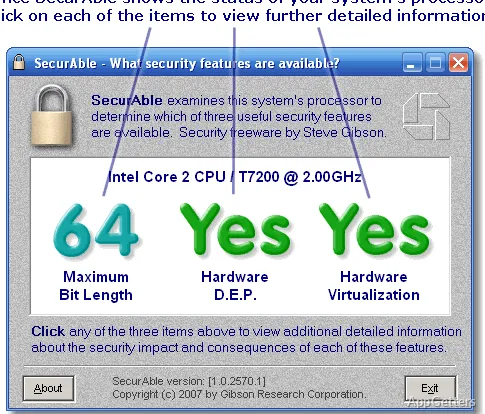
The results window shows whether a processor supports 64-bit instructions, hardware DEP, and virtualization, including signs that a feature may be disabled. SecurAble checks these capabilities and their current status without changing system settings.
Processor feature results
SecurAble checks three processor capabilities: 64-bit instruction support, hardware Data Execution Prevention (DEP), and hardware virtualization. The compact display reports what the processor supports and whether a feature appears to be operational or unavailable.
A 64-bit result indicates whether the processor has the instruction extensions needed to run a 64-bit operating system. The DEP check covers processor support for marking memory areas as non-executable. Intel calls this capability XD, while AMD uses NX; Windows refers to its use as hardware DEP.
DEP and virtualization status
Processor support does not guarantee that a feature is enabled. SecurAble can report when hardware DEP support is present but appears to be off, which may point to a setting disabled by the system firmware or operating environment.
The virtualization check reports processor support for hardware-assisted virtual machines. That information can guide decisions about running virtualization software or creating a virtualized environment. SecurAble reports the capability; it does not switch virtualization on.
Feature-specific details
Select one of the three result areas to open an explanation tied to that processor feature. The extra detail clarifies what the reported status means, including the difference between having hardware support and having it available to the system.
The scan is designed to run as a standalone program and does not require setup. Administrator privileges are not mandatory, but SecurAble may be less certain about some findings when it cannot run its kernel-mode component.
Pros
- Checks 64-bit processor capability, hardware DEP, and virtualization in one scan
- Shows whether supported processor features may be disabled
- Clicking a result opens context-specific information about that feature
Cons
- Some findings may be uncertain without administrator privileges
- Reports feature status but does not configure DEP or virtualization
System requirements: Runs as a standalone executable; no setup required.
Which processor features does SecurAble check?
It checks 64-bit instruction support, hardware DEP, and hardware virtualization.
Does SecurAble enable DEP or virtualization?
No. It reports processor capabilities and their status; it does not change those settings.
Is administrator access required for the scan?
No, but some findings may be uncertain without the privileges needed to run its kernel-mode component.