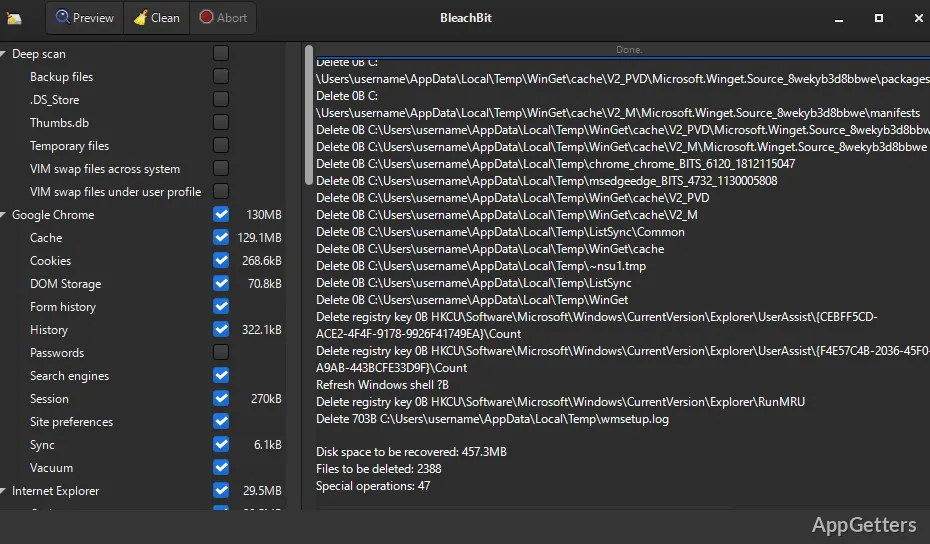
Every now and then, our computers collect lots of useless files that can slow them down and take up space unnecessarily. These can be web browser remainders, log files, or leftover bits after an installation or uninstall procedure. Mostly, it’s nothing harmful, but the amount of it can grow unnoticed over time and take up a lot of space or, even worse, affect the privacy of the user. However, many operating systems come with quite basic cleaning utilities that do not cover all such areas. This means that the user may end up with a lot of cleaning to do himself/herself. BleachBit is targeted at those users who want to be able to see what is going to get cleaned and have control even over the level of “aggressiveness” of the cleaning process.
What cleanup actually looks like in daily use
What BleachBit does is to perform a deep and thorough sifting of your entire system. So, on one hand, it can make an inventory of everything in temporary folders, browser caches, and whatever application-specific data the user has. On the other hand, it can also quite eloquently tell you exactly what you are about to lose, as it provides a list of categories to explain what each line item covers (with some examples even). As a result, the user can pick and choose only those areas where cleaning is really necessary.
While clearing the browser cache might be the best way to quickly make some space, this, on the other hand, is the type of data that is normally kept for one’s convenience (saving sessions and cookies). Even after you finish these, the software makes descriptions available so that you don’t get the nasty surprise. You might otherwise realize after the fact what the consequences of your action are. This level of detail and transparency is not normally something you get from other cleaning utilities.
How it behaves during real-world system maintenance
When working with a system that has been used heavily, the scope of system files and folders that can be cleared can be quite large. However, BleachBit scans the system quickly. Users can, after a brief moment, see how much space can be recovered. They also get a chance to check out which files exactly are set to be deleted, presumably to rule out any mishaps. The actual cleaning itself is performed at quite a high speed. However, operations such as secure deletion, which require rewriting file data multiple times, can take more time.
One interesting point about BleachBit is that it does not work as a background “watcher” program. Instead, it is simply launched whenever it is needed. This makes the program a perfect fit for periodic system maintenance rather than a tool for the persistent monitoring of the system. This feature will certainly attract those users who value their manual control over the automated cleaning routines that are typical nowadays.
Strengths and realistic limitations
One of the major advantages of BleachBit is that it offers users a wide range of cleaning options. At the same time, it provides a high degree of control over the whole process. It opens the door for cleaning various types of data and locations beyond the ordinary ones. Most users are familiar with these. At the same time, it does not perform any actions automatically without user involvement. This feature is of great help to users who are especially concerned about their privacy. It helps those who want to get rid of all traces of their activities.
On the other hand, perhaps an experienced user would run such a tool without worry. For a new user, this level of control might be overwhelming. They may not even want to make a move. In any case, one should avoid performing a very aggressive cleaning without first knowing what will be deleted. It might well be the case that the user is going to remove quite useful data. Such as preferences or saved login sessions that would affect the way the user normally works.
Where BleachBit fits in privacy-focused and routine cleanup habits
System cleanup and privacy management would normally be entirely automated routines for the majority of users. However, those who want to have the last word on these two would be the best candidates for using BleachBit. Infrequent cleanup to regain disk space and erase unnecessary traces may be what a typical home user or a student will be doing with the program. Users having privacy worries will use it as their favorite tool to get rid of their web data and history of usage of other applications more thoroughly and almost completely. Compared to those standard tools that most users have and rely upon.
Restoring shared or public computers to an original, unused state is one area that prompts this sort of thorough cleaning. However, it is still not necessary at all times. If one views BleachBit as an “always-on” optimizer, then one does not quite list up its true worth. It can and should be understood as a really intentional maintenance tool. It provides users both insight and control at the highest levels of what they keep or remove from their systems.