EXE
Home » Maintenance » Auslogics Disk Defrag for Windows
Auslogics Disk Defrag for Windows

Auslogics Disk Defrag for Windows

In the case of older Windows operating systems or computers equipped with traditional hard drives, which typically experience slowdowns in performance, the deterioration usually occurs so gradually that one hardly notices it happening. File fragmentation is one of these factors. As more time passes, the files get more and more fragmented, and the time required for loading also increases. The overall responsiveness of the machine seems to become more and more inconsistent. Although there is a defragmentation tool built into Windows, it runs its operations quietly in the background and provides only limited visibility and control options to the user. On the other hand, Auslogics Disk Defrag is meant for those users who wish to take a more active part in improving their disks, but at the same time do not want to get involved with very complicated utilities.

A More Visible Approach to Defragmentation

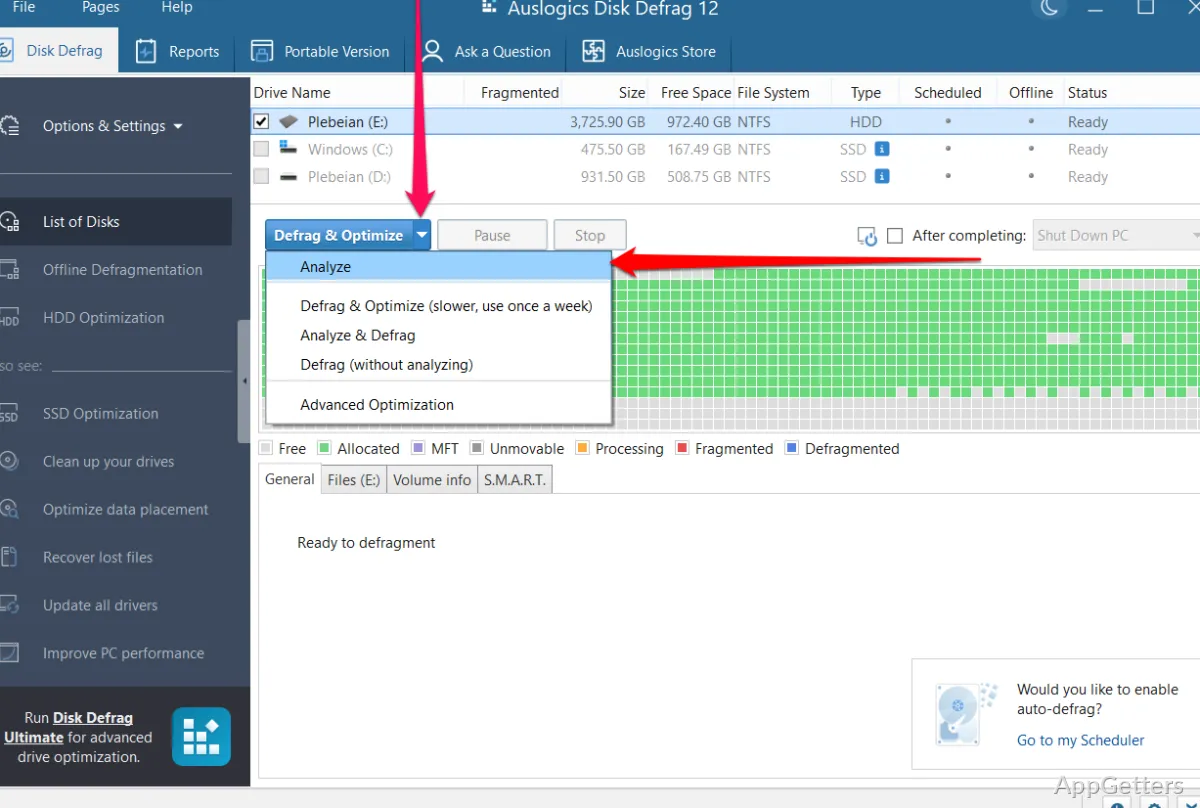
In normal operation, one of the major differentiators of Auslogics Disk Defrag is that it helps a lot in improving the understanding of disk operations. The program’s interface displays a vivid and detailed graphical representation of the locations where fragmented files are stored on the disk. This allows the user to get a visual idea of how and where the data is spread over the disk. This sort of transparency may serve as a great help in linking a slowdown in performance to fragmentation, which is still a mystery to most users.

Defragmenting the disk is a simple task. The program is equipped with basic optimization that can be performed quickly and without going into details, which makes it a good match for novices. But, conversely, the most advanced options are also open to the user who wants to give a higher priority to system files or to reorganize the disk in such a way that the user’s areas are cleaned up regularly.

Nevertheless, the increase in transparency does not automatically mean the results will be drastically different from those of bundled tools. More often than not, the very advantage that visibility and control give is that they do not necessarily result in profoundly different outcomes.

Performance in Practical-World Use

Changes after defragmenting will be mainly visible with mechanical hard drives. Oftentimes, after the optimization, it is the very opening of the same program that becomes less erratic. Also, file access gets faster after defragmenting. Auslogics Disk Defrag is very capable in these aspects and performs the operation several times faster than a typical third-party utility.

When it comes to solid-state drives (SSDs), everything is different. Defragmentation becomes irrelevant in usage. If overused, it may even shorten the drive’s life. The program is smart enough to understand that. It has a very important feature of not applying the standard traditional defrag method on SSDs. This prevents them from getting worn out.

Consequently, practically speaking, only those users who have old laptops or desktops get really nice advantages from it. Users who have more modern systems equipped with SSDs will rarely see the tool as something relevant on a daily basis.

Reliability and System Impact

On the occasions when the program was tested, Auslogics Disk Defrag seemed to be very committed not to crash the system at all. Normally, it uses a moderate amount of resources. The user can carry on basic tasks without being bothered by the optimization that is going on. This feature is the right match for background use, especially on machines that are not heavily loaded.

The software also comes with a scheduler. This enables the user to set up automatic maintenance without the requirement of human involvement. For a user who wants to use the program with the set-and-forget mentality, this will come in handy. Besides, manual control is still very easy for those who only use it occasionally.

One of the main weaknesses is that the success of defragmentation remains extremely reliant on the fault or the wear of the disk. If the disk is in a very poor condition or it is on the verge of failing, then one should not expect any meaningful changes. Or improvements after the optimization.

Restrictions in Modern Windows Environments

Some really good news is that most users still do not have to think about performance failing. Just because they have not used the tools knowingly. The decisions nowadays are already built in, and they will be made anyway. So, only a few users buy software like that for their PCs that are fully SSD or mostly SSD. Some may have one or two worn drives, but they also have some HDD space.

Finding out the real need for defragmentation is not always an easy thing to do. If the tool gets used wrongly, then it may be that a user simply does not notice improvements. These are, at least, in terms of hard disks. Instead, look at the overview to decide if defrag is necessary or not. The program may help and show what needs to be done, but every user is going to need basic knowledge on the physical level.

The tool is still very good and dependable when it is used for its original purpose.

Best Fit to Preserve Traditional Hard Drive Performance

In fact, the tool is at its best for people running a Windows system on a hard disk drive (HDD). This is associated with a desire to see and completely try the disk clean and defrag operation. The tool makes an excellent match for running disks in a hardware environment that is mostly or only hard disks. Such as an old home desktop, a student’s laptop, or a secondary machine.

For those people, it turns out to be an excellent solution for keeping the machine efficient. It also helps prevent a further reduction in performance resulting from fragmentation cycles. The tool’s performance in its role is not as regular a necessity on newer systems with SSDs. It is more occasionally in use.

Software Details of Auslogics Disk Defrag 12.1.0.1

License
Freemium
Version
12.1.0.1
File Size
24.67 MB
Downloads
0
Languages
English English, French, German, Italian, Japanese, Portuguese, Russian, Spanish
Category
Op. System
Windows
Last Updated
December 29, 2025

Version History

5 versions
12.1.0.1
Latest
24.67 MB
December 29, 2025
12.1.0.0
24.54 MB
October 7, 2025
12.0.1.2
24.19 MB
July 25, 2025
12.0.1.1
23.64 MB
June 20, 2025
12.0.0.2
23.63 MB
January 22, 2025

Leave a Comment

Your email address will not be published. Required fields are marked *

Software Icon
Security Report

Loading scan data...

Scroll to Top