EXE
Home » Maintenance » Driver Fusion for Windows
Driver Fusion for Windows

Driver Fusion for Windows

  • By Treexy
  • Free
  • Version: 13.2.0.3
  • 24.92 MB
  • Security Report:

Windows users have long been familiar with the driver dilemma. they once thought they needed just a few drivers, but actually, the count went way up. The majority simply rely on automatic updates as well as Windows built-in functionalities. that, at best, replace the drivers but leave the residues or leftover files. To that end, systems slowly get mixed up with fragments of old hardware, sabotaged updates, or scrapped devices. These can be the root cause of system unreliability or conflicts. To handle these issues, Driver Fusion was developed because it offers much more than just finding the latest updates and removing drivers. Also, it cleans up the system.

Helping Remove Leftover Drivers and Hidden System Mess

Windows is not that great at removing the drivers associated with the hardware that has been removed or replaced. These leftovers can get stuck there and, from time to time, hold back the new installations.

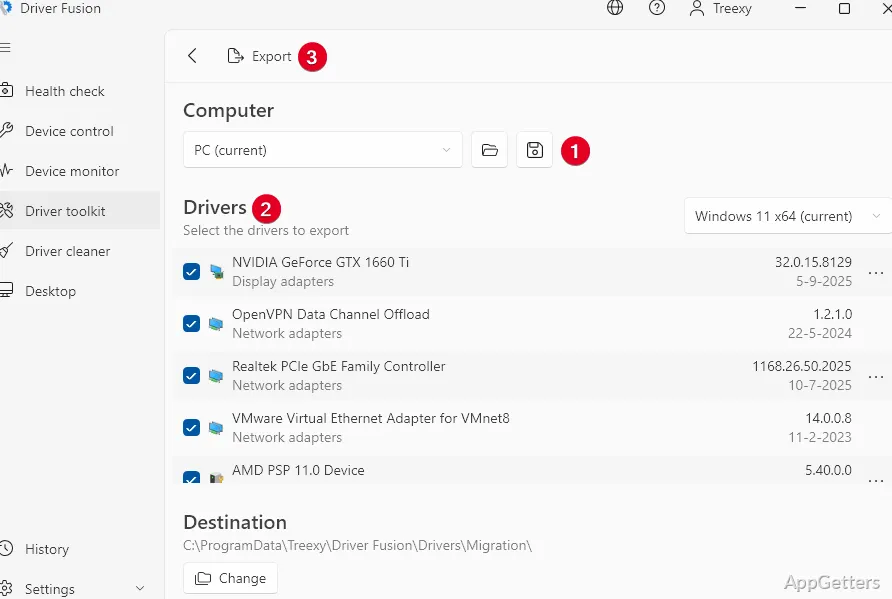
The program looks for such kinds of remnants and displays them in a very user-friendly manner. This way, anyone who has changed his/her hardware or installs various devices quite often can keep the system clean and reduce the chances of conflicts. The interface is designed to be quite easy to navigate for even those who are not technically very capable. though a little understanding of driver basics won’t hurt for confident use.

Real-World Usage in Driver Removal and Updates

Physically, the time when the users need to change the video cards, network adapters, or any other devices. When the old drivers start to cause problems, is when the tool comes in handy.

By using the tool, the users will have the chance to delete the drivers more deeply than the usual Windows uninstall options. To the users who frequently repair hardware or maintain several systems, this can greatly simplify their daily work.

System Dependability and Practical Impact

If Driver Fusion is handled properly, then it has the potential to help with system operation issues that arose because of old or duplicate drivers.

Generally, it is older systems or the ones that have seen multiple hardware changes that are coming to the rescue with this tool.

After cleaning things up, there might be fewer device errors, and hardware might be recognized more smoothly by the users. Nevertheless, the upgrades can’t always be perceived right away. and in the case of new systems with clean installations, the difference can be almost nothing. Driver Fusion works best when there is a driver history that is complex, as opposed to simple or recent.

Restrictions and things to keep in mind when using the app in daily life

There may be cases when Driver Fusion will actually be the best tool to realize certain goals. However, it is not a good idea to consider it a universal PC optimizer. It cannot fix everything. First of all, the software completely focuses on solving driver problems. On the other hand, it totally ignores things like disk cleanup, memory optimization, and application performance.

Driver removal itself has risks in it, so that is something to bear in mind as well. Even though the tool provides structured assistance, misuse of it can lead to the hardware being disabled temporarily. Until the right drivers get reinstalled. For this reason, using it with care is very important, especially in the case of less experienced users. The interface is designed in a way that lessens bewilderment, but understanding of system drivers is still necessary.

Where Driver Fusion Fits in Hardware Maintenance Workflows

Driver Fusion definitely isn’t for those who rarely or never change or upgrade the hardware on their Windows machines. It is aimed at users, PC enthusiasts, technicians, and advanced home users. These users want more than what Windows usually offers for driver installation and removal.

Driver Fusion actually uses the tool as a means of a special service tool, not a regular utility on a daily basis. It is only when one upgrades the hardware, troubleshoots, or resets the system. The cases in which a clean driver state is very much required. That Driver Fusion is highly appreciated.

Software Details of Driver Fusion 13.2.0.3

License
Free
Version
13.2.0.3
File Size
24.92 MB
Downloads
0
Languages
English English, Arabic, Catalan, Chinese, Czech, Danish, Dutch, Finnish, French, German, Greek, Hindi, Italian, Japanese, Korean, Norwegian, Polish, Portuguese, Russian, Spanish, Swedish, Turkish
Category
Op. System
Windows
Developer
Last Updated
April 21, 2026

Version History

5 versions
13.2.0.3
Latest
24.92 MB
April 21, 2026
13.2.0.1
24.92 MB
April 16, 2026
13.1.0.10
20.7 MB
February 3, 2026
13.1.0.7
20.7 MB
January 29, 2026
13.1.0.6
20.58 MB
January 27, 2026

Leave a Comment

Your email address will not be published. Required fields are marked *

Software Icon
Security Report

Loading scan data...

Scroll to Top