EXE
Home » Software » Windows » Download Managers » Nicotine+ for Windows
Nicotine+ for Windows

Nicotine+ for Windows

  • By Nicotine Plus
  • Free
  • Version: 3.3.10
  • 39.31 MB
  • Security Report:

It can be quite a challenge to find a good peer-to-peer client on Windows. Many old file-sharing programs are stuffed with ads, have bundled installers that users generally dislike, or their unstable versions seem like they have been left in the lurch. So, to accomplish a simple task of searching and downloading shared content, some programs make the experience so complicated that a user is forced to use it like a technical problem. For users who want total control and are wary of transparency, especially those who know community-driven networks well, their choices become very limited very fast. Nicotine+ is a modern, open-source client for the Soulseek network. The developers say it is focused on a good, easy-to-use experience, keeping things smart and manageable.

A Practical Interface for Everyday Use

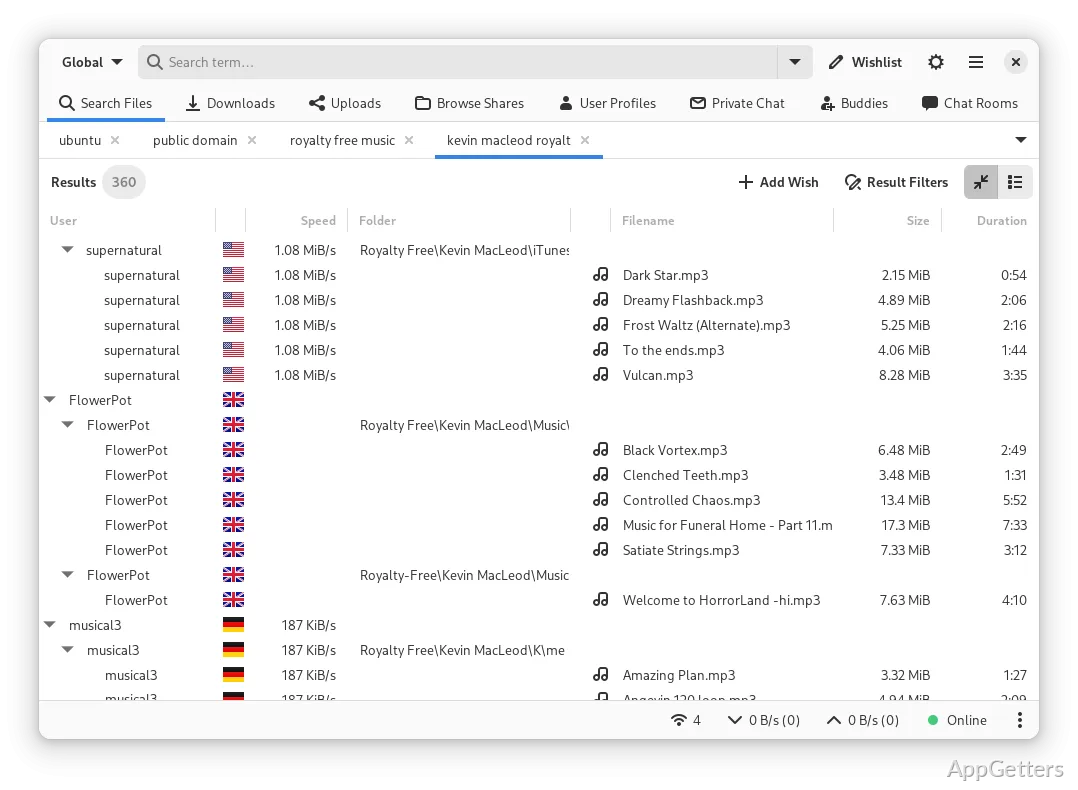
The first time Nicotine+ is started, it shows a simple interface with tabs for search, transfers, chat rooms, and user browsing. It is not too much for beginners; however, it even gives experts who like to venture deep an option to have complete control. The search area works very quickly. The filters are so simple that one can use them without giving it a second thought, while transfer queues are neatly arranged and easy to work with.

When you use it in your normal everyday life, the whole package of the interface gives a feeling of being steady. You can always predict what it is going to do. Downloads are something that you can pause, continue, and even sort without getting confused. The clarity of managing and understanding the stuff at hand is very important. This applies to college students organizing their research files or home users setting up a music library. The look of the design is more of a roadmap than a sleek and trendy one, but the advantage gained lies in the unchanged approach and very little getting away from the main point.

Stability and Performance on Windows

Nicotine+ is one of those pieces of software that you can depend on to work without any problems, even if you make use of it for a long period of time. Running on a Windows system, nobody will notice that it suddenly uses up a lot of RAM. The computer does not randomly behave weirdly due to some background process of the software. The responsiveness of the program doesn’t suffer. This remains true even if the user is downloading lots of files simultaneously and has many active private chats. That steadiness is indispensable for users who leave the client running in the background for hours.

Installing this program does not include lots of useless programs. There are also no hidden features. Updating the program is a simple procedure, and users’ preferences are not changed. There were hardly any disconnects during the tests. The disconnecting and reconnecting feature didn’t make any noise. Running the program efficiently still depends on the condition of your internet connection and how many peers are available. However, the program itself does not cause any problem in this issue.

Control, Community, and Customization

With Nicotine+, one of the main arguments in favor of this program is that it puts a lot of power in the user’s hands. Upload slots, speed limits, and folder permissions can be changed. You do not have to wade through a lot of complicated files for this purpose. Thus, the program can still be used by novices. Meanwhile, more experienced people will get their share by managing their common directories with a high level of accuracy.

Being a community persists as the priority. Both chat rooms and private messaging are seamlessly incorporated into the users’ routine without coming off as secondary features.

Where Nicotine+ Fits in a Windows Workflow

Nicotine+ is the very client that those Windows users who are all about openness to the world will be most comfortable with. They wish to exchange with the community and appreciate a steady background operation. It wouldn’t occur to the developers to add all sorts of fancy graphics or put automated content discovery in the spotlight. The program, on the other hand, is geared towards intentional searches and controlled management of files. Students who are working on their theses would be good candidates for the tool. Music lovers who are creating their own collections would also be good candidates. Hobbyists sharing specialized archives would be good candidates as well.

The disadvantages or the drawbacks are, for the most part, related to the visuals and context rather than the technology. The interface is far more functional than pretty, and it assumes that the user is somewhat familiar with peer-to-peer culture. Yet, it turns out to be reliable and even helpful when used every day. People who have Windows and want to have a Soulseek client will find that Nicotine+ stands for a practical, reliable, and trusted solution. It not only focuses but also stresses stability and user control, rather than making a big show of itself.

Software Details of Nicotine+ 3.3.10

License
Free
Version
3.3.10
File Size
39.31 MB
Downloads
0
Language
English
Op. System
Windows
Developer
Last Updated
March 11, 2025

Version History

1 version
3.3.10
Latest
39.31 MB
March 11, 2025

Leave a Comment

Your email address will not be published. Required fields are marked *

Software Icon
Security Report

Loading scan data...

Scroll to Top