Print jobs can move from a calculated quote to costing, production tracking, and invoicing in one workflow. Logic Print is an ERP for print shops and graphic-arts businesses, with estimating tools built around the details of each job.
Building a quote around the print job
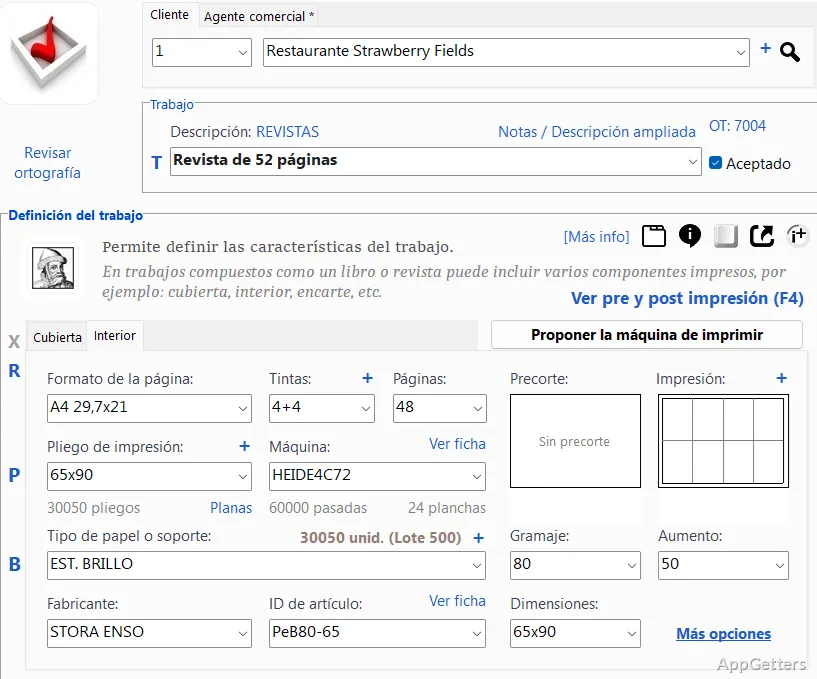
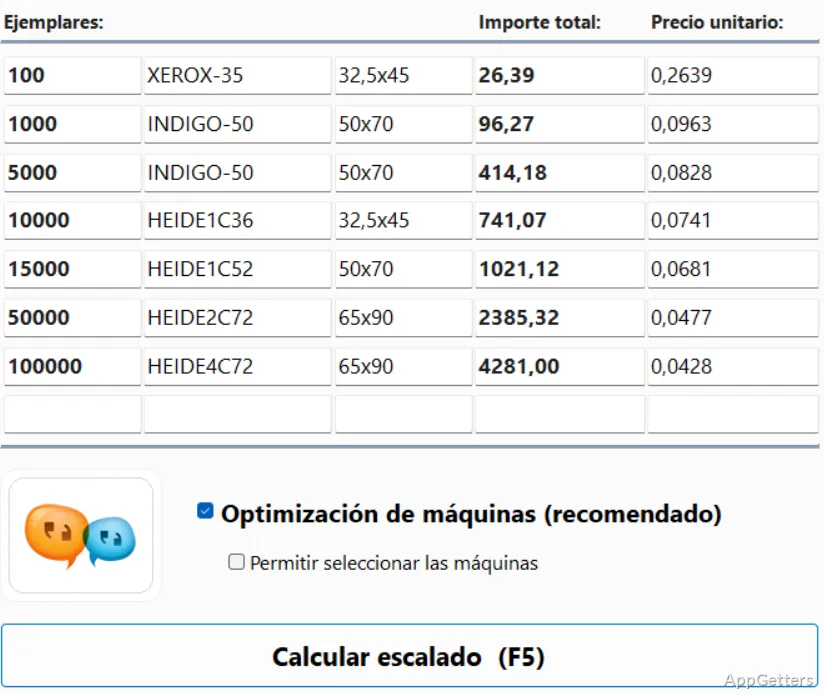
Enter the job details to calculate an estimate, then adjust quantities and production parameters as needed. Logic Print can prepare quotes for multiple quantities and recalculate them after changes to inks, formats, or page counts. A precut and print-layout sketch shows how the job is arranged.
When more than one press could handle the work, the “Propose printing machine” function compares machine options and their costs. The estimate can also account for different print formats and layouts, making the equipment choice part of the costing workflow.
From estimate to production
Once a quote becomes a job, production planning and tracking bring work status and workload information into a KPI dashboard. Logic Print also includes reports for examining profitability, machine hours, and differences between estimated and actual costs.
Inventory management and automatic order handling connect materials to shop operations. Staff can search quotes by customer, send estimates as PDFs by email, and use acceptance reports to follow which proposals have been approved.
- Production planning with workload information and KPIs
- Cost calculations by hours or units
- Customer-based quote search and emailed PDF estimates
Which printing workflows does it cover?
Logic Print is configured for several print processes, including sheet-fed and web offset, flexography, gravure, digital printing, screen printing, pad printing, and reprographics. Its reporting covers production and business results, while invoicing integrations support electronic-invoice standards such as Verifactu, TicketBAI, XRechnung, and Peppol.
The built-in AI assistant answers questions about Logic Print settings and print-shop topics. It can guide tasks such as setting up a machine, entering paper details, and preparing a quote.
Pros
- Compares available presses to find the lowest-cost option for a job
- Recalculates quotes when ink, paper format, or page count changes
- Tracks production with a live KPI dashboard and workload planning
- Includes print-shop inventory management and automatic order handling
Cons
- The AI assistant may prompt users to sign in with a Google account
System requirements: Windows 7, Windows 8, Windows 10, Windows 11
Can Logic Print compare machines when costing a job?
Yes. Its machine proposal function calculates the job on available presses and identifies the option with the lowest total cost.
Can a quote be recalculated after job details change?
Yes. Changes to inks, formats, or page counts can trigger a revised calculation. Quotes can also be prepared for multiple quantities.
What production processes does Logic Print support?
It is configured for offset, flexographic, gravure, digital, screen, and pad printing, as well as reprographics.