EXE
Home » Software » Windows » general » Battle.net for Windows
Battle.net for Windows

Battle.net for Windows

On Windows, a lot of users who play PC games probably have to deal with multiple launchers, as well as different login and updating systems. It gets even more confusing when games need constant patching or online verification. Blizzard Entertainment created Battle.net to give gamers a one-stop gaming experience. What it really does is serve the user less as an electronic store. It is more of a control center of Blizzard’s ecosystem. Users’ biggest concern probably is not what it offers but how well it integrates into their daily gaming on Windows.

A single place for Blizzard

If you use it daily, Battle.net seems to be made only for that purpose. Its attention is focused solely on Blizzard’s games, such as World of Warcraft, Diablo, and Overwatch. This allows its interface to be simple and neat, not like other game launchers that are filled with unnecessary stuff. Getting a new game and running it is a piece of cake. The updating of the games goes on in the background, and the users do not have to worry about it. Gamers, however, who play Blizzard games only will come to appreciate it a lot, as it will be their greatest asset.

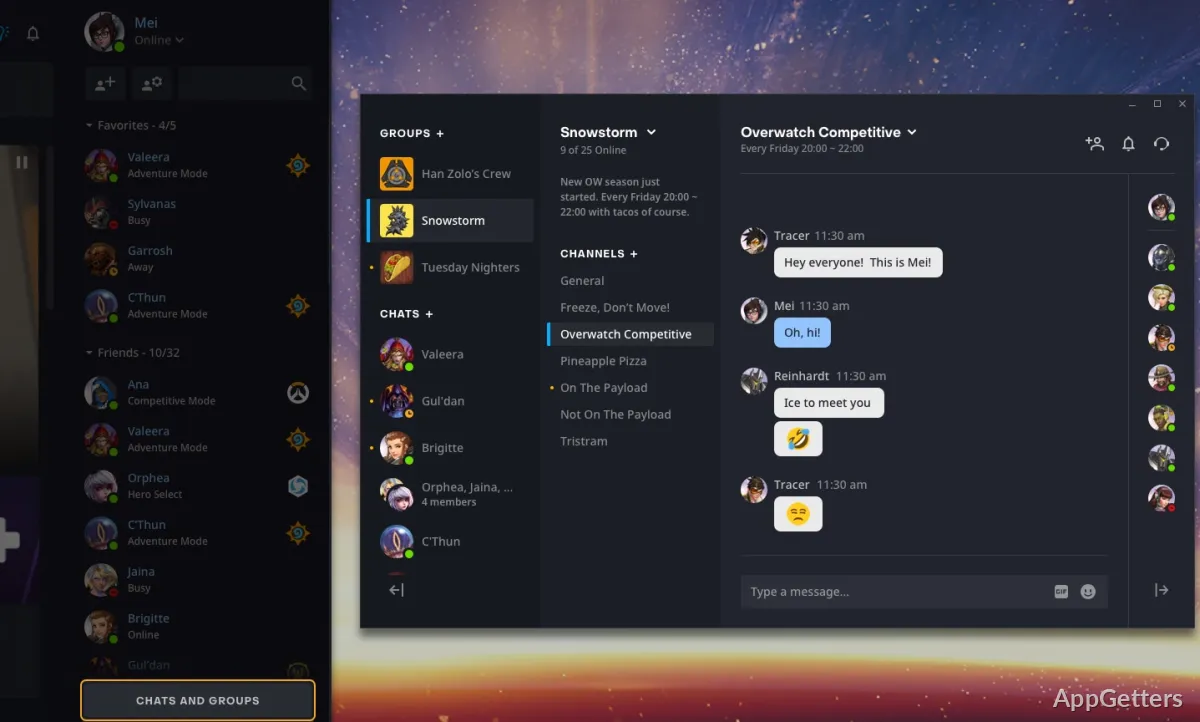
Besides that, Battle.net also organizes your friends list, as well as your messages, in one place. So the necessity of third-party chat applications during the game is quite minimized. Its closed nature, however, makes it incapable of bringing in other external libraries. So that may prove to be a drawback for a user who intends to play games from multiple platforms.

It is possible to set the game launcher to update your games. It is quite stable.

How Battle.net functions when it comes to Windows updates is one of the first things that will catch your attention. Generally, game patches that come as part of an update either get preloaded. Or are done in a way that the user does not see anything.

Issues such as crashing have not been a serious problem even after prolonged use. The launcher runs silently in the background. It is not a big memory hog, especially when compared to the other competitors present on the market. But there are still those times during the download of a large file. The users will definitely notice it. Now, occasional users in this case may experience a dip in performance if their broadband is slow or their PC is not state-of-the-art. However, the drop in performance will not be felt by users who stay online all the time.

One of the main strengths of Battle.net is how reliable it is in delivering updates. It only sporadically asks for user help, which is a big plus for the users, as they can stick to their routines with little or no change.

Account merging and always connected to the server

Listening to Battle.net means using a single account system, which makes it easier to get into any of the games. But, on the other hand, it also means the user is always having to rely on the internet connection. A lot of gaming titles demand that the player stay connected to the internet most of the time, if not all of the time. And so, this model is not really the best one for those who like to play offline.

On the other hand, the integration of the account is very helpful in a number of ways. Everything from a player’s progression, game purchases to social features can be accessed by only one login. If you are the type who opens a game on a device that is different from the one last used, then such a feature would be very helpful. The downside to the system is also very obvious. The entire collection of games at the player’s disposal will be at a standstill if the player has problems with logging in or the server.

There are some security features, like authentication, that are included. They require additional time during the login that the users have to spend. Some users might see them as a hindrance to their playtime habits.

Making Sense of Battle.net in a Windows Gaming World

Battle.net is really a good fit for gamers who own Blizzard’s games. It gives them a gaming environment that is continually evolving and can handle launching and updating games easily. Thus, a student or a home user who plays only a couple of games regularly will most likely appreciate the product’s simplicity.

On the contrary, the developers did not aim to have it take over the launching of games on a wide level. Gamers who have a collection of games coming from different publishers may be better off using Battle.net as a tool among a host of other ones, and not as their main one. Its main selling point is that it is focused, and so it lacks versatility, which is a trade-off in this case.

In actuality, Battle.net is a great assistant for your Blizzard games on Windows. It does not shout from the rooftops. It keeps up with the updates and makes the games available all the time without requiring much effort on your part, provided that you stick to its ecosystem.

Software Details of Battle.net 1.19.0.3190

License
Free
Version
1.19.0.3190
File Size
4.66 MB
Downloads
0
Language
English
Category
Op. System
Windows
Last Updated
March 19, 2026

Version History

6 versions
1.19.0.3190
Latest
4.66 MB
March 19, 2026
1.18.12.3160
4.66 MB
September 15, 2025
2.32.1.14852
4.69 MB
May 30, 2024
2.30.2.14766
4.69 MB
March 28, 2024
2.26.0.14494
4.61 MB
October 23, 2023
2.20.1.14132
4.61 MB
May 1, 2023

Leave a Comment

Your email address will not be published. Required fields are marked *

Software Icon
Security Report

Loading scan data...

Scroll to Top