EXE
Home » IDE » Arduino IDE for Windows
Arduino IDE for Windows

Arduino IDE for Windows

  • By Arduino
  • Free
  • Version: 2.3.10
  • 150.75 MB
  • Security Report:

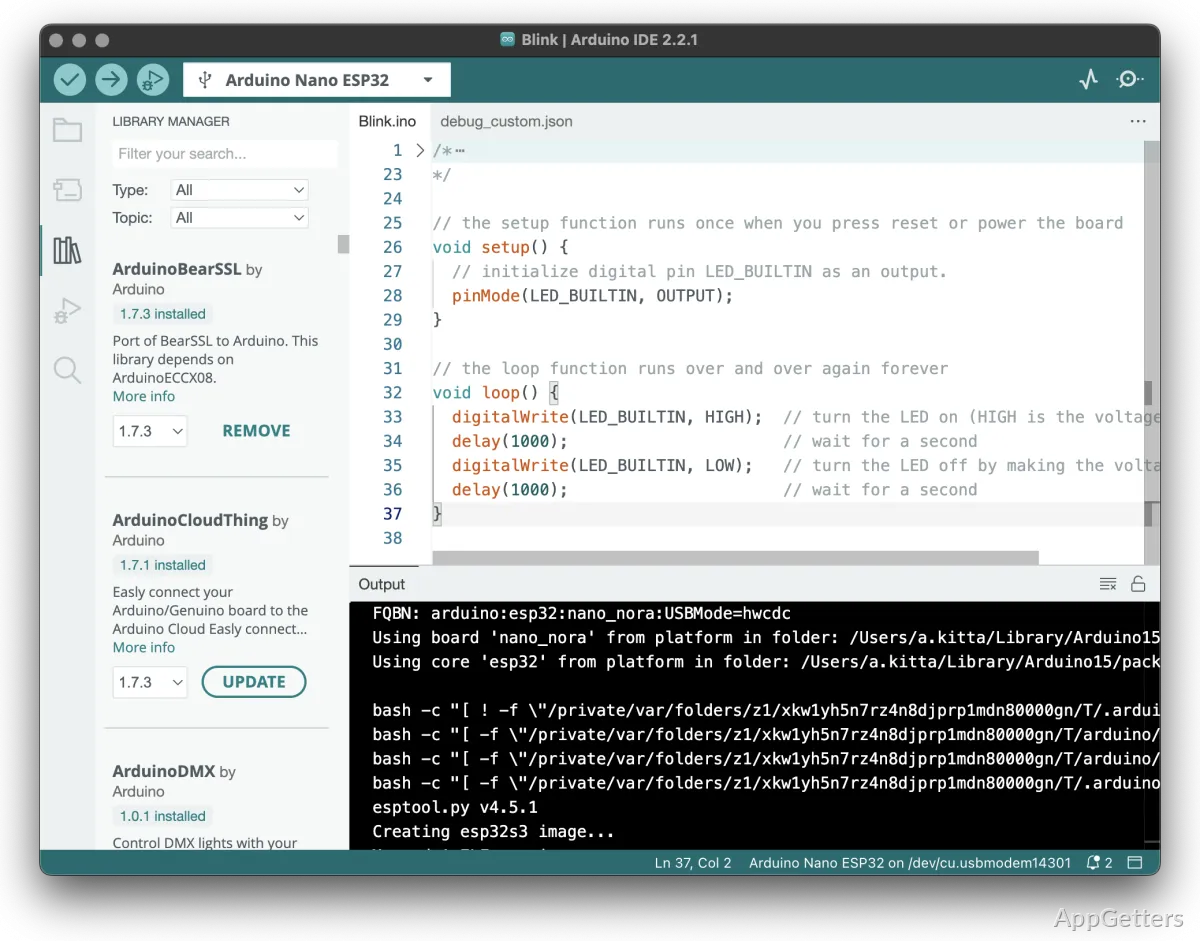
Usually, the hardware isn’t the problem when a person wants to get in electronics. The main difficulty is usually programming the hardware. To a lot of people just starting out, microcontroller programming might seem really scary. This is especially true if they know next to nothing about programming tools or embedded systems. To tackle this, Arduino IDE gives you a nice and easy-to-use environment. Here, you can write, compile, and upload your code to Windows-compatible boards.

These days, a LOT of students, hobbyists, and DIYers use this program as their first starting point. It removes most of the difficulties of embedded development. Instead of the user having to go through a long and boring process of configuring lots of command line options and syntax, they usually just have to install the software and plug in a board. Then they can start messing around. Apart from that, functionality and performance, simplicity, and user-friendliness are some of the reasons why Arduino IDE is so widely used. It is especially popular for educational and personal projects.

Day-to-Day Activities and UI

In fact, working with the Arduino IDE is geared towards simply accomplishing your task. Even the interface of the IDE is very bare, with just a text editor, serial monitor, and basic project management features. Mainly, novices are the ones who have the greatest advantages since it prevents their frustration and confusion caused by the steep learning curves of larger programs.

Most of the time, writing and uploading sketches is very easy and intuitive. The program assumes a certain board that you are using and takes care of the serial port by itself. You don’t have to worry about such technical aspects as are usual for first-timers. Also, a few lines of code come with Arduino so that you can quickly see how to do sensor reading, display working, motor control, etc.

On the other hand, everyone who uses it extensively for quite a long time, doing quite a lot of work, might start missing some of the features of the big and powerful development tools. The ones that advanced users care about are things like being able to jump through the code easily, a powerful debugger, and large-scale project management stuff. They just won’t get these in the Arduino IDE.

Dependability for Training and Testing

Experimenting and learning with Arduino IDE is one of the best aspects of the computer program. Whether the project is super simple, using an LED, or involves building an automated system for a house, the software mostly carries out the main functions faultlessly. The process in which you convert your human-readable code into machine language and send it to the microcontroller is generally very predictable. This is what makes troubleshooting often hardware vs. software possible.

A very influential part of the total experience is the extensive Arduino playground supplying a total set of tools and ready-made codes. This is where you can get both libraries and code examples written by many community members. You will be able to use them in your projects and learning path. Using these, you do not always need to reinvent the wheel. This makes it easier and quicker to achieve tasks like sensor integration, wireless communication, and display control.

However, if you want to complete a project, it is really up to you to see how good the libraries created by others are. Most of them have been very well maintained. However, there are also some not-so-good ones that are sometimes out of date and have incomplete and confusing documentation. As a project continues to expand, users spend more time on library support and running tests with the hardware.

Arduino IDE’s Most Appropriate Uses

If you belong to the group of people who prefer that something be easy to use, that it can be set up quickly, and that its working flow be well defined, then Arduino IDE should be a really good fit for you. Those who will benefit most from it are students who are learning the concept of programming, hobbyists who want to play with electronics, teachers who expose students to embedded systems, and home users who want to make personal projects.

What makes it a good solution is how fast it can help users go from just an idea to having a prototype. Very skilled programmers will certainly need other and more powerful tools later on, but for beginners, Arduino IDE is still a great learning and experimenting platform that they can rely on.

Being the first step for Windows users in programming electronics, it is still a very feasible and reliable environment. It achieves the right mix between ease of use and the ability to complete projects. It supports a very broad set of real-world projects.

Software Details of Arduino IDE 2.3.10

License
Free
Version
2.3.10
File Size
150.75 MB
Downloads
0
Languages
English English, Afrikaans, Amharic, Arabic, Armenian, Belarusian, Bulgarian, Catalan, Chinese, Croatian, Czech, Danish, Dutch, Estonian, Farsi, Finnish, French, German, Greek, Hebrew, Hindi, Hungarian, Icelandic, Indonesian, Italian, Japanese, Kazakh, Korean, Latvian, Lithuanian, Malay, Norwegian, Polish, Portuguese, Romanian, Russian, Serbian, Slovak, Slovenian, Spanish, Swahili, Swedish, Tagalog, Thai, Turkish, Ukrainian, Vietnamese, Zulu
Category
IDE
Op. System
Windows
Developer
Last Updated
June 10, 2026

Version History

5 versions
2.3.10
Latest
150.75 MB
June 10, 2026
2.3.9
150.74 MB
May 27, 2026
2.3.8
151.02 MB
March 4, 2026
2.3.7
150.67 MB
December 19, 2025
2.3.6
150.2 MB
April 11, 2025

Leave a Comment

Your email address will not be published. Required fields are marked *

Software Icon
Security Report

Loading scan data...

Scroll to Top