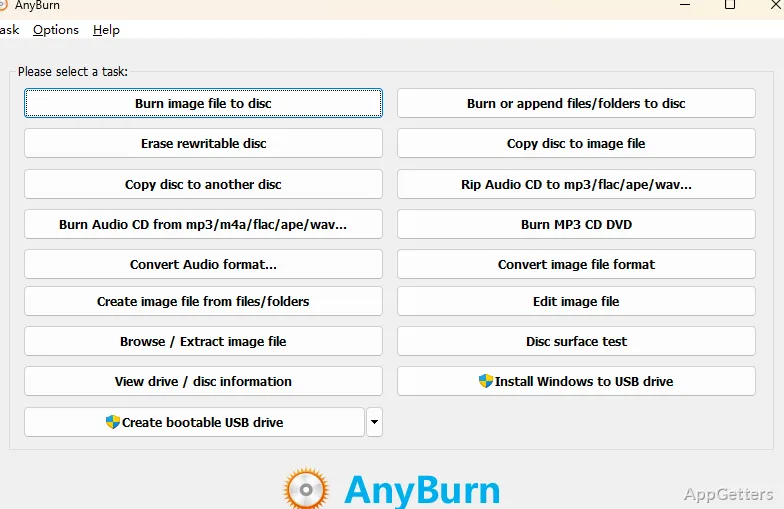
Looking for one small free tool that burns discs, handles ISO files and makes bootable USB sticks? AnyBurn brings these jobs together, including audio CD creation, ISO handling, and bootable USB setup.
Disc burning and audio tasks
AnyBurn handles data discs as well as audio projects. For an audio CD or MP3 CD, choose musical files as the source; the program can also copy tracks from an audio CD into music files. A separate conversion task changes music files from one format to another.
The same disc workflow covers CD, DVD, and Blu-ray media.
- Burn files to a data disc.
- Create Audio CDs and MP3 CDs from music files.
- Rip tracks from an Audio CD or convert music files.
ISO images and USB drives
Image-file tasks include creating, extracting, and converting ISO and other disc image files. AnyBurn can also create an image file from a USB drive or write an image file to a USB drive, linking removable-drive work with its image tools.
For boot media, it can create a bootable USB drive from an ISO file. The program also includes workflows for making Windows installation media on a USB drive and for creating bootable USB drives for Windows or Linux.
Which tasks can AnyBurn handle?
The available operations cover optical discs, audio files, image files, and USB drives.
Pros
- Burns data, audio, and MP3 discs on CD, DVD, and Blu-ray
- Creates, extracts, and converts ISO and other disc image files
- Rips audio CDs and converts music file formats
- Creates bootable USB drives and writes image files to USB
System requirements: Windows 7, Windows 8, Windows 8.1, Windows 10, Windows 11 · 32-bit and 64-bit
Can AnyBurn create a bootable USB drive from an ISO?
Yes. It can create a bootable USB drive from an ISO file, including boot media for Windows or Linux.
Can AnyBurn copy music from an audio CD?
Yes. It can rip an audio CD to music files, and it can convert music files between formats.
What can AnyBurn do with ISO files?
It can create, extract, and convert ISO images, and write an image file to a USB drive.