EXE
Home » Software » Windows » Download Managers » Any Video Downloader for Windows
Any Video Downloader for Windows

Any Video Downloader for Windows

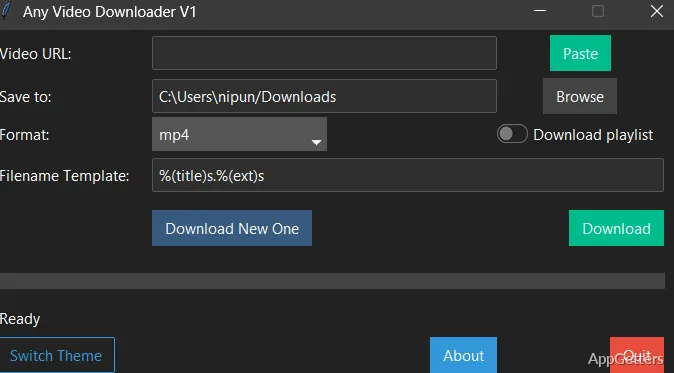
On Windows, downloading videos from the web is seldom as straightforward as it might seem. Most websites can be streamed quite easily in a browser. They usually do not have an intuitive way for a user to save content for offline viewing. Often, the availability of a download button is a feature limited to mobile apps. Even browser extensions may turn out to be unreliable or get blocked completely. Any Video Downloader aims to be the desktop answer to a gap in the market posed by such problems. Instead of relying on browser extensions, this program is designed as a Windows application. It runs independently of a browser. The concept is simple: paste a link, source check, select a format, and download. The experience, however, is decent and stable. It is more reliable compared to the use of web tools that are lighter in weight.

How it Fits into Windows Workflow

Workflow considerations are quite crucial on Windows. It is common for users to alternate between multiple browser tabs, media players, and file explorer windows. Any Video Downloader is designed to blend into this. It confines everything to one simple interface only.

The program first fetches the video URL for a moment. Then it displays the list of available video resolutions and formats. During tests on the usual streaming services, the detection phase hardly lasts more than a couple of seconds. Being able to pick between various quality levels is a real plus feature. One often has to compromise among file size and resolution.

The downloads are saved on the local drive with file names that are faithful. Users can easily move, rename, or share the files. For those who habitually archive stuff, a high degree of predictability is an enormous plus in reducing the friction. In fact, it doesn’t feel like an ad hoc solution.

Format Compatibility and Practical Adaptability

Such software is expected to provide convenience in situations that go beyond a straightforward video download. Conversion to popular file formats is just one of the things made easy by Any Video Downloader. Users will appreciate this, especially if they need to switch files between devices or software.

Imagine a student downloading a lecture in a conventional MP4 format. He is going to watch it on his laptop. On the other hand, a content creator might want to extract the audio track for reference. Wheels could be completely reinvented if these programs were combined into one. All kinds of features would be available.

The efficiency of conversion is dependent on the processing power of the computer. On average, working on large HD files on mid-spec Windows PCs is inevitably time-consuming. So, there is a trade-off between the file resolution and conversion time. The program is not overstrained when dealing with normal video resolutions. For huge files, users will need to have some patience.

Performance, Reliability vs. Limitations

Features are always welcome, but the uniform performance of software in its operation is the main concern for most people. Any Video Downloader is dependable if one is mainly using it with popular video sites. The source should be a valid and publicly available URL. This helps avoid unsuccessful downloads, which are very few here.

In addition, the user can collect batches of videos for their library through batch downloading. This is quite a useful feature for those who upload numerous copies in one go. In reality, the speed of download is still a matter of the host server and the internet connection bandwidth. The application does not unlock container content on web platforms. Region restrictions or private content will remain out of reach.

Streaming services might update their layouts from time to time. There is an occasional need for updates for users of video downloaders. This is a standard thing with these types of tools. The tool in question here is not an exception to the rule. Users should keep updating the software if they intend to keep using it for their projects.

Handy Offline Tool for Content Collectors and Learners

Any Video Downloader serves a small but specific community that is primarily concerned with offline access. The tool is great for students who spend a lot of their time in the library, home users who are into instructional content, and professionals who collect reference material.

The tool is not designed to be a full-fledged media suite or editing platform. It is simply a tool that can cut the cord and bring the internet to your doorstep. As a result, the tool does the job well and consistently.

Software Details of Any Video Downloader 1.0.2

License
Free
Version
1.0.2
File Size
81.75 MB
Downloads
0
Languages
English English, Afrikaans, Amharic, Arabic, Armenian, Belarusian, Bulgarian, Catalan, Chinese, Croatian, Czech, Danish, Dutch, Estonian, Farsi, Finnish, French, German, Greek, Hebrew, Hindi, Hungarian, Icelandic, Indonesian, Italian, Japanese, Kazakh, Korean, Latvian, Lithuanian, Malay, Norwegian, Polish, Portuguese, Romanian, Russian, Serbian, Slovak, Slovenian, Spanish, Swahili, Swedish, Tagalog, Thai, Turkish, Ukrainian, Vietnamese, Zulu
Op. System
Windows
Developer
Last Updated
October 14, 2025

Version History

1 version
1.0.2
Latest
81.75 MB
October 14, 2025

Leave a Comment

Your email address will not be published. Required fields are marked *

Software Icon
Security Report

Loading scan data...

Scroll to Top