EXE
Home » Software » Windows » Screen Recorders » Agent DVR for Windows
Agent DVR for Windows

Agent DVR for Windows

  • By iSpyConnect
  • Free
  • Version: 7.2.5.0
  • 357.65 KB
  • Security Report:

Windows Agent DVR is an uninterrupted surveillance and video monitoring program that is quite common for users who want to do camera recording 24/7 without the need for the traditional hardware of a Network Video Recorder (NVR). A lot of the time, people resort to software such as this one after they have been confronted with the limits of their basic webcams or their cloud-based security systems, which are either too restrictive, too expensive, or demand very steady internet for them to work. To sum up, the major issue that is being tackled here is providing reliable, “always-on” video recording and remote access by using the cameras that one already owns and a Windows computer as the main hub.

Installation, Setup, and System Configuration

The whole process of Agent DVR installation on Windows means first of all gaining the software and then linking the available cameras. These may include USB webcams, IP cameras, or network equipment. Being at least a little tech-savvy, the user is expected to handle things like device discovery, stream sources, and storage settings. These are the basics of the configuration since this task is not a straightforward, consumer-level one.

The fact that the user interface is a web page-based program running on the user’s computer is essentially the core of the system. It is a web-page-based program running on a user’s computer. It is naturally understandable and reachable through any device after network configuration, though a beginner might find the process a bit challenging and even confusing.

Regular hands-on experience as well as actual use in the field is important

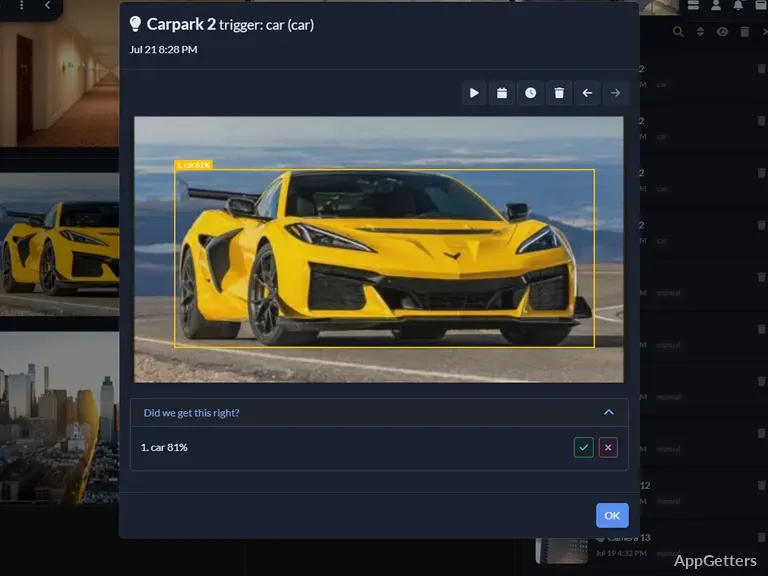
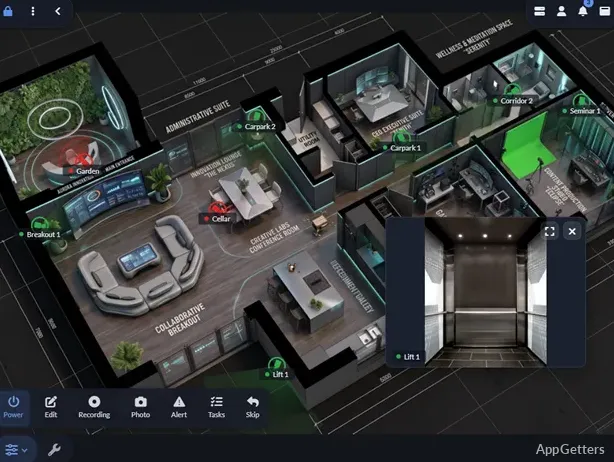
Agent DVR on a daily basis mainly functions as a video recording and monitoring system operating close to 24/7, unlike a regular video app. The main user interface, besides being a very effective tool for viewing live surveillance videos, also supports playback of hours of saved footage and multi-camera viewing at the same time. It is capable of home surveillance, small office setups, or personal security needs.

The fact that this software can be the best one is, to a large extent, its practical feature of working flexibly with video recordings. Users are able to modify their recording configurations in various ways. These include motion detection triggers, constant recording schedules, or combinations of both. Switching to real situation mode enables a person to substantially reduce unnecessary footage while continuing an extensive record of all major events. In contrast, the system is heavily dependent on hardware. A low-end PC will definitely have difficulties when dealing with recording and viewing several streams of high-resolution video concurrently.

Performance Behavior, Storage Handling, and Network Use

Agent DVR is designed to run a single task for an extended period of time. For this reason, matters such as stability, efficiency, and storage are of paramount importance. In the case of a Windows machine with a decent CPU and storage, the application would work fine even if multiple cameras are used simultaneously.

Setting up a system with network-connected cameras brings up even more problems. Put simply, remote access is just one of the platform’s advantages. It still needs a well-configured network. It also requires enough bandwidth to be available. Local setup users, i.e., users that rely only on their local setup for base performance, will most probably experience very stable operations. They will not face interruptions or latency. As far as the minimum spec machine is concerned, those who want to keep the device running efficiently for a long period of time will have to compromise. They must accept a low resolution or lower frame rate.

Practical Use in Home Security and Small-Scale Monitoring

Agent DVR, equipped with a wide range of features, is chiefly used in home monitoring environments. It is also used in small office security systems. DIY security enthusiasts also rely on it. People who want more control than consumer cloud cameras find this product useful. This is especially true for those focused on privacy and local storage. Moreover, the option of using old webcams or IP cameras converted into security cameras makes Agent DVR. It is a very cost-effective option. This is compared to purchasing new devices.

But then again, it is not really a plug-and-play consumer product. Basically, customers need to know minimal things about network, camera configuration, and storage management.

For this reason, it is more interesting to those who are comfortable while tinkering with systems. Rather than those who are looking for a fully automated home security solution. On the flip side, once one is adequately set up, one has access to a quite dependable monitoring environment. It is very adaptive.

Long-Term Monitoring for Technical Home and Office Setups

Agent DVR is right on point for users who want continuous video surveillance. It is locally controlled and based on Windows. It works without subscription cloud services. Agent DVR suits technically comfortable home users and small business owners. We can consider Agent DVR as one of the alternatives. It is a consumer-camera apps option. It will assist the user in managing the cameras, recording behaviors, and remotely accessing features.

Software Details of Agent DVR 7.2.5.0

License
Free
Version
7.2.5.0
File Size
357.65 KB
Downloads
0
Languages
English English, Afrikaans, Amharic, Arabic, Armenian, Belarusian, Bulgarian, Catalan, Chinese, Croatian, Czech, Danish, Dutch, Estonian, Farsi, Finnish, French, German, Greek, Hebrew, Hindi, Hungarian, Icelandic, Indonesian, Italian, Japanese, Kazakh, Korean, Latvian, Lithuanian, Malay, Norwegian, Polish, Portuguese, Romanian, Russian, Serbian, Slovak, Slovenian, Spanish, Swahili, Swedish, Tagalog, Thai, Turkish, Ukrainian, Vietnamese, Zulu
Category
Op. System
Windows
Developer
Last Updated
March 11, 2026

Version History

5 versions
7.2.5.0
Latest
357.65 KB
March 11, 2026
7.0.8.0
303.12 KB
December 26, 2025
6.8.4.0
303.12 KB
October 29, 2025
6.7.3.0
302.89 KB
October 23, 2025
6.6.8.0
303.03 KB
October 14, 2025

Leave a Comment

Your email address will not be published. Required fields are marked *

Software Icon
Security Report

Loading scan data...

Scroll to Top